Inspiring
February 18, 2026
Question

"Adobe Illustrator 2026.app" would like to access data from other apps."

  • February 18, 2026
  • 5 replies
  • 1565 views

After the last update of the application, the following pop-up appears every time after launching:
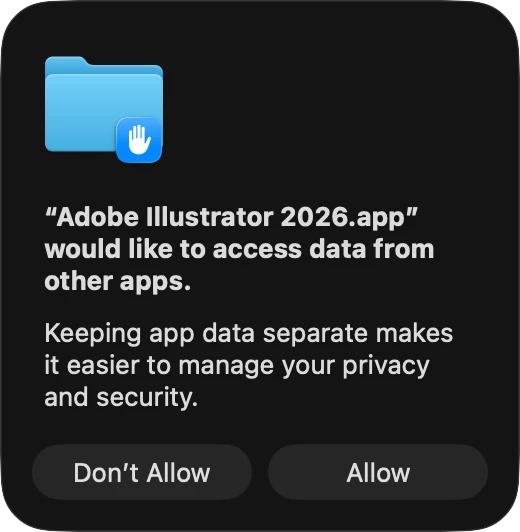


How can I stop it?

Thanks in advance.

5 replies

Miraud
Participant
March 19, 2026

This feels pretty clearly like a bug to me, if only that Allowing it (granting it permission) register for longer than the session (Lightroom wasn’t this way). AND after I Allow, opening Privacy Full Disk, Illustrator doesn’t even appear on the list, allowed or not. You need to manually add it. This is also not how other apps work.

ehh_d
Participant
March 7, 2026

Same issue occurring with me, but I was getting a continuous 224 error if I selected Don’t Allow. It suddenly resolved when I allowed. Dirty Tricks

Anubhav M
Community Manager
Community Manager
February 23, 2026

Hello everyone,
 

Thanks for reaching out. Adding to the expert suggestions, this prompt is coming from macOS privacy controls, not from Illustrator itself. To prevent it from appearing, go to System Settings > Privacy and Security > Full Disk Access and ensure Adobe Illustrator is enabled. 

For reference, you can also take a look at these similar discussions where the same behavior was resolved by granting full disk access: https://community.adobe.com/questions-606/cc-library-asks-for-permission-every-time-i-restart-my-mac-580498 and https://discussions.apple.com/thread/255856376


Please let us know if the message stops appearing after this. Looking forward to your update.

Anubhav

March 1, 2026

Although giving Illustrator ‘Full Disk Access’ may solve the issue of the prompt appearing, it doesn’t clarify what Illustrator is doing that causes MacOS to show this Security and Privacy prompt to users. Why does Illustrator want/need Full Disk Access? 

sskaz
Inspiring
March 5, 2026

Adding on to this. Please don’t tell your customers to give apps full disk access—ever. Most of them are not security experts and every time a developer tells customers to do it, you’re making your customers think these security prompts are just something to ignore instead of giving serious consideration to, and will make them more likely to permit it when there’s a serious malicious threat.

Find out what in your apps is prompting for permission and fix it. Talk to Apple if you need to.

Ton Frederiks
Community Expert
Community Expert
February 18, 2026

I had this message in Illustrator Beta. Giving Illustrator Full Disk Access in System Settings > Privacy & Security solved the problem for me.

Inspiring
February 19, 2026

I don't have the beta version installed.

Ton Frederiks
Community Expert
Community Expert
February 19, 2026

Did you try it? May work as well with your installed version.