
Known Participant
September 18, 2024
Question

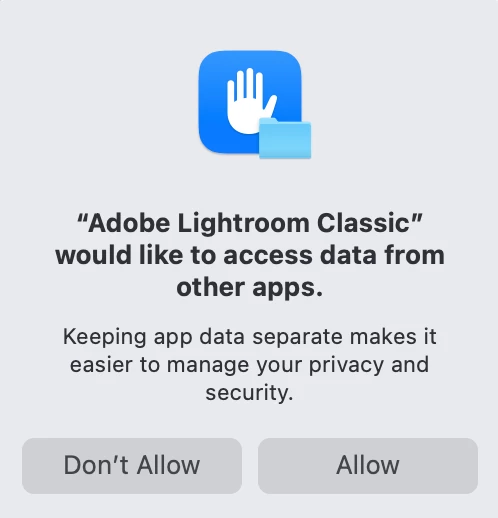
After Mac OS and LR update: Adobe Lightroom Classic” would like to access data from other apps

  • September 18, 2024
  • 4 replies
  • 2540 views

I updated MacOS from 12 to sequoia. I also updated LR to the latest version.


Now, every time I start LR I get:

Adobe Lightroom Classic” would like to access data from other apps. The options are then don't allow/allow.


I don't want this message to pop up again How do I stop it while not granting LR access to all my other apps ( will this prevent me from opening LR files in Topaz photo AI or Luminar Neo for example?)
 

4 replies

Conrad_C
Community Expert
Community Expert
September 18, 2024

I haven’t upgraded yet, but based on recent macOS trends and the wording of the message, my guess is that the alert message has something to do with the nature of Lightroom Classic looking down a lot of file paths in various folders, which it has to do to keep photo/video links up to date. Increasingly, macOS and iOS have gotten more suspicious about apps that poke around all over the machine, for security reasons. But in this case, we know (or would like to assume) that Lightroom Classic has good intentions and that it’s OK to click Allow.


I did a web search on the error, and it’s something other developers have seen. The threads I read are what helped me think that maybe it has to do with the normal verification of folder paths that Lightroom Classic has to do.

https://forums.developer.apple.com/forums/thread/742147

https://discussions.apple.com/thread/255172264


Why does the message talk about accessing data from other apps? I don’t think it’s about literally using other apps’ data. I am guessing it’s because Lightroom Classic is looking in so many folders. Today, more macOS apps save files in their own folder (especially those that are “sandboxed” or use iCloud Drive), so because Lightroom Classic might normally look at large numbers of folders outside the Lightroom Classic folder or its Application Support container, macOS gets suspicious that the app is trying to read files that have different Content Creator names than its own. Again, that is my own guess and I don’t know if it’s true.


Until we hear something official from Adobe about this, again my guess is that this might be a temporary incompatibility with macOS 15 Sequoia. Apple might release an update to macOS 15 so that it isn’t so picky and suspicious about something Lightroom Classic has always done, or Adobe might release an update to have Lightroom Classic inspect folder paths in a way that doesn’t set off Sequoia security warnings, or both. We don’t know yet.


What we do know is that, at least as I write this, Adobe has not yet published any compatibility information about Lightroom Classic and macOS 15 Sequoia, and it is one reason I haven’t upgraded my Mac yet. I usually hold off for 6 to 9 months to let problems like this get ironed out by Apple or the developers.


The article below can provide some more background on the situation with the over-zealous macOS 15 security alerts. It’s from TidBITS, a publication run by Mac experts for over 30 years.

macOS 15 Sequoia’s Excessive Permissions Prompts Will Hurt Security

quote

After a complete operating system upgrade, I can see Apple’s desire to have us verify previously granted permissions we hadn’t thought about in a while…However, I was taken aback to receive the same prompt again a short time later. And increasingly irritated when I was asked again after another day or two. And again. And again. 


Legend
September 18, 2024

When I worked at Apple, IS&T installed upgrades the day they came out. I always spot-check Mac websites for emerging showstoppers and I know how to revert if I absolutely had to, but I've never really had serious issues.

Apple is well aware that they may be overdoing things, but we constantly hear news about Windows malware - password stealers and spyware, crypto miners, ransomware, viruses, you name it. The Mac is far from perfect but I'd rather err on the side of safety.

Known Participant
September 18, 2024

Hi Legend, I agree 100% with you! Thanks for tuning in. Regards, Andrew

Legend
September 18, 2024

I'm guessing that you have third-party plugins, in which case you probably have to allow access. I upgraded last night and have not seen this message.

JohanElzenga
Community Expert
Community Expert
September 18, 2024

Edit in Photoshop might also need this, so give it the permissions it asks for! If you don't trust Adobe, then don't use Lightroom Classic or any other Adobe apps. If you do trust Adobe, then do not deny these kind of dialogs if you want your Adobe apps to function properly. They do not ask permissions for the fun of it.


-- Johan W. Elzenga
Legend
September 18, 2024

IIRC Adobe recommends giving Lightroom Full Disk Access. I don't know how these various permissions interact, especially under Sequoia.

This would make a good feature request, for Adobe to document exactly what permissions they want. I know Apple is pushing developers to explain all of this to users.

Ian Lyons
Community Expert
Community Expert
September 18, 2024

The dialog is a feature of macOS Sequoia not LrC. Click on the Don't Allow button should stop it appearing, at it does on my Macs.

Known Participant
September 18, 2024

No thats the thing, it keeps coming back every single time I open LR.

Anybody here have suggestions maybe?

Thank you

Ian Lyons
Community Expert
Community Expert
September 18, 2024

Try opening the Privacy section of Sequoia and click on the Learn More link. You may find more info there. I've attacheda screenshot of where to look.


Known Participant
September 18, 2024

I updated MacOS from 12 to sequoia. Now, every time I start LR I get:

Adobe Lightroom Classic” would like to access data from other apps. The options are then don't allow/allow.


I don't want this message to pop up again How do I stop it while not granting LR access to all my other apps ( will this prevent me from opening LR files in Topaz photo AI or Luminar Neo for example?)