Participant
April 6, 2022
Question

Adobe Illustrator and RTX 2060

  • April 6, 2022
  • 2 replies
  • 1616 views

Hi!

Lately my illustrator isnt working with my rtx 2060.
I've tried a lot of versions and combinations from latest drivers and illustrator. Nothing is working. It dont show the card in the performance settings of the app, not even the card name!
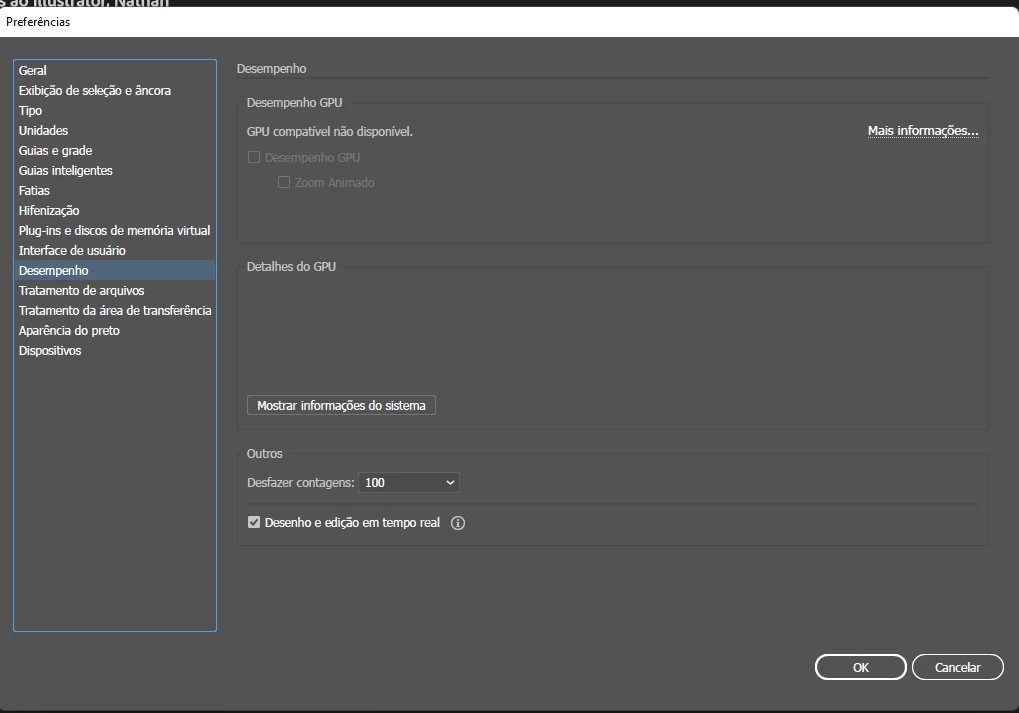


Current using:
Adobe Illlustrator 26.1
Geforce Game Ready 512.15

Somebody experiencing that?

Reached to Adobe support, they remote check my pc and came to the conclusion:
"Oh, we do not have official support for the RTX 2060! Cant do nothing."

But i have this card for almost 3 years and always worked, now they have the courage to say this.

Any help?

This topic has been closed for replies.

2 replies

Brad @ Roaring Mouse
Community Expert
Community Expert
April 6, 2022

"now they have the courage to say this"

Well, considering the card was never listed in the compatible graphic cards EVER, you've been living on borrowed time.

Just based on a quick Google search, many people have had issues with your card, in fact NVIDiA recommends RTX 3050 or ABOVE for Illustrator.

I also saw issues with people using the Gaming drivers as opposed to the Studio drivers, so maybe you need to focus on getting support from your card maker, rather than the company that has never officially supported it.


Participant
April 6, 2022

hi brad. im not blaming adobe for anything, in fact im talking with nvidia as well. What I said was: " I've used for 3 years without official support and always worked". im just trying to figure if anybody can help me, sorry if it sounded arrogant.

and yes, i also tried studio drivers, no lucky.

Brad @ Roaring Mouse
Community Expert
Community Expert
April 6, 2022

All good.

I hope you can sort this out. I know it's a pain!

Kevin Stohlmeyer
Community Expert
Community Expert
April 6, 2022
Participant
April 6, 2022

yess, every step