
Known Participant
October 17, 2024
Answered

Ai2025 - The Pencil tool has become unusable again! There's no accuracy—it’s too smooth! SOLVED!

  • October 17, 2024
  • 22 replies
  • 15121 views

UPDATE!!!
ADOBE HAS FIXED THIS BUG


Hi folks

Adobe has been quick and responsive and fixed this bug in the version 29.0.1 update

Go to you CC app and you should see the version there under the update section.


Thanks everyone for the team effort voting and posting to solve this bug.


--- ------ --------- --- ------ --------- --- ------ --------- --- ------ --------- --- ------ ---------

I’m here to post about the same issue I did in 2014.
The Pencil tool has become unusable once again! It’s smoothing too much, even on the maximum accuracy setting (left first slider tick).

Back in 2014, when Adobe rewrote the Pencil tool, you removed the previous numeric settings and replaced them with four ticks. All of them were too smooth and took too much control over the path, leading to imprecise bubbly and smooth drawings.

I made a post about this back then, and Adobe was super nice to respond by adding a fifth lowest left tick with the previous lowest accurate settings, which I’ve been using for nearly 20 years now: "fidelity[0.5px], smoothness[0%]".

Here is the post I made in 2014:

PLEASE PLEASE adobe. The new pencil tool has become unusuble to me

Now, after the 2025 update, the pencil tool once again is smoothing too much, even on the lowest accuracy setting. This is making mine and my colleagues work impossible because the tool doesn’t generate enough anchor points to create the detailed and organic edge illustrations we need. Not everyone is looking to draw smooth, bubbly shapes!

This is crucial in an free hand drawn operation such as the pencil tool because anchor points act as the resolution of the path, determining the type of edges you want to express in your drawings. The character of the edge is essential for the final look.

Why shouldn't we have more control over the path resolution, allowing for higher values? Currently, Illustrator seems to be leaning towards reducing the resolution of our paths, limiting our creative control leaning towards more smooth bubbly or geometric style.


Inkscape is fantastic in this regard as it doesn't limit the resolution the artist gets to add to the path. It has a numeric setting where you can set what you need. Unfortunately inkscape falls short on other aspects of the freehand pencil drawing process, for instance you can't redraw over and over again and sculpt your path with the pencil tool as you can in illustrator.

With this post I’m requesting:

(1)
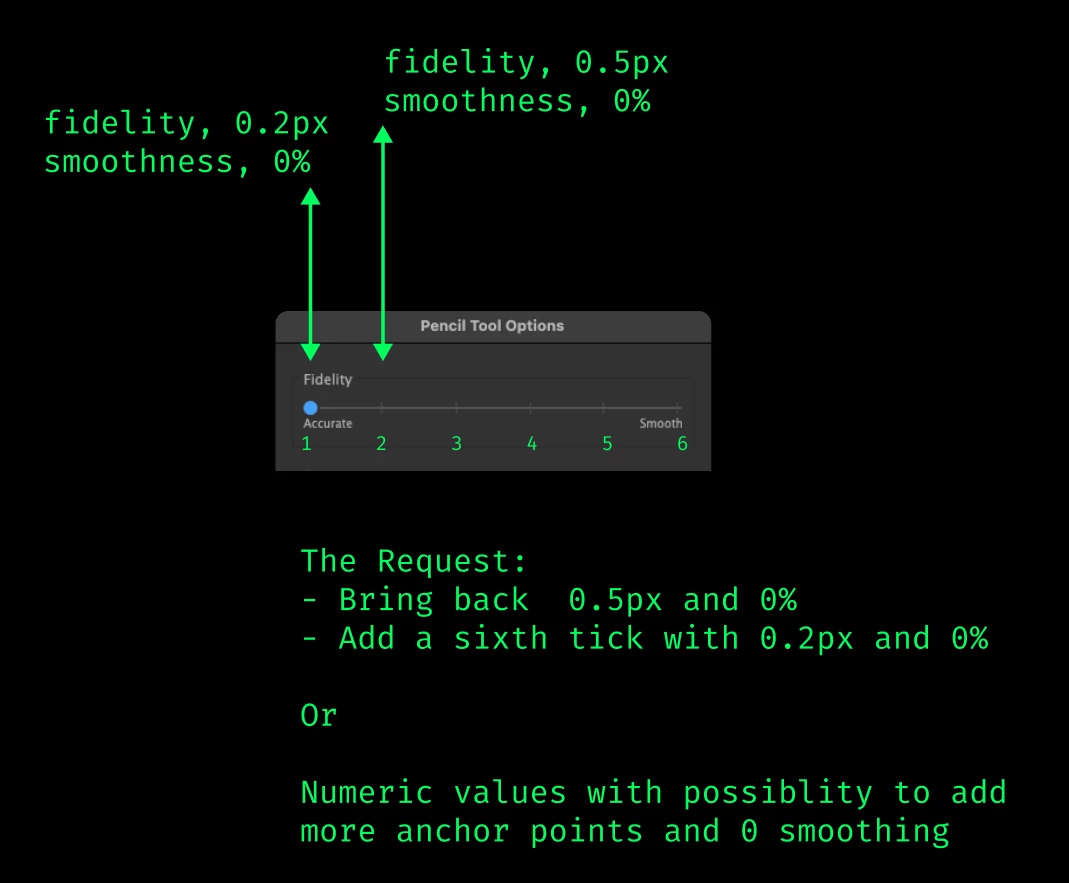
 To fix the bug and bring back the ability to generate more anchor points on the path for accuracty on the lowest tick with "fidelity[0.5px], smoothness[0%]"

(2) 
I'm also making an additional feature request for the ability to add even more anchor points than that by 
adding an even lower sixth tick that generates even more anchor points, with a setting like "fidelity[0.2px], smoothness[0%]"

Alternatively, and idealy, please bring back the numeric values like you had before that allow us to set the path resolution more precisely, similar to how Inkscape still handles it.

This won’t slow down the application in any significant way—today's machines can handle it. I've pushed Illustrator to its limits for many years, and higher resolution paths have never been an issue. There's no reason to hold back on giving users more control over the paths and the style of their illustrations.


I would love to assist in testing it out.


Please Adobe.


Thanks


MacBook Pro Apple M1 Max PRO 64GB RAM.
macOS Sonoma 14.7 (23H124)

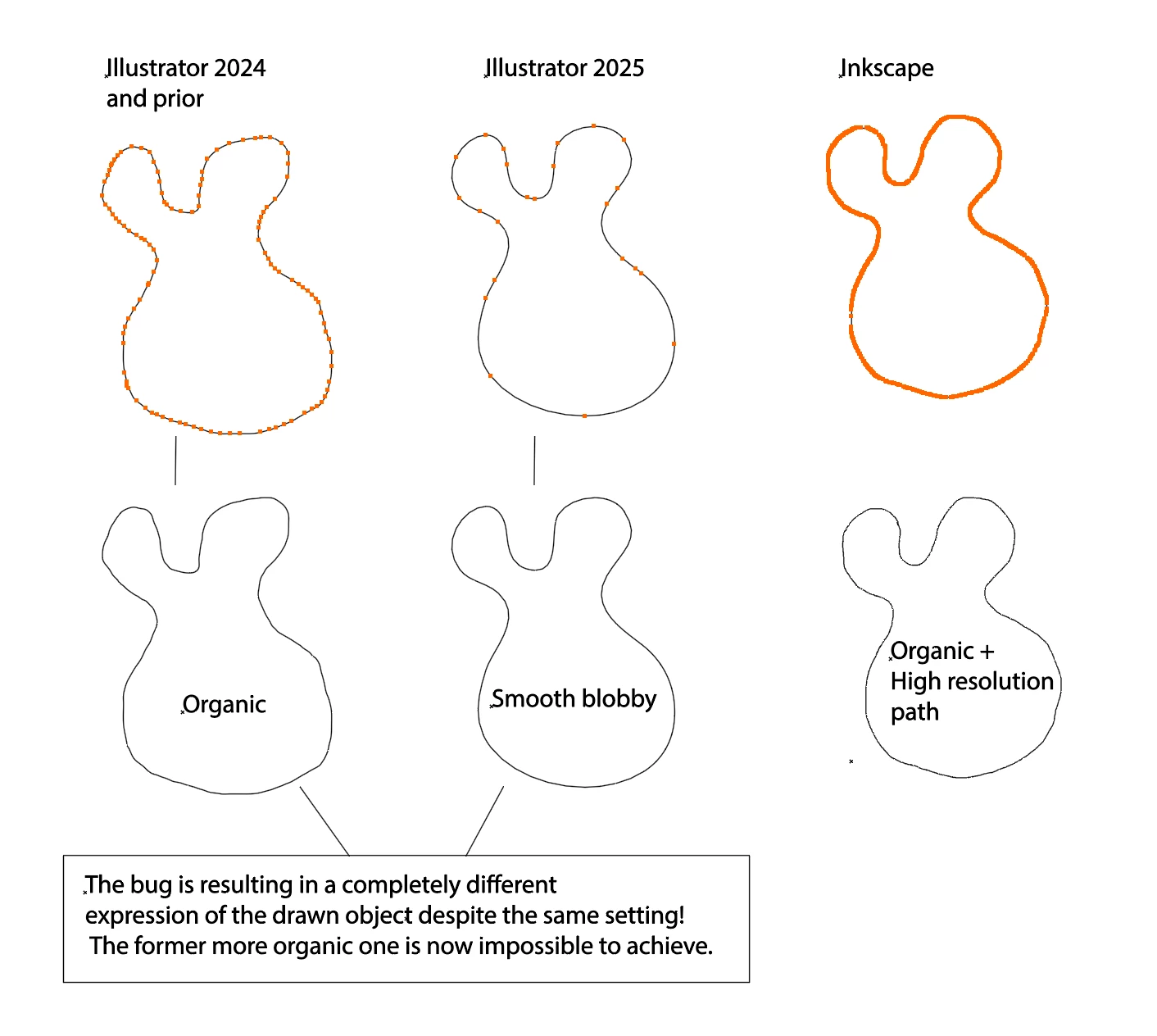
Here follows some comparisons of anchor point generation to show the bug and the feature request on the bottom:

(Please click the images to see the anchor point amount better, thanks)


BUG IMG 1:1
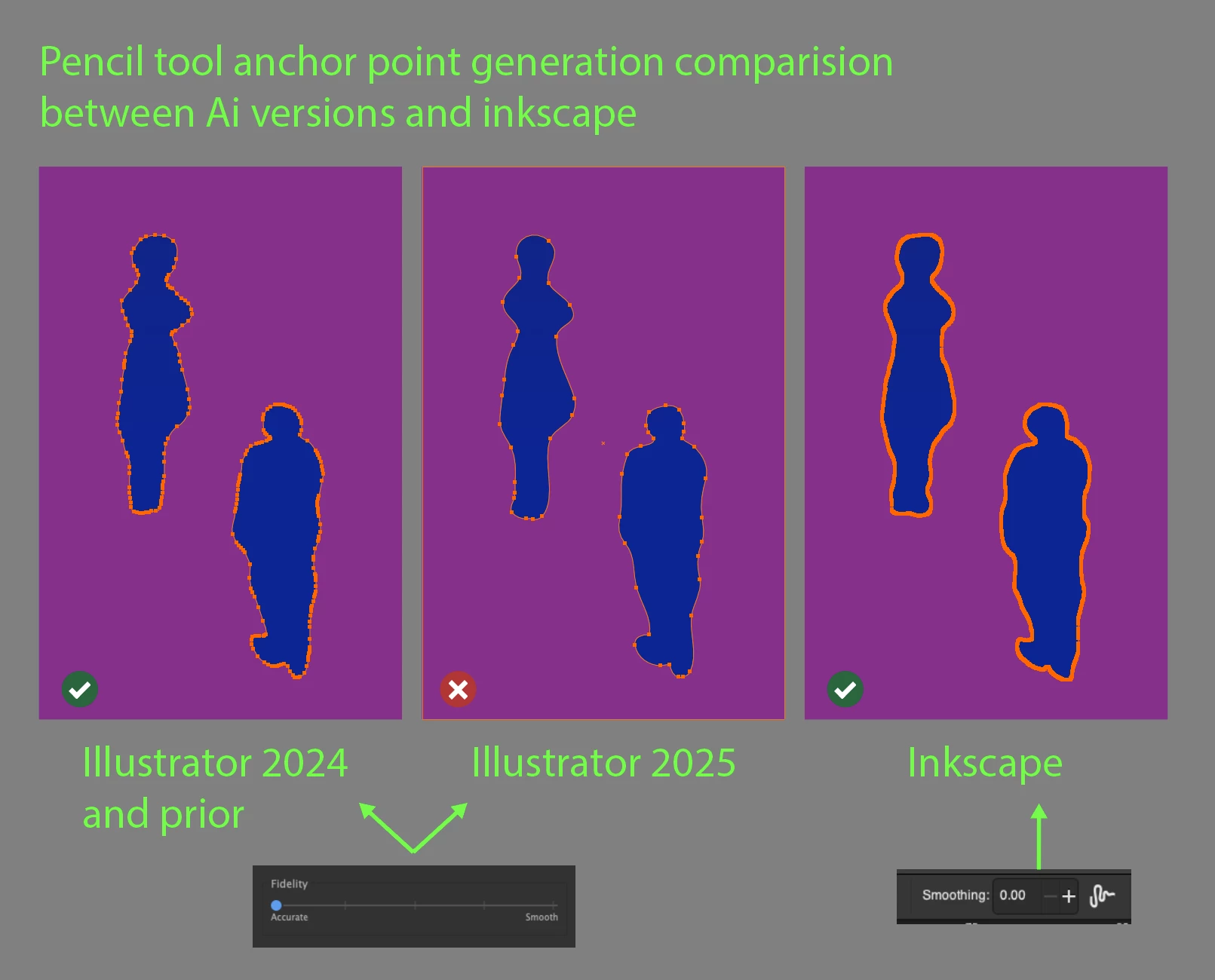


BUG IMG 1:2
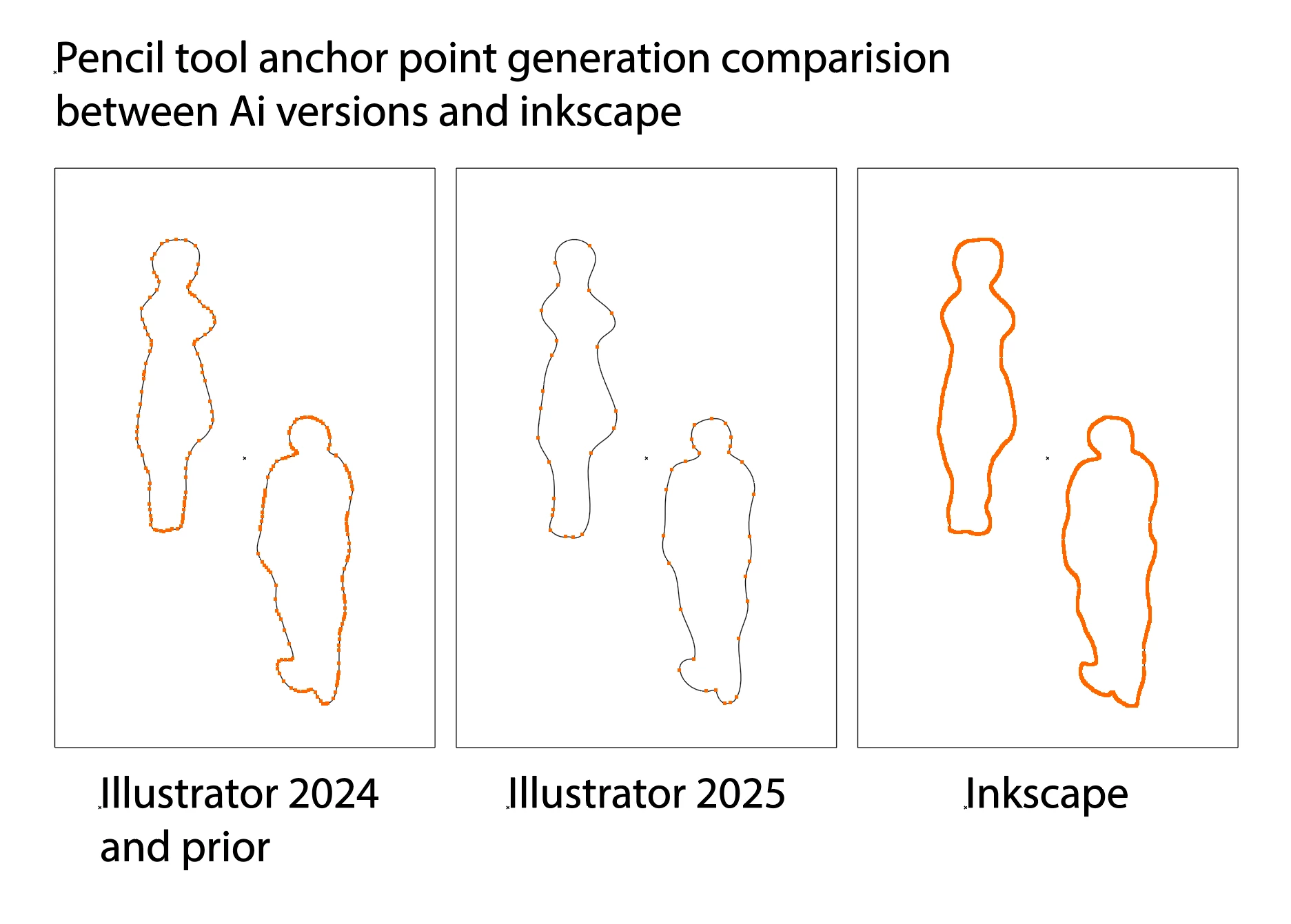


BUG IMG 2:1
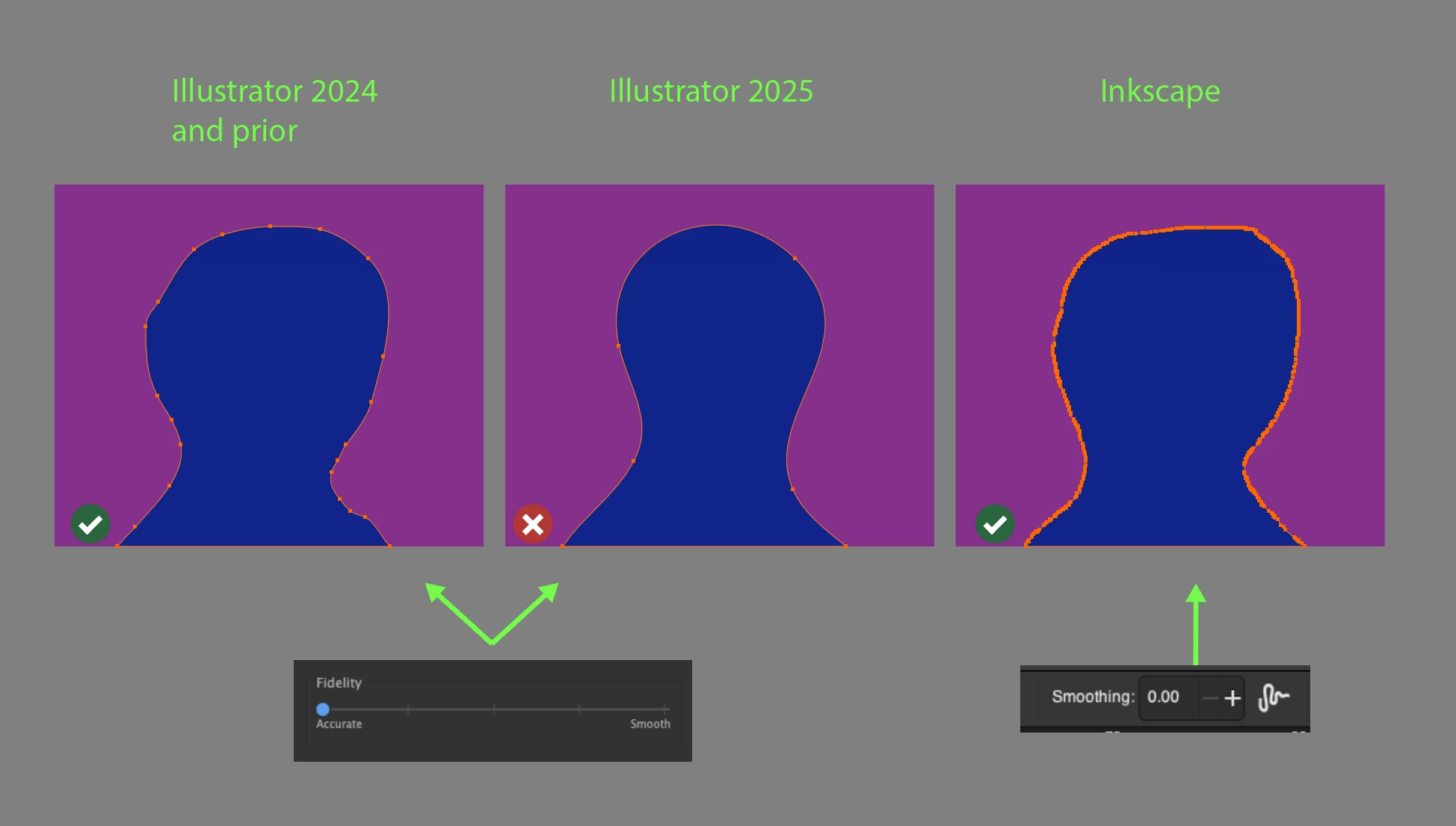


BUG IMG 2:2
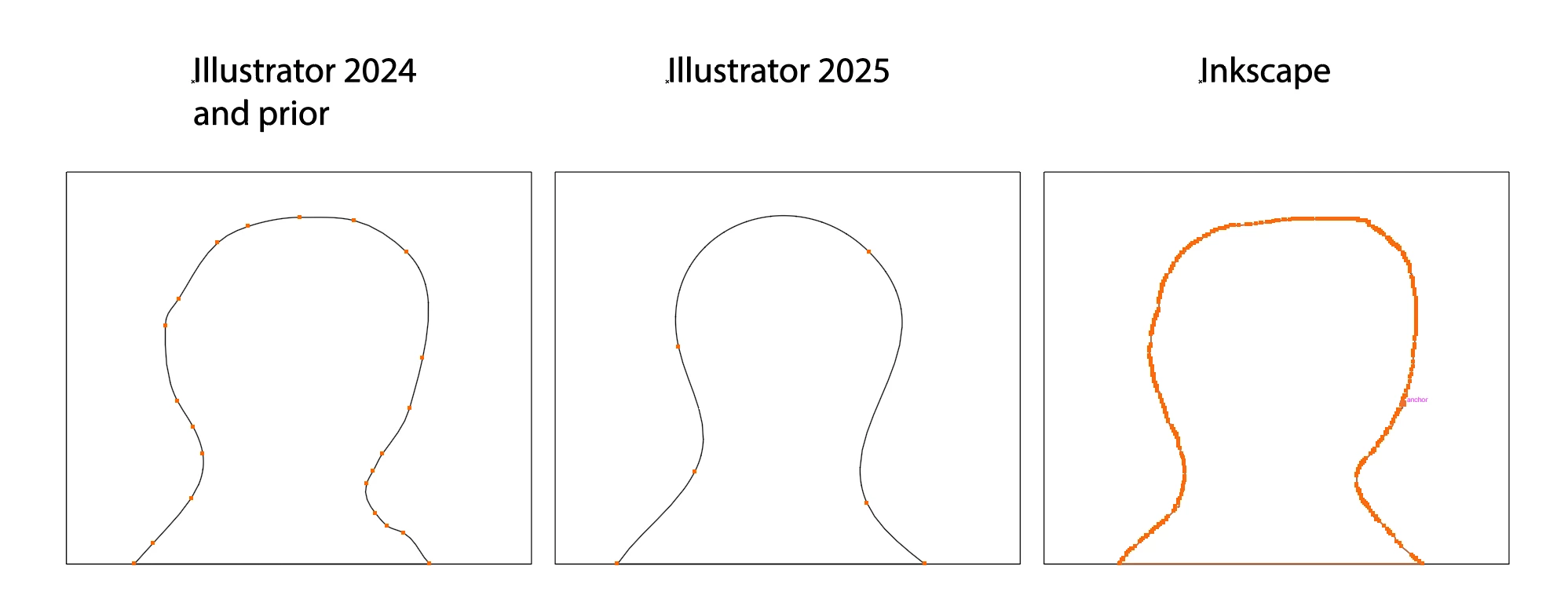


BUG IMG 3:1
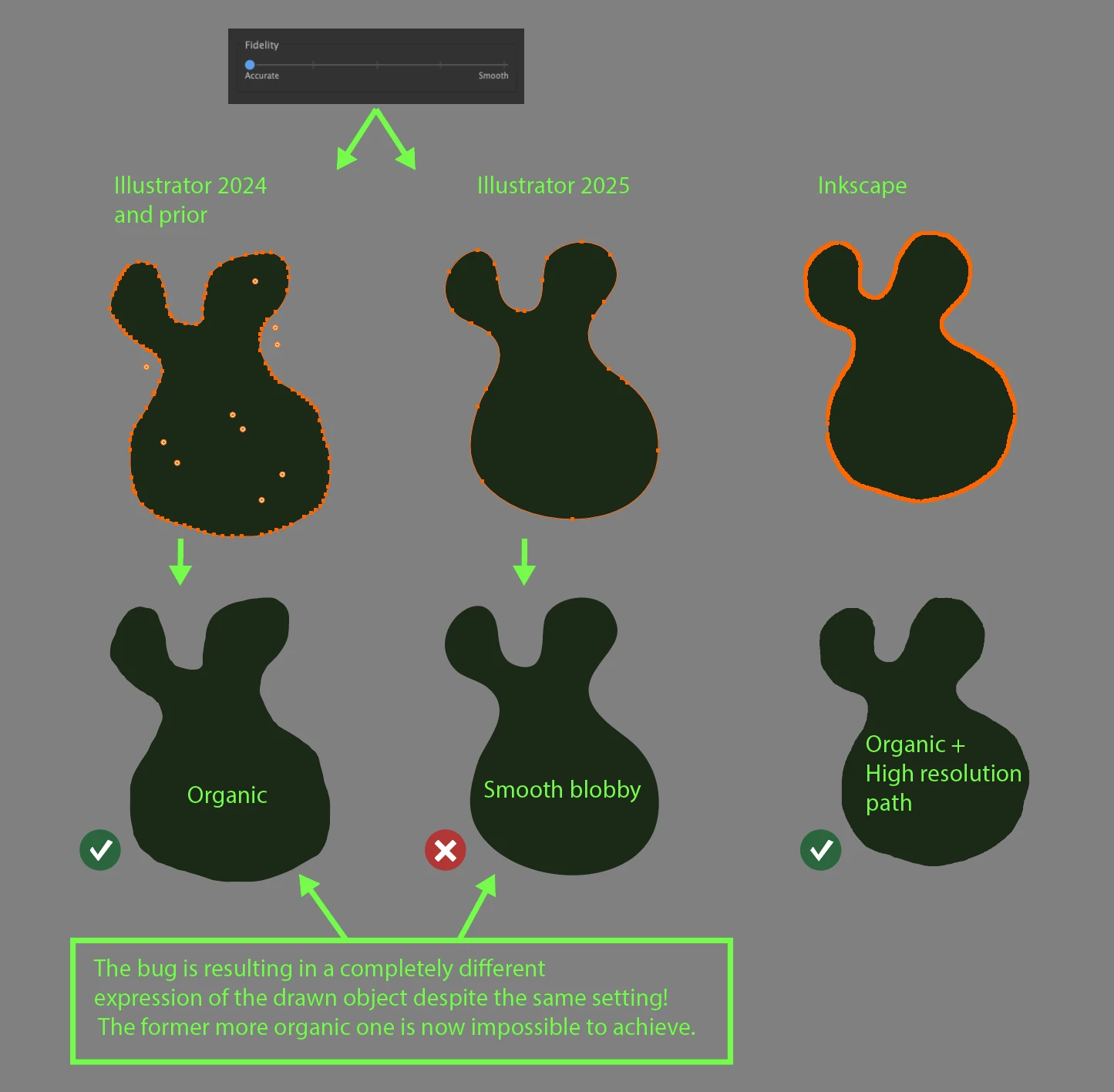


BUG IMG 3:2


ADDITIONAL FEATURE REQUEST IMG 4:1:
Correct answer Anubhav M

Hello everyone,

Our product team has tried fixing this problem with the latest update for Illustrator v29.0.1. Would you mind updating Illustrator to check if it helps resolve the problem?

Looking forward to hearing from you.


Anubhav

22 replies

Participant
October 23, 2024

Upvoted. So disappointed ... it's become practically unusable for me now. I've messed with the settings in almost every combination and nothing even comes close to what I'm looking for.

Participant
October 23, 2024

Thank you for highlighting this error.


Exact same issue for me, means I can't complete my workflows. I reliy on accuracy of tracing NOT minimiziing points and smoothing curves. Really hope this gets sorted ASAP . Looks like I'll be reinstalling Ai 28 whilst I wait 

Participant
October 22, 2024

Thank you for sharing this- I thought I was going crazy with how terrible the pencil tool is. I do a lot of tracing and need to make detailed shapes with tight curves, not over-smoothed blobs. I hope they fix this ASAP or I'll need to unsubscribe and go back to my old verison

ruy mejia
Participant
October 22, 2024

OMG thanks for posting this! I was hoping 2025 update would address the pencil tool issues like error messages after selecting the tool. The error messages are gone but a much worse problem is now here. I can't even use the tool because it smoothes out everything. My job is a headache because everything is a work around now. I have to use the erase tool to get the shapes I need. Please fix this! C'mon, It's called illustrator and the PENCIL tool doesn't work. The irony is funny for about a second. 

Participant
October 21, 2024

Upvoted. This is crazy how much this effects my every day work flow. I use this for every single one of my drawings and this is making it so difficult to get anything done. Thank you for the work you are putting in on this! 

ncicAuthor
Known Participant
October 21, 2024


Hello everyone,

STATUS UPDATE

I had a nice and productive video meeting today with the Illustrator team as they are investigating and working on a fix for the Pencil tool issue. I explained the problem in detail, and we went through debugging steps together.

There was no intention on their part to change the previous behavior of the Pencil tool and so the team is actively looking into where it has gone wrong and working on a solution to bring back what we had.


@Ingrid Lill @Halina_il

When it comes to the brush tool
Judging from previous issues in 2014 with the pencil and brush drawing engine,  I'm pretty it's the same engine being used for the pencil tool and the brush tool.
If the pencil gets fixed the brush will be fixed too. I'm positive about that. The difference between the pencil tool and the brush tool is the attributes that get added on top of the freehand path drawing engine after a path has been drawn. In the pencil tools case standard illustrator attributes are used, fill and stroke, in the brush tools case a it's brush preset is laid on top of the path.

In the meantime, I recommend using the previous version of Illustrator until the issue is resolved.
2024 (28.7.1)

As i mentioned before I do have a parallel discussion about this in their user voice forum where developers are active.

https://illustrator.uservoice.com/forums/601447-illustrator-desktop-bugs/suggestions/48973289-ai2025-the-pencil-tool-has-become-unusable-again

Please do upvote this thread top left as @Monika Gause suggests and in the user voice fourm post 

Thanks for reading folks

Participant
October 22, 2024

Upvoted, it affects my work as a graphic designer, it is not acceptable, i can't work proprely for my clients without this tool functionning as before.
Thank you for the efforts, hope it will be fixed soon, it's urgent.

Participant
October 21, 2024

Ще я помітив, що змінюю налаштування на більш детальний малюнок, а він все одно підлаштовується як хоче. Це дуже незручно в роботі! Я витрачаю багато часу на редагування! Поверніться як було!

Participating Frequently
October 21, 2024

I just noticed that. It applies to the brush tool, too. I need it to be accurate! Please change it back to how it was for the past many years. This is urgent. 

Monika Gause
Community Expert
Community Expert
October 21, 2024

If you are experiencing this, please vote for the bug report linked in this thread. You will then get notified of what's happening. The engineers do not read this forum.

ncicAuthor
Known Participant
October 20, 2024

I have and update here for everyone looking and hoping for this to be resolved.
I have a parallel thread going on with Adobe over at their uservoice forum where Im talking to the engineers.

Here it is:

https://illustrator.uservoice.com/forums/601447-illustrator-desktop-bugs/suggestions/48973289-ai2025-the-pencil-tool-has-become-unusable-again


They are aware of the issue and want to help resolve it.
There was a suggestion to reset the illustrator preferences and that it would put the pencil tool accuracy back as before. While it does bring some improvements unfortunately it's not quite doing it all the way that is needed to restore accuracy fully.
I'm going to paste my post and extensive research here too just to explain and spread awareness

I’m on:

MacBook Pro Apple M1 Max PRO 64GB RAM.

macOS Sonoma 14.7 (23H124)

Illustrator 2025 version 29.0.0

Illustrator 2024 version 28.7.1

Wacom Intuos Pro Medium


I managed to properly reset my preferences this time, and while I did notice some changes in anchor point generation on the accuracy setting, the core issue still persists. 

Initially, I was glad to see some improvement, but after closer analysis, it became clear that the problem remains—it’s just more subtle now and requires a more granular explanation.


I’m including a recording from both before the preferences reset because other users seem to have the same problem and you can see what that issue looks like.

That recording im calling “pencilTool-PRE-PreferencesReset.mp4”


The recording after the preference reset is called “pencilTool-POST-PreferencesReset.mp4” which is the more relevant clip from now on and here follows an explanation.


As someone who has used the Pencil tool heavily on a daily basis at its most accurate setting for almost two decades, I can immediately tell when something is off.

After resetting the preferences, it may seem like the anchor point generation is back to normal, but it’s not. While it's closer to how it used to be, it’s still not close enough.

See my recording in the “pencilTool-POST-PreferencesReset.mp4” clip and you will see what I mean when i say there is a difference in the point generation.


I've also conducted extensive testing several times under the same settings and same conditions, and you can see in my charts how much anchor point generation has changed when comparing Illustrator 2014 (v28.7.1) to the 2025 (v29.0) version. Even after the preferences reset on the first accuracy tick.

There’s a 35-40% difference in the number of anchor points generated for the same object, under the same settings and conditions.

Please study my six charts in the image called “pencilTool-pointDifference-POST-PreferenceReset.png” of the point generation difference.


(1) My hope is that we can fix this to get back to where it was and even better, as it’s still not the same as it used to be.

Let's have a call and talk about it. I've mailed Rama the Engineering Manager and suggested a time for a call.


(2) Additional notes. Im also hoping for further improvement on this accuracy aspect. When the similar issue occurred in 2014 when the Pencil tool was rewritten, and Adobe was great about addressing it back then. 

While there was a fix made it wasn’t perfect, it was close enough than for me to further push it here in the forum. Unfortunately, this time it feels even further from what it used to be and feels wonky to draw with for someone who is used to the accurate pencil tool.


The "0.5px fidelity, 0% smoothing" setting was originally my suggestion for the first accuracy tick on the slider in the pencil tool options back in 2014 as this was the lowest value you could set it too when it had the numeric pencil tool options, however, this setting is just about adequate for accuracy but there is need for improvement for us who need more accuracy and more point generation. That’s why I’m also requesting an additional tick on the slider, closer to "0.2px fidelity, 0% smoothing." See my feature suggested screenshot in my previous posts and my examples that show closer to inkscapes amount of point generation.

I hope you’ll consider this and give the Pencil tool the attention and features it deserves for more accurately tracking the hand movement. I’m happy to assist further in any possible way.


Participant
October 18, 2024

Having this exact issue when trying to smooth out bumps for custom typography, overly smooth and completely disfigured from the original. There is no actual change in the intensity if you adjust the rudimentary slider to "accurate" aka less smooth. Rather than only adjusting the area where I am using the tool, it also adjusts everything around it rather than the target area, making it a ridiculously flimsy and unhelpful tool. Really disappointed if this was a mandated change or a mistake in the update but Adobe needs to do better.
