
Known Participant
October 17, 2023
Question

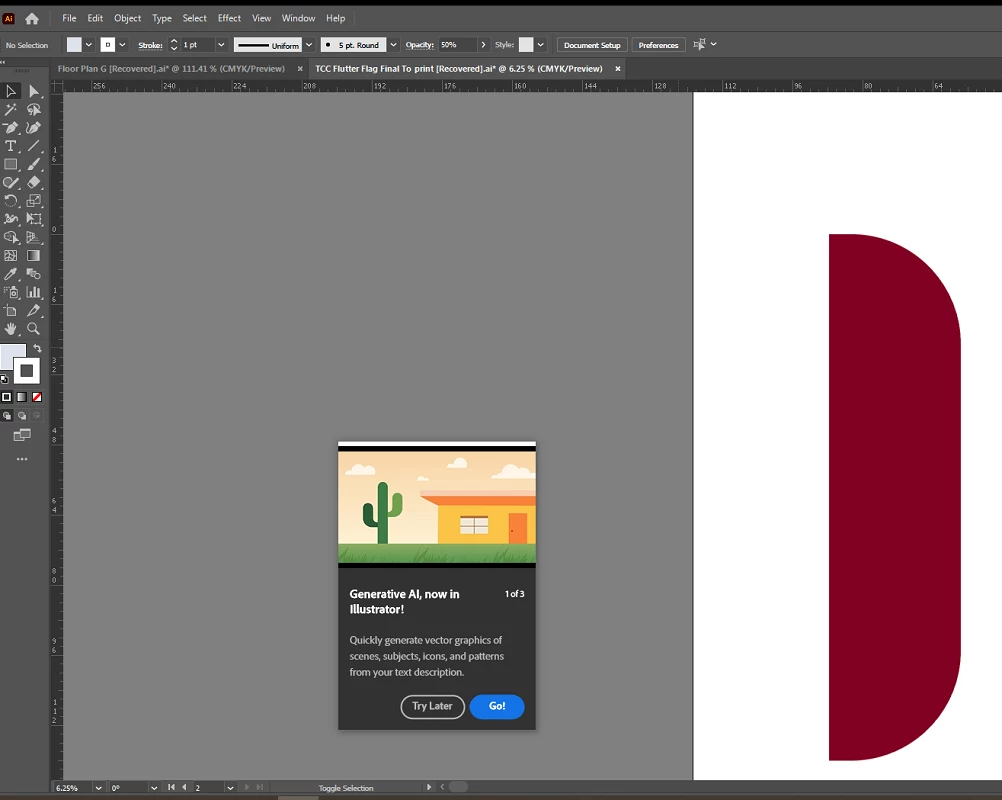
Any way to stop the "Generative AI" prompt from popping up?

  • October 17, 2023
  • 27 replies
  • 50033 views

EDIT: since it seems this might legitimately be a bug, I recommend seeing see my latest post on this thread for a Uservoice request someone else has created. If you're still experiencing this issue, please go to the Illustrator Uservoice forum and upvote/support that post.

I'm guessing this is just a bug or an inescapable prompt with the new program updates, but in the off chance ... Is there any way to get this "Generative AI, now in Illustrator!" to permanently go away? I've run through it with the "Go!" option multiple times, and I've even fiddled around with generating stuff, but it still shows up multiple times a day as if I haven't. It keeps popping up over parts of files I'm working on and interrupting me. I think it's been 3-5 times today alone. Resetting preferences (or not resetting them) makes no difference. I'm using Illustrator 28.0.


27 replies

Participant
January 30, 2025

I know this is quite an old thread but does anyone know how to get rid of this stupid "Generative Expand currently lacks support for raster artwork 'error' every time i make a new art board in illustrator?  I'm (unfortunately) working with the ARM version of illustrator on a windows surface. 


Participant
January 30, 2025

Yes there actually is a way - at least one that worked for me - but I have forgotten the EXACT sequence I did to get rid of this annoying pest. If I remember, I went to 'Window' and scrolled down to 'Contextual Task Bar' - I then either checked (enabled) it, or UNchecked it, then restarted Illustrator and the stupid pop-up did not bother me for a long time, like a year or two - then it came back maybe a few months ago, and I diddled around with that Window / Contextual Task Bar dance routine again, and it's gone again. It might look like you haven't gotten rid of it, but you have to restart Illustrator - Don't be like me! WRITE DOWN what you do and if/when it works, you can refer to the Post-It Note that I wish I had over my work station. Good Luck, and, wake UP, Adobe; nobody wants your stupid pop-ups.

Participant
July 22, 2024

I fixed this* by going to Adobe's chat. Then the person took over my PC (with my permission of course) and if I saw what I think I saw him or her do, they went to the Windows drop-down, went to "Contextual Task Bar" and UN checked it. Then rebooted Illustrator, and voila, it seems to be gone, gone, gone. I'd say try this yourself first, but the chatter at Adobe was able to do it.


* We'll see if it "sticks"

Participant
July 22, 2024

I'm glad this worked for you. I went to make this change for myself and it's already disabled.

Participant
July 22, 2024

OK just freewheeling here - but maybe try ENabling it, then DISabling it ... and THEN reboot? Might be worth a try - - but honestly, I had pretty good luck (after getting cut off a few times) with the support people. So far, so good, the pesky window has not returned yet. Good Luck!!

Participant
June 24, 2024

This, with all the other CONSTANT pop-ups for surveys and AI and, I've had it. Worst bunch of products ever. The moment you start to use anything Adobe and it's going to pop-up. The CC menu changes all the time for no reason. It's gotten to be a mess.


Participating Frequently
May 31, 2024

I agree that it's incredibly annoying! At times (like right now) I can't turn it off no matter how many times I click the X.  And I can't even move the box out of the way.  

Participant
May 15, 2024

ADOBE! By ignoring this pop up issue you are pushing a feature on your users without consent, ruining work flows, and making all of our screens clustered with faulty software. I am disappointed that this is now been going on for a year. Losing respect by the day. 

Monika Gause
Community Expert
Community Expert
May 15, 2024

@alwaysinpursuit  schrieb:

ADOBE! By ignoring this pop up 


This is the community forum. 95% of people are not staff.


Is it still showing for you in the latest version? 28.5?

Participating Frequently
April 10, 2024

There is no way to stop them......and they get worse (more regular) the longer you leave it, a week or 2 ago i was getting 1 alerts per day and today it was 1 or 2 EVERY MINUTE, and I am not exaggerating, to the point where i just had a chat session with Adobe rep and he couldn't do anything about it......nothing, I even shared my screen with them and opened PS and showed this guy 2 alerts popping up within the first 60 seconds 😮 Anyway,  he said have to no choice but to upgrade which basically means their strategy is to harass people so much that they stop their lives and do the upgrade (even when they don't use AI) which sucks, specially because the reason i can't upgrade is space so it means Adobe is forcing me to stop my job and delete things or go buy a harddrive or whatever and will harass me until i do it. Staggering that a company treats paying customers like that, like 1 alert a week 'advising' me to upgrade is no problem.....1 per minute, sorry, no thats it not ok. 

Participating Frequently
April 10, 2024

And it also appears that Adobe Creative Cloud keeps inserting itself into the favourites of my finder side panel window.......I have just removed it for the 4th or 5th time this week. What th is going on with this company, who tf do they think they are?  Like it might be your software but its my computer.......GTFOH

Monika Gause
Community Expert
Community Expert
April 10, 2024

Which version of Illustrator is it?

When was the last time you rebooted the cpomputer?

Did you reset the preferences when you last updated?


The popups have appeared randomly in recent versions, but in the current version I found them at least less disturbing. 

Participant
April 6, 2024

This happens to me every time I try to use the search fucntion in a PDF document. It is an outrage that this is still a problem when the orginal post asking how to fix it is from 2023.

And the aggressive heavy RAM demanding auto-update feature that relentlessly turns itself back on over and over again remains an even *bigger* outrage.

Paying 20 bucks a month for this level of customer disrespect is not something I intend to continue much longer.

peterl28855421
Participant
March 18, 2024

This is VERY FRUSTRATING ADOBE.


I have several projects open and this stupid prompt KEEPS COMING ON and it won't GO AWAY. REMOVE THIS. 


I now have to close the program and reboot everything.


WHY ARE YOU DOING THIS? REMOVE IT.

Participant
March 8, 2024

Hope this helps: I've turned off all of the same things everyone has suggested ("Show Rich Quick Info," "Show Tool Tips," and "Enable Content Aware Defaults") in the Preferences panel. AND unchecked the "Contextual Task Bar" under "Window" drop down. The annoying pop ups have gone away now.

Participant
August 9, 2024

This worked for me – turning off the "Contextual Task Bar" under "Window" drop down.

Legend
February 28, 2024

Since Illustrator records the number of times it has displayed such an advertisement in the preferences file, perhaps if a larger number of times is set, it may no longer be displayed. But this has not been verified.


  • Onboarding/OnShapeCreation/FirstCard
  • Onboarding/OnShapeCreation/SecondCard
  • Onboarding/OnShapeCreation/ThirdCard
Participating Frequently
February 28, 2024

I am so infuriated by these annoying pop-ups, I've just got another one about the new measurement tool as I was about export something. I simply don't need to be constantly prompted. And I have no idea why Adobe feels it necessary to start doing this. And the fact that this might actually be recorded in the preferences file. This really does feel like the beginning of the end with my relationship with Adobe, after 30 odd years.