
Amir Mahdi Moslehi
Participant
June 10, 2021
Answered

Artboard Rotation while using touchpad for zoom in Illustrator 25.3

  • June 10, 2021
  • 64 replies
  • 122653 views

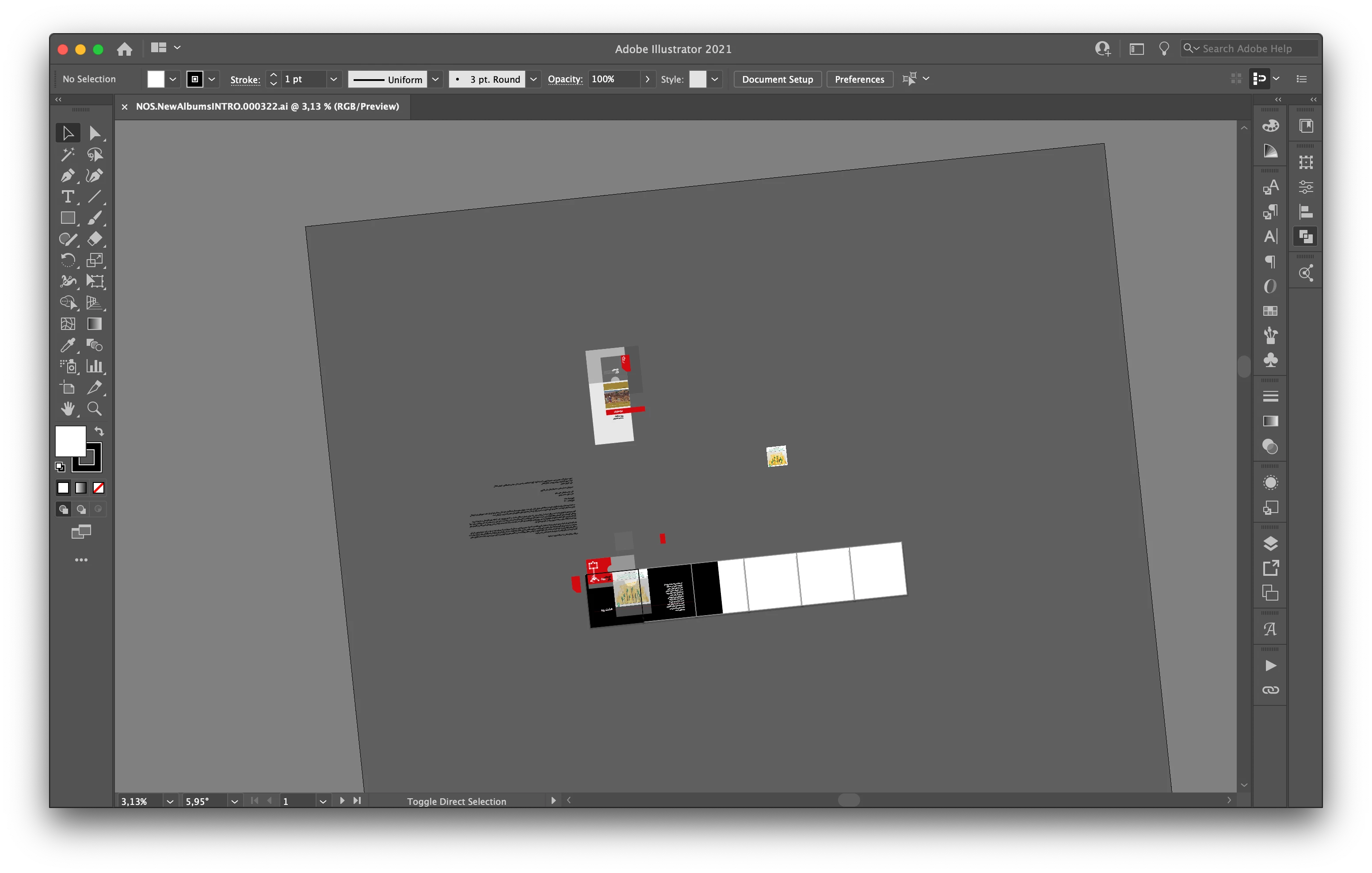
Hi, recently I faced a new problem. When I use the trackpad for zoom-in/out the artboard keeps rotating. I don't know how can I fix this problem.

Correct answer joannem27208843

Hi I solved this problem by going to macbook System Preferences> Track Pad >Scroll and Zoom > Rotate and uncheck rotate with two fingers .


Hope this helps if there isn't already another solution that i have missed. 

Jo 


64 replies

Participant
June 13, 2021

A new feature seems to have hit Illustrator, where you can turn the artboards with the 2-finger-turn on the trackpad of your laptop... but for the life of me I cannot get the artboards returned back to be vertically straight again. Can someone help me with this? there must be a drop-down menu for resettting the angle of the artboards in the sdropdown menu that I'm missing...?

Monika Gause
Community Expert
Community Expert
June 13, 2021

That menu is in the status bar at the bottom left of the document window.

Monika Gause
Community Expert
Community Expert
June 12, 2021

Double click the rotating hand tool.


It looks like you cannot lock the angle of the canvas.

William Neufeld
Participant
June 10, 2021

My artboard rotates in the newest version when I make a slight rotation gesture on my touchpad, like 5° and it seems impossibel to bring it back to 0°. Anynone solved this?

William Neufeld
Participant
June 10, 2021

For now I deactivated the rotation function for the touchpad in the Mac settings, so it wont happen again 

Inspiring
August 10, 2021

Thank you! I don't see the point of this function and why it would be made SO easy to initiate that it interferes with basic work.

Participant
June 10, 2021

As you can see i accidentally rotated my workspace (not just my artboard, the ENTIRE workspace) and i can't rotate it back to 0 deg. 

Doug A Roberts
Community Expert
Community Expert
June 10, 2021

Either double-click on the rotate view tool in the toolbar, or View > Reset Rotate View

Participant
June 22, 2021

This is so annoying, please look at adding a disable rotating function,