Participant
October 5, 2023
Question

Can’t activate Trim View in Adobe Illustrator

  • October 5, 2023
  • 3 replies
  • 672 views

Why is Illustrator's 'Trim View' greyed-out in the drop down-menu?
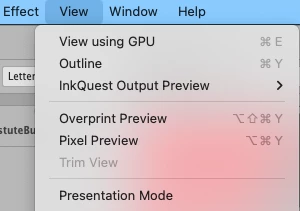
 

This topic has been closed for replies.

3 replies

Mike_Gondek10189183
Community Expert
Community Expert
October 5, 2023

Also make sure you did not hide artboards.


https://illustrator.uservoice.com/forums/333657-illustrator-desktop-feature-requests/suggestions/39157192-trim-view-stops-working-when-artboards-are-hidden


Once you let us know if this happens to all documents or just this one, that will eliminate most of the possibilities.

Mike_Gondek10189183
Community Expert
Community Expert
October 5, 2023

In this case was a modified print.ai that was too large 300mb.  https://community.adobe.com/t5/illustrator-discussions/why-is-trim-view-greyed-out/td-p/13358096


I see you have inkquest and am wondering if that might be conflicting.


Until we get more information to be able to help you. try Shift F to go into prevention mode, and escape to exit. That key command works if you are not setting type.

Mike_Gondek10189183
Community Expert
Community Expert
October 5, 2023

What OS version are you running? Has it worked before?
