


Known Participant
Mar 10, 2021 8:01 PM UTC
Answered

Can't round corners on some shapes

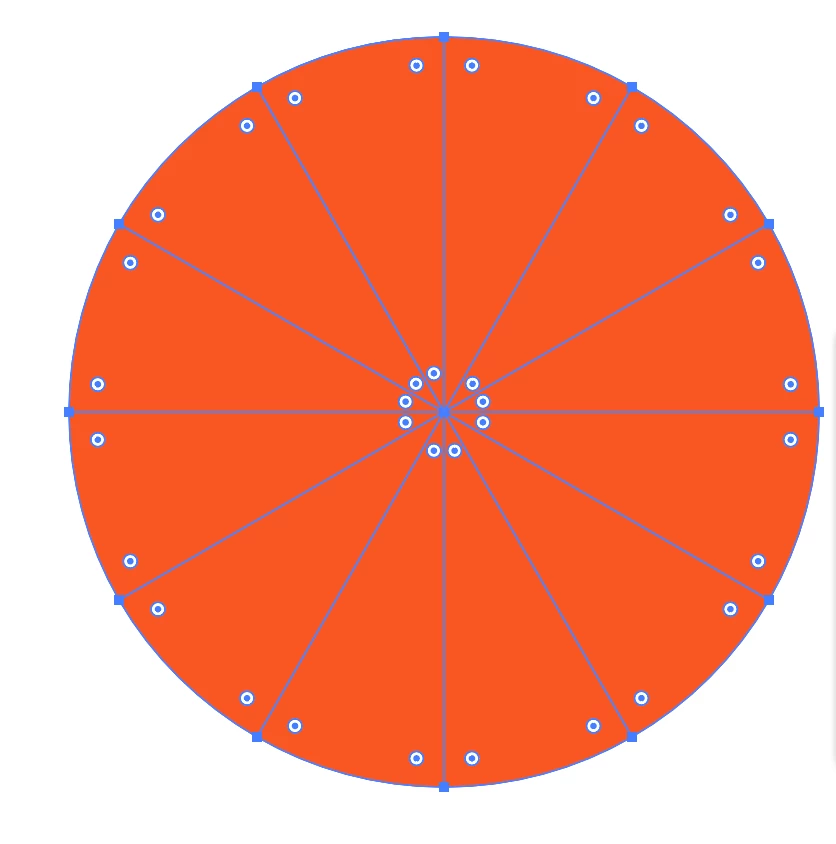
I made a circle using the Ellipse tool and used the Line Segment tool to make lines to divide it into 12 sections. I used the Shape Builder tool to make it into 12 separate shapes. When I go to use the Direct Selection tool, the option to round corners is on almost all the corners except 3 of the corners in the middle. What could be the reason for this? Thanks!

Bill Silbert
Bill SilbertCorrect answer
Community Expert
Mar 10, 2021 8:43 PM UTC

I would suggest pulling one of the segments that doesn't have the round corner option out of the circle and make sure that the path is closed at the point where there is no round corner icon showing.

6 replies

Participant
Aug 29, 2024 9:58 AM UTC

Why arent there dots to round out my Square.
Can someone help me Please 

Translate
Monika Gause
Community Expert
Community Expert
Aug 29, 2024 10:05 AM UTC

@Joyful_Flair3953  schrieb:


Why arent there dots to round out my Square.
Can someone help me Please 


Please see your own thread: https://community.adobe.com/t5/illustrator-discussions/cant-round-out-the-shapes/m-p/14829666#M418530

Translate
Ton Frederiks
Community Expert
Community Expert
Mar 10, 2021 9:03 PM UTC

It seems like the Shape Builder tool is not very accurate and sometimes creates multiple anchor points very close to each other.

You could try to use Pathfinder Divide, but first set the Pathfinder precision in the Pathfinder Options to a very small number like 0,001 pt.

Translate
Known Participant
Mar 11, 2021 9:42 PM UTC

It turns out that some of the triangles had two anchor points where it looked like there was just one. It was due to some line segments not crossing at exactly the middle of the circle. Thanks for the tip! 

Translate
Bill Silbert
Community Expert
Bill SilbertCommunity ExpertCorrect answer
Community Expert
Mar 10, 2021 8:43 PM UTC

I would suggest pulling one of the segments that doesn't have the round corner option out of the circle and make sure that the path is closed at the point where there is no round corner icon showing.

Translate
Known Participant
Mar 11, 2021 9:42 PM UTC

I looked closer and some of the triangles had two anchor points at what looked like just one. I think this was due to some of the line segments not crossing exactly in the middle. Thanks for the help! 

Translate