mackenziec34220754
Participant
November 29, 2021
Question

Cannot Convert to Shape/Need to Use Clipping Mask

  • November 29, 2021
  • 3 replies
  • 186 views

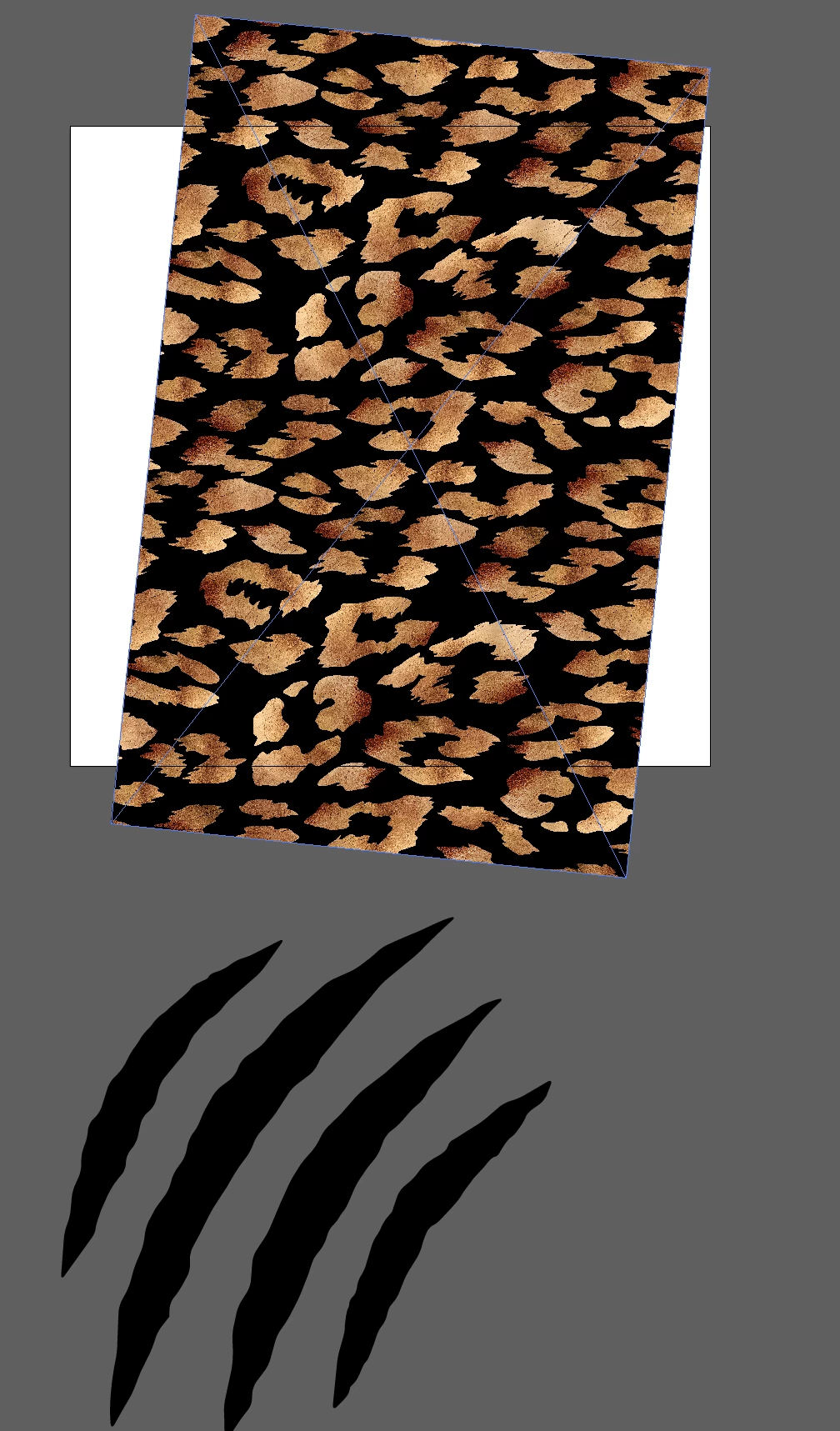
I've got an ai file from Adobe Stock of some claw scratches that I want to use as a clipping mask over a cheetah print background. The scratch marks keep telling me "Cannot convert to shape". When I convert it to a compound back and put it over the cheetah print and create a clipping mask it uses the cheetah print rather than the scratch marks so the scratch marks disappear (even when they are laid over top of the cheetah print). Not sure what else to do at this point. 


    This topic has been closed for replies.

    3 replies

    Legend
    November 29, 2021

    Try using the Transparency Mask panel instead of Clipping Mask.

    Ton Frederiks
    Community Expert
    Community Expert
    November 29, 2021

    I am not sure if I understand it, but if you want the cheeta print to appear inside the claws;

    Group the claws.

    Put them on top of the cheeta

    Select both and select Make Mask in the Transparency panel (test the two checkboxes)

    Ged_Traynor
    Community Expert
    Community Expert
    November 29, 2021

    Moving thread to the Illustrator forum from Using the Community