Known Participant
November 4, 2022
Answered

Color difference between CPU/GPU previews

  • November 4, 2022
  • 11 replies
  • 36619 views

Hi,

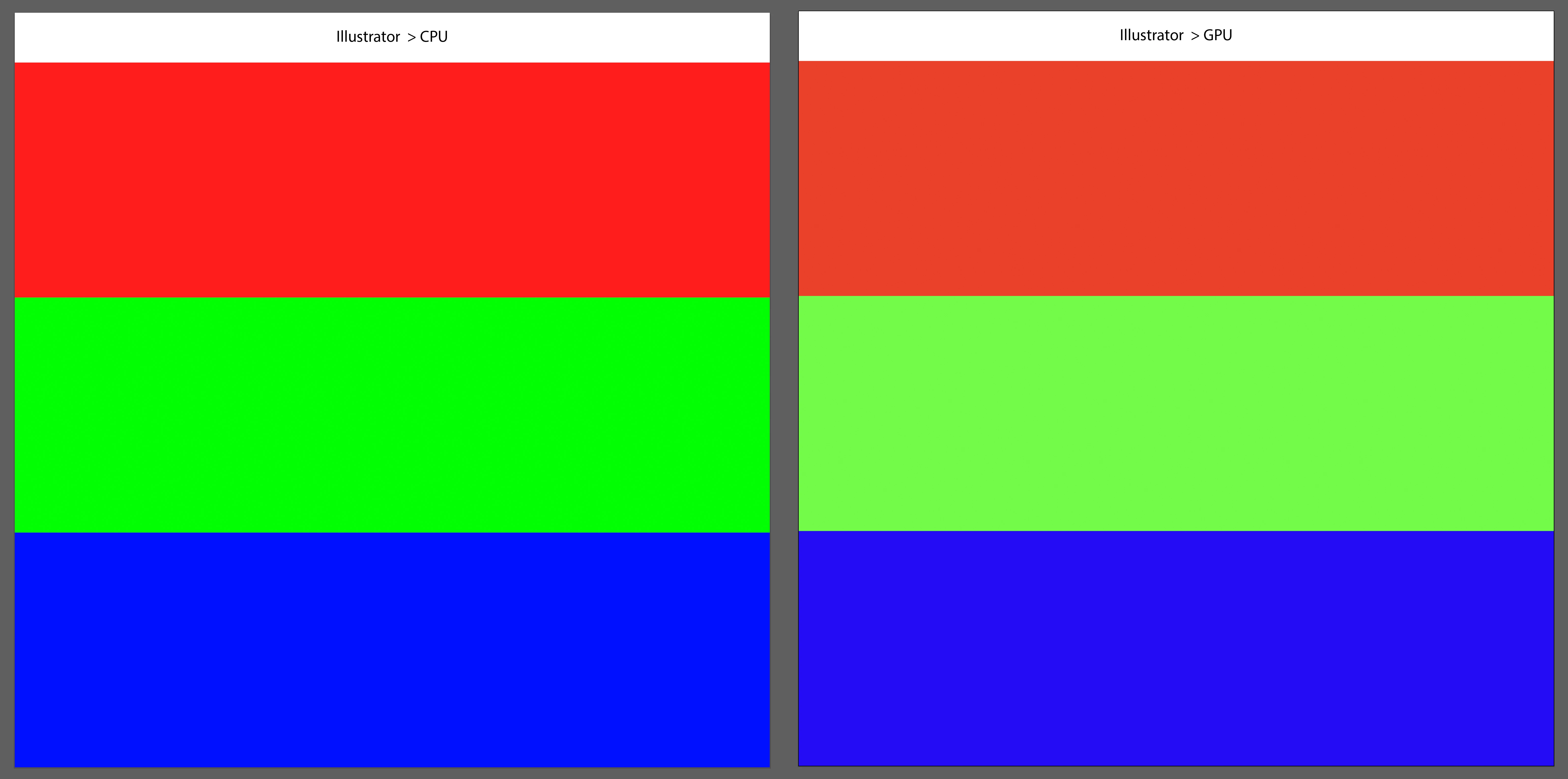
I have a big color problem between CPU/GPU previews.
In GPU preview, the colors become dull, bland. I didn't have this issue before the latest updates when switching between the two.
I tried to reinstall an older version, but the problem persists.
I am having the problem on both indesign and illustrator.
Do you have a solution ?

Correct answer Anshul_Saini

I have the same problem with my 2021 16-inch MacBook Pro M1 MAX w/ 32GB running Ventura 13.0.1 (22A400).  On both the laptop and external monitors, GPU preview is dull, especially noticable when dealing with colors outside CMYK gamut. Color picker colors are correct, but when shown on the artboard, they are dull and washed out. 


Hi Jeff,


Sorry for the trouble! This issue has been fixed in the Ventura update, v13.1. Many users have reported that this update has resolved the color difference between CPU/GPU previews on the internal MacBook display.


I suggest that you update your Ventura to the latest version and see if it resolves the issue for you as well.

If you have any other questions or concerns, please feel free to ask.


Best,

Anshul Saini

11 replies

Community Manager
November 4, 2022

Hello @Mouchet0D4C,


Sorry to hear about this experience. Would you mind trying the suggestions shared in this community post (https://community.adobe.com/t5/illustrator-discussions/illustrator-25-2-1-gpu-cpu-preview-change-the-colors/td-p/11890469) and checking if it helps?


If the issue persists, kindly share some more information, like the exact version of the OS and Illustrator installed on your computer, the system configuration (CPU/GPU/Monitor), the Color Settings used, and whether Illustrator also behaves this way with other files.


Looking forward to your response.


Thanks,

Anubhav

Known Participant
November 5, 2022

Hi,

I've been researching the forum since, and read that this is from the latest update on macOs Ventura.
Indeed, it is since this update that I encounter the problem.

I've never had this issue before, even when switching between the two CPU/GPU previews
I will reinstall macOS Monterey to try.


Here is my setup :

illustrator 26.5.1

indesign 18.0

photoshop 24.0.0

MacOS Ventura

CPU/GPU : Apple M1 Pro

Monitor : Retina screen XDR + Dell U2723QE

Known Participant
November 5, 2022

So, I confirm that with a downgrade on MacOS Monterey, I no longer have any color difference problems when switching between CPU / GPU.

An update for Ventura will be welcome very soon.