


Participant
July 23, 2025
Question

Colour Swatches saved within objects

  • July 23, 2025
  • 2 replies
  • 252 views

Hello, we have an issue at work where files are being inundated with hundreds of swatches (see screenshot) and it is slowing files down immensely. This is also combined with hundreds of brush presets.
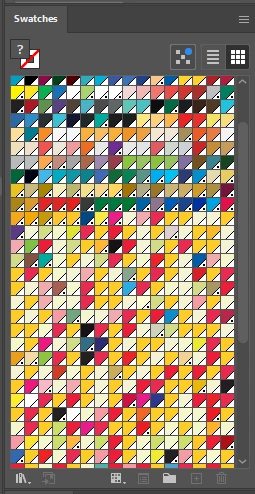


The problem being is that we have illustrator files we use as templates to create our work. But all of our work is now corrupted by these immense amount of swatches and brushes. 


We cant use our templates without copying hundreds of swatches and brushes too.


If we delete the swatches, which takes a while to load anyway, then save the file. Even if we copy out of the file at a later date, it REGENERATES all the swatches when copied into a new document? 


My question being how can hundreds of swatches be made again by copying an object into a new file? 


it feels like a virus these swatches, if you delete them, they just regenerate themselves if you copy an object into a new file.


As you can imagine, this issue replicates itself, as we make more designs and more documents, more corrupted files become sources.

2 replies

Junior Rocha
Community Expert
Community Expert
July 23, 2025

Hi@Josh33740383kjgf 

If you open an artwork that have Global Colors, (The swatches with a triangle at the corner, with or without the dot inside).


When they are used in the artwork, the illustrator creates a link with the color and the artwork, so if you copy to another file, the swatches are copy too.

To avoid the copy of the swatches, you need to break this link to the color before copy to another file.
Go to EDIT - EDIT COLOR - CONVERT TO CMYK (OR CONVERT TO RGB if is RGB document)
This will convert the arwork colors into a regular colors that are not linked with it's swatches.
So your new file will not receive those swatches.

About regenerate the swatches again, is the same thing, before delete the swatches you need to convert to RGB or CMYK, to break the link with swatches panel, if you don't do that, cause they are global color, illustrator will recreate the swatches.

Same happen with brushes, if an artwork have a brush, when you copy this artwork to another file, the brush goes too. Cause is impossible have a editable brush on you artwork with it in you brushes panel.

If you want to copy something with a brush to another document, but you don't want that brush into the brushes panel, before copy, you have to go to OBJECT - EXPAND APPEARANCE, to convert the brush object, into a regular artwork, it keeps the appearance and breaks the link with the brush, so only the artwork will be copied, not the brush on brushes panel.

The same happens with Symbols, Patterns, Graphic styles, if you copy an object that use them on another file without add into your panels, you need to break the link with panel, using break links (for symbols and graphic style) and Expand or Expand Appearance for the patterns and brushes.


I hope this helps you!

Participant
August 4, 2025

Thank you this is amazing insight,


I believe this would fix the issue but the length to go into all of our files and select every swatch and uncheck global would take a considerable time. 


I dont suppose anyone knows a way to do this by mass?

Monika Gause
Community Expert
Community Expert
July 23, 2025

This has been a huge issue a long time ago. Are your files very old? 


This scary thread: https://community.adobe.com/t5/illustrator-discussions/deleted-global-colors-huh-error-unused-brushes-keep-returning/td-p/2922841 

Someone has reported it just a couple of weeks ago. I hope it's not back.

Participant
July 23, 2025

our files aren't really old, but im guessing that as weve used an object maybe from freepik or vecteezy it might have been an old file and has leaked its way into our work, sad thing is that we use the old file once, that corrupts our files, then corrupts more of our files. etc. thank you for the thread link however!

Monika Gause
Community Expert
Community Expert
July 23, 2025

Unfortunately you might have got it from there. The problem is that once you have it, it can spread further. I have alerted the engineers and I hope they will take care of it soon.