
Disposition_Dev
Legend
January 6, 2015
Answered

Create artboard around group, unless there's a clipping path, then create the artboard around the clipping path

  • January 6, 2015
  • 2 replies
  • 2349 views

Hello again everyone.

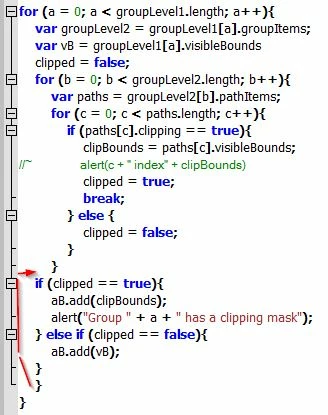
I've been able to work out a bunch of this code from other people's questions, but i've hit a snag in my if/else clause structure.. I need to make an artboard around each top level groupItem on layer[0]. That part is cake.. unless there's a clipping mask. Visible bounds don't work when there's a clipping mask. So i built some for loops that cycle through the pathItems to search for the clipping mask and return the visibleBounds of said mask. However, i can't seem to work out how to structure the if clause in a way that will create the artboard around the clipping mask if there is one.

I'm successfully finding the visibleBounds of the mask and creating the appropriate artboard, but it's ALSO creating an artboard around the visible bounds of the entire group. How would i structure an if clause to determine whether an artboard was made around the clip path already and thus, not create a second artboard around the visible bounds of the whole groupItem? i imagine i'd need some kind of function to determine whether createdArtboardAroundClip = true and if so, skip this group..

Thanks all.

here's the code:

var aB = docRef.artboards;

var docLayers = docRef.layers;

var layer1 = docLayers[0];

var groupLevel1 = layer1.groupItems;

for (a = 0; a < groupLevel1.length; a++){

    var groupLevel2 = groupLevel1.groupItems;

    var vB = groupLevel1.visibleBounds


    for (b = 0; b < groupLevel2.length; b++){

        var paths = groupLevel2.pathItems;


        for (c = 0; c < paths.length; c++){

            if (paths.clipping == true){

                var clipBounds = paths.visibleBounds;

                aB.add(clipBounds);

                break;

                }

            }

        }

    aB.add(vB);

    }
This topic has been closed for replies.
Silly-V
Legend
January 6, 2015

hey, you can probably use the continue keyword in the for loop once you've set up a flag to let you know if something's already been created.

Disposition_Dev
Legend
January 7, 2015

pixxxel schubser

here's that screenshot.

Silly-V

could you elaborate on that a little more? i think i understand what the continue keyword does, but i don't really know how to set up a flag or use said flag/continue combination to do what i'm looking for here..

what i had in mind was to push the parent index to an array if an artboard was created around the clip mask.. something like this

var dontMakeAB = [];

for (loop through top level groups){

     for(loop through group items within top level groups){

          var paths = groupLevel2.pathItems

          for (c=0; c< paths.length; c++){

               if (pathsclipping == true){

                    var clipBounds = paths.visibleBounds;

                    aB.add(clipBounds);

                    dontMakeAB.push(paths.parent.index)

but i already know that's not really going to work because it's calling out the parent of 'paths' which is <Clip Group> in the screenshot above. I don't know how to go back farther to get the "groupLayer1[index]" and at that point.. how to use that index to negate a future artboard..

am i way off base here? pixxxel it seems like your solution is much more elegant.. but i just don't understand how it works at all. (in fact, when i copied that into my code, it didn't work.. but that could just be because i was unsure where to put it or how to use it).

EDIT***

or what about a function to determine simply weather the clipping mask exists instead of building that if clause into the for loop? example:

var ifClipped = function(){

     loop through path items in each 2nd level group

     if paths have clipping masks

          make global variable for bounds of clip mask

          return true

     else

          return false

}

for (loop through top level groups){

     for (loop through group items within top level groups){

               if (ifClipped){

                    make artboard at bounds of global clip mask variable created in the function

                    }

               else {

                    make artboard at bounds of top level group

Silly-V
Legend
January 7, 2015

So now it's kind-of getting confusatory here, so I'd like to step back a moment and offer a different approach.  Through the screenshots it looks like you want to put artboards around art objects, and the visible bounds with clip paths is complicating things.  I offer you my own technique for this: make your target art group selected (groupItem.selected = true), make a new artboard and use document.artboards.fitToSelectedArt() to fit the temporary board to the edges of your art group.  Then, you will be able to resize your new board if you need buffer on edges.  This will work CS5 and up, that I know of.

pixxxelschubser
Community Expert
Community Expert
January 6, 2015

Hi williamadowling,

try this for your "firstlevel groups" on your layer 1

var docRef = app.activeDocument;

var aB = docRef.artboards;

//var aB_0 = aB[docRef.artboards.getActiveArtboardIndex()];

var docLayers = docRef.layers;

var layer1 = docLayers[0];

var groupLevel1 = layer1.groupItems;

for (a = 0; a < groupLevel1.length; a++){

    //var groupLevel2 = groupLevel1.groupItems;

    if(groupLevel1.pathItems[0].clipping == false) {

        var vB = groupLevel1.visibleBounds;

        } else {

            var vB = groupLevel1.pathItems[0].visibleBounds;

            }

        aB.add(vB);

        }

    //aB_0.remove();

Here is my layers hierarchy:

Have fun

Disposition_Dev
Legend
January 6, 2015

can you explain that a little? i don't really understand what's going on there.

i want to avoid looking at a specific index **groupLevel1.pathItems[0].clipping** because the clipping mask could be anywhere within that group.

can i loop through the indexes for the pathItems of groupLevel1?

pixxxelschubser
Community Expert
Community Expert
January 6, 2015

I've added a screenshot of my own layers hierarchy to my previous posting at this moment.

Can you show me the same of yours, please?