
visualWebber
Known Participant
August 3, 2017
Answered

Crosshatch pattern applied to an image

  • August 3, 2017
  • 7 replies
  • 5547 views

Hello

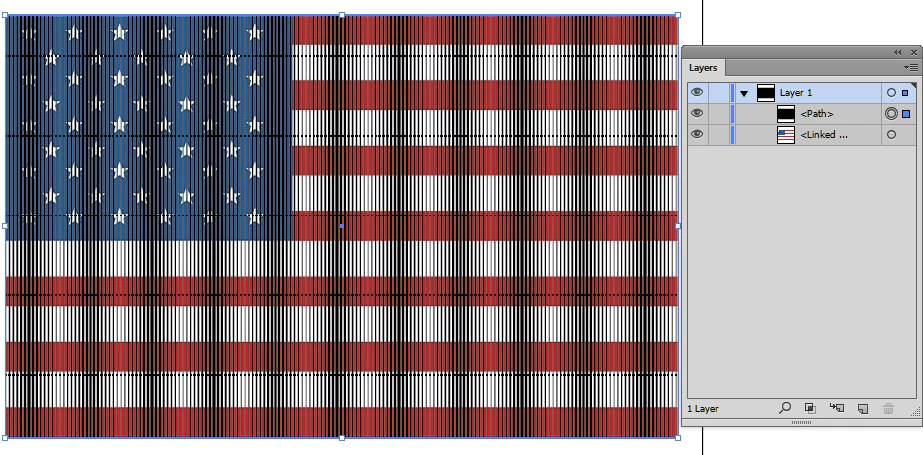
I'm trying to apply a crosshatch pattern (or any pattern for that reason) to an image. The result should be a crosshatched image. Most likely there are several ways of applying a pattern to an image in Illustrator. I don't remember how they did that in the video I saw a while back (long story short, I might have not bookmarked it). I'm not looking for applying the pattern to an object, though. Please help me with that. Thanks a lot

Cristian
This topic has been closed for replies.
Correct answer edgrimley

If you just want a pattern over an image just add a rectangle shape above the image and fill it with a pattern.

7 replies

visualWebber
Known Participant
August 3, 2017

Thanks again for your replies, Monika, Ed

visualWebber
Known Participant
August 3, 2017

In the meanwhile I found the video. It's also on lynda.com. It uses opacity masks. I guess it's somehow related to clipping masks

I need to keep track of the videos better

Monika Gause
Community Expert
Community Expert
August 3, 2017

Opacity masks are not related to clipping masks

visualWebber
Known Participant
August 3, 2017

They are not. It's just that they are masks, too. I did a poor job at explaining it but that's all I remembered. I posted this so that everyone knows I found what I was looking for. Unlike U2

edgrimleyCorrect answer
Participating Frequently
August 3, 2017

If you just want a pattern over an image just add a rectangle shape above the image and fill it with a pattern.

visualWebber
Known Participant
August 3, 2017

Ok, thank you, I didn't think about it, I'll just do that!

visualWebber
Known Participant
August 3, 2017

There was a video about this by Mordy Golding, he used for sure a crosshatch rectangle, but I didn't see it on Lynda.com.

visualWebber
Known Participant
August 3, 2017

Thank you for replying, Monika.

By "image" I mean a placed image (picture).

I will be able to show something later.

I had to select the placed image and also the crosshatched rectangle. It wasn't a swatch, so maybe it wasn't an actual pattern, just a rectangle that had a crosshatch fill.

I guess I don't know how to reply to you, Monika, I don't have that option, that's why I'm replying to original question.

Monika Gause
Community Expert
Community Expert
August 3, 2017

visualWebber  schrieb

Thank you for replying, Monika.

By "image" I mean a placed image (picture).

You will need to first trace it before you can apply a pattern.

visualWebber
Known Participant
August 3, 2017

Thank you, Monika, I guess I can trace the image, too, what I was thinking about didn't involve tracing, though.

Monika Gause
Community Expert
Community Expert
August 3, 2017

Please show.

It's not clear what you mean  by "image".

Patterns are applied by using swatches

visualWebber
Known Participant
August 3, 2017

I remember it as being vaguely similar to clipping masks