
Known Participant
February 1, 2015
Question

Custom workspace panels location jumps off screen after running Mac Yosemite 10.10.2 update

  • February 1, 2015
  • 13 replies
  • 18383 views

Hi there.

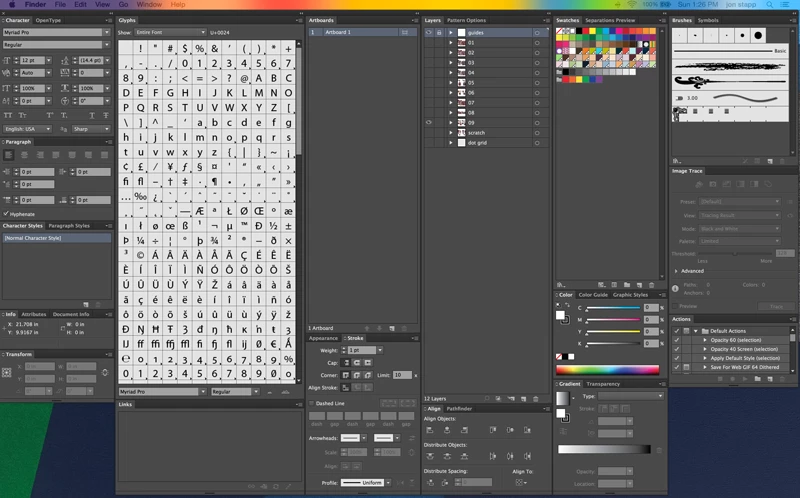
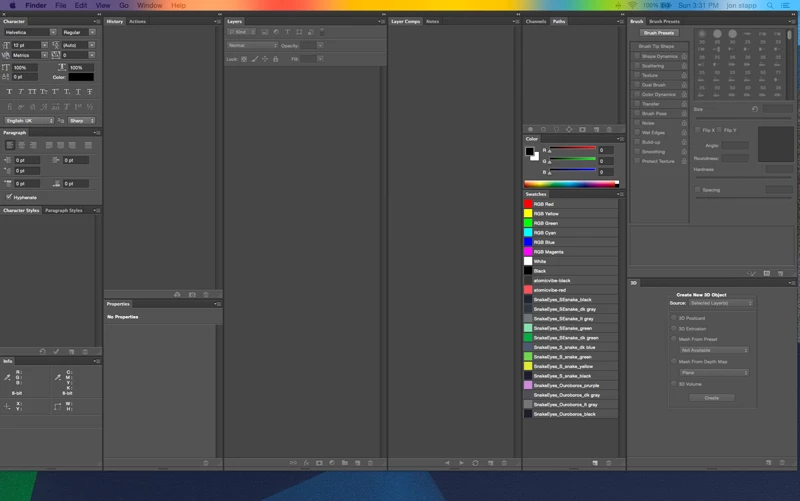
In October 2014 I purchased Adobe CS6 and set up custom workspaces for Illustrator and Photoshop. I have a 2014 MacBook Pro connected to a Thunderbolt Display, and I use the Thunderbolt screen for my main work area, and the MBP to host my custom workspace panel arrangements.

They look like this, respectively:

Illustrator:
Photoshop:
Last night, I left both Photoshop and Illustrator open and my MBP on before going to bed. When I went to do some work today, I saw a notification that Mac OS X Yosemite had auto updated to 10.10.2, and had rebooted. When it rebooted, it reopened both Photoshop and Illustrator, however, my workspace panels now look like this:
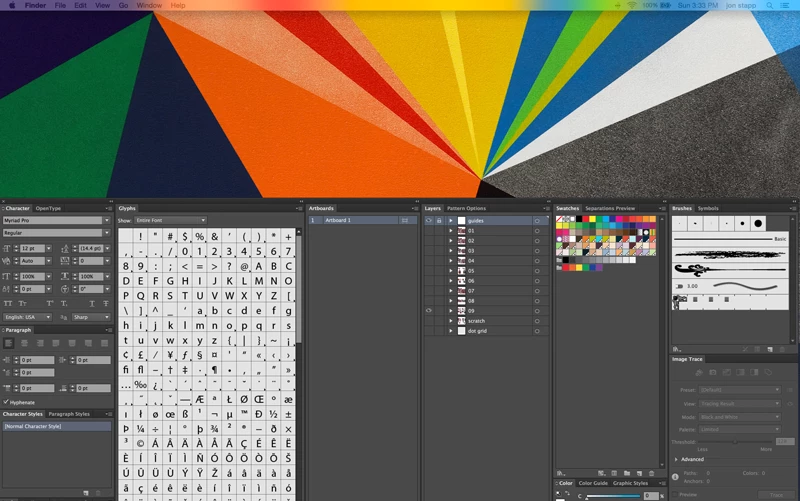
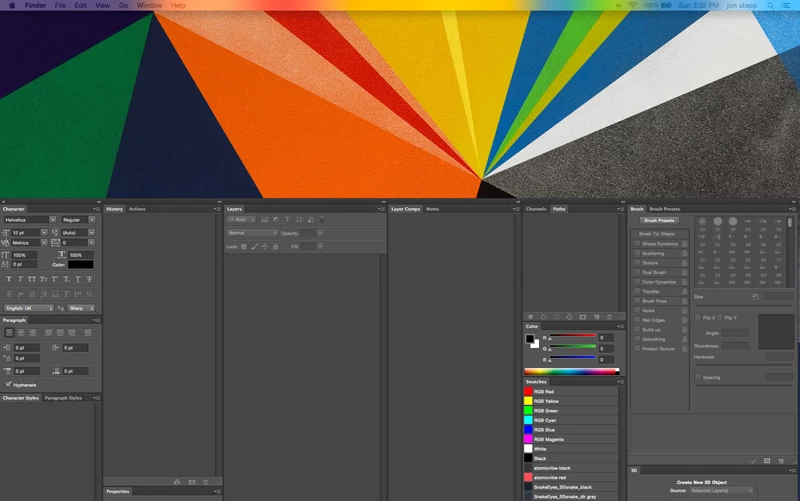
Any attempt to snap them back to their original position is futile, because they always snap back to this mid-screen position when either switching back and forth between applications, or whenever I try to use any of those panels. It's frustrating because I can't make them stay put!

I tried restarting my Mac, and then tried a hard shutdown and restart. Issue persisted. I then thought my Adobe prefs might be corrupt, so I trashed the prefs files for both applications. That didn't fix it, either. I then tried renaming my custom workspaces. That didn't work. I also tried deleting my custom workspaces, and then rebuilding them from scratch, and the problem still persists.

So, I called Apple, since this issue arose directly after this Yosemite update, and after a two-hour call — during which we zapped PRAM, and repaired the disk in safe boot mode — and after consultation with a senior advisor, the tech's only advice was to reach out to Adobe, since *technically* this is an issue happening from within an Adobe application.

Of course, Adobe does not support non CC-related software by phone or email, so, here I am.

So... has anyone come across this issue? TBH, I'm convinced something happened during the Yosemite update, since both apps were left open — AND my Yosemite experience has been nothing but frustrating ever since I bought my MBP.

Aside from reinstalling CS6 (which I feel like I might have to do at this point), any help you guys could give me would be most appreciated.

This topic has been closed for replies.

13 replies

Known Participant
October 28, 2015

OK, so it seems Apple has released their new OS, El Capitan (<--WTF), and after reading a review of it and its copious bugs, I'm sure as hell not updating yet.

As a matter of fact, considering all the problems I was having with Adobe products, I stayed with Yosemite 10.10.1 (which was always working for me) and I have yet to update to Yosemite 10.10.5.

Can anyone who has been following this saga tell me if these original compatibility issues with Adobe apps are persistent in Yosemite 10.10.5? I don't want to get too far behind current OS updates.

Participant
May 18, 2015

Just change your display settings to 1680 x 1050 - fixes the problem every time.

Participant
March 13, 2015

I had the same issue with Illustrator CC after this update.

And when I restored backup with Yosemite 10.10.1 the problem was resolved.

Participant
March 11, 2015

Chipping in - I'd managed to "work around" this by ignoring and constantly switching workspaces until it began behaving.

As of this week, also on a dual screen (thunderbolt MacBook Air) it's become nearly unusable, dragging and scaling doesn't conform to the location of the cursor (quite often working inverted, scale up and to the right, it scales down and to the left), save Dialogs appearing off screen, bounding boxes not having handles. It's a pretty shoddy batch of releases recently.

It really has become unstable to the point of not working anymore.

Well done Adobe. Slow clap.

Larry G. Schneider
Community Expert
Community Expert
March 11, 2015

The problem is not from something Adobe did but from the 10.10.2 update from Apple. Take it up with them.

Participant
March 13, 2015

That is not true, Larry. Adobe makes their product to be sold/used on the mac os. If Apple changed something, it would be Adobe's task to adapt. It is simply not even logical that an Operating System needs to adapt to a Program. This will be fixed by Adobe, they even said that their products are "beta" for Yosemite. The thing I am aggravated about is that it is taking so darn long. Fingers crossed, hoping for a bit more speed in resolving this issue.

Btw: The Photoshop & Edge teams are on the ball. No problems there. It seems that InDesign, Illutrator & Flash are sleeping on this one.

Edit: added last comment

Tim_E-Macman
Participant
March 11, 2015

Same thing happening, dual monitors and my panels would jump half way down the screen after updating to 10.10.2, and resetting the custom workspace just makes them all disappear?!

I tried switching the displays (dragging the white box in system prefs - displays - arrangement, from one to the other), then I mirrored them - on/off, and then in display I changed the resolution from - Default for display to - Scaled, and that seems to have fixed it, they jump very slightly away from the top of the screen when I start up the app but at least its not half way down the screen

Participant
February 25, 2015

I'm having this problem too, it's awful! This setup has been working for me for so long with a 2014 Macbook Pro and Adobe CC. Then I just noticed this week that this behavior kicked in (I didn't connect to my Cinema Display for the previous week and a half, so the update could have occurred in that time frame).

I'm so glad to finally have found people who are experiencing a similar problem.

It seems like switching the white bar over to the Cinema Display is finally allowing me to use my Adobe apps without the window snapping down out of place. It messed with my workflow a tiny bit, but I'm just excited to have the functionality back.

Is this something Adobe intends to fix? I have noticed the problem only in Adobe apps so far. I'm glad to have a duct tape solution, but the behavior is still not optimal behavior, so I'm hoping they'll patch this up.

Participant
February 25, 2015

Moving the menu bar doesn't entirely fix this issue...and it's not altogether Adobe's bug as much as it's the v10.10.2 OS update. The only sure-fire fix is to back-grade to OS X 10.10.1...until of course Apple fixes what apparently is a retina display driver bug. Sorry for the bummer news.

Participating Frequently
February 26, 2015

Yes, unfortunately some functions of the panels are not working, like Right-clicking panel-items or weird behavior when scrolling inside a panel (Dreamweaver CC). When expanding a panel, error gets even worse...

LaBigDogs
Participating Frequently
February 20, 2015

More info just released.... Apple will fix your older MacBook Pro's video problems for free 

I have an appt at the Apple store to have mine looked at this Sunday 22nd Feb 15

I will post the findings here.

Mark

Participating Frequently
February 10, 2015

I had this happening on dual monitors. Every time I would click one of the page spreads in indesign, ALL of my palettes would jump halfway down the screen.

I fixed it by unchecking "Displays have separate Spaces" from the Mission Control panel in System Preferences.

Hope this helps someone.

LaBigDogs
Participating Frequently
February 11, 2015

Thanks,

Back up and running.... working great!

You guys Rock....

LaBigDogs
Participating Frequently
February 4, 2015

I had the exact same problem with CS6 after 10.10.2 upgrade.  I use my MBP and Thunderbolt display, Workaround, I change the arrangement where the top of the Macbook and the top of the Thunderbolt match and it works. (but not how I like it... but it's a workaround until......)  It has also affected my Wacom Pro Intous, in LR5 it will not allow the pen to move above, at the same upper position that CS6 get stuck in.  Does anyone know is CC has this issue?

Mark

erichn42422257
Participant
February 4, 2015

I tried to install CC just to see if didn't have the issue - but it did. I also had the problem of apple automatically updating to 10.10.2 shortly after I had restored due to me forgetting about automatic updates - - -

my current setup (15" rmbp + 24" Dell 4k display) leaves me with 2 solutions :

1) work in clamshell mode with the rmbp closed which appears to avoid the issues or

2) do as mentioned in the previous comment and in the 'Displays' section of system preferences, move the 'menu bar' to the external display making it the 'main display' which also has seemed to avoid the issue as well.

It appears the issue mainly arised when i was moving CS6 applications to my external display - while the 2 solutions above have seemed to solve the problem for now. Reporting a bug with Apple is also something everyone should do to ensure this is looked into.

Known Participant
February 4, 2015

@

Apple doesn't want to hear it.

When my system once again auto updated yesterday, and my Adobe experience reverted to frustration, I called Apple to report the bug. Despite clear evidence that 10.10.2 directly negatively affects the behavior of Adobe products, they once again tried to pass this off as an Adobe issue. The response I got was basically, "Apple is moving forward, and it's the responsibility of third party software companies like Adobe to be on board."

While I feel like this is a very absolutist standpoint — especially considering how buggy Yosemite has been since its launch — maybe there's some validity to it, considering these bugs are also apparent in CC.

Maybe Adobe can issue out some sort of patch...? And not just for CC.

Participating Frequently
February 3, 2015

Mirroring then unmirroring your displays seems to fix the issue temporarily. You'll need to then drag your palettes back to their proper display, and you'll need to do this each time you launch CS apps. Serious OS bug, serious pain.

Known Participant
February 3, 2015

‌ARRRRRRRGGGGHHH!!!

MY computer auto updated to 10.10.2 AGAIN last night! And once again, this update caused erratic behavior in my CS apps.

So, the first thing I did was to go to System Preferences > App Store, and turn off auto updates.

Then I figured I could repeat the steps I took yesterday, and restore my system back to 10.10.1. I went into recovery mode and reinstalled OS X. Much to my chagrin, it reinstalled to 10.10.2. Seems that while I was able to go back to 10.10.1 yesterday through recovery mode, I must've been in a very narrow window of availability for this version of Yosemite. It's now no longer possible to go back to 10.10.1 via recovery mode.

SOoooooooo, my only two options now are to recover from my last Time Machine backup (thank god I did this yesterday while I was happily back in 10.10.1), or to do Internet Recovery, which restores the Mac OS to what was originally installed on the machine at purchase.

I chose to recover from my last Time Machine backup, since doing it through Internet Recovery would put me at Yosemite 10.10, and I had a LOT of wifi problems with that one.

So far, I'm 5 hrs into my Time Machine restore, with about 45 mins. to go. I'm praying this works.