ulrickMzgn
Known Participant
January 20, 2020
Answered

Drawing a circle segment by script.

  • January 20, 2020
  • 10 replies
  • 6165 views

Hey there,

how would you guys set up an illustrator script that can draw circle segments (like in a pie chart)?
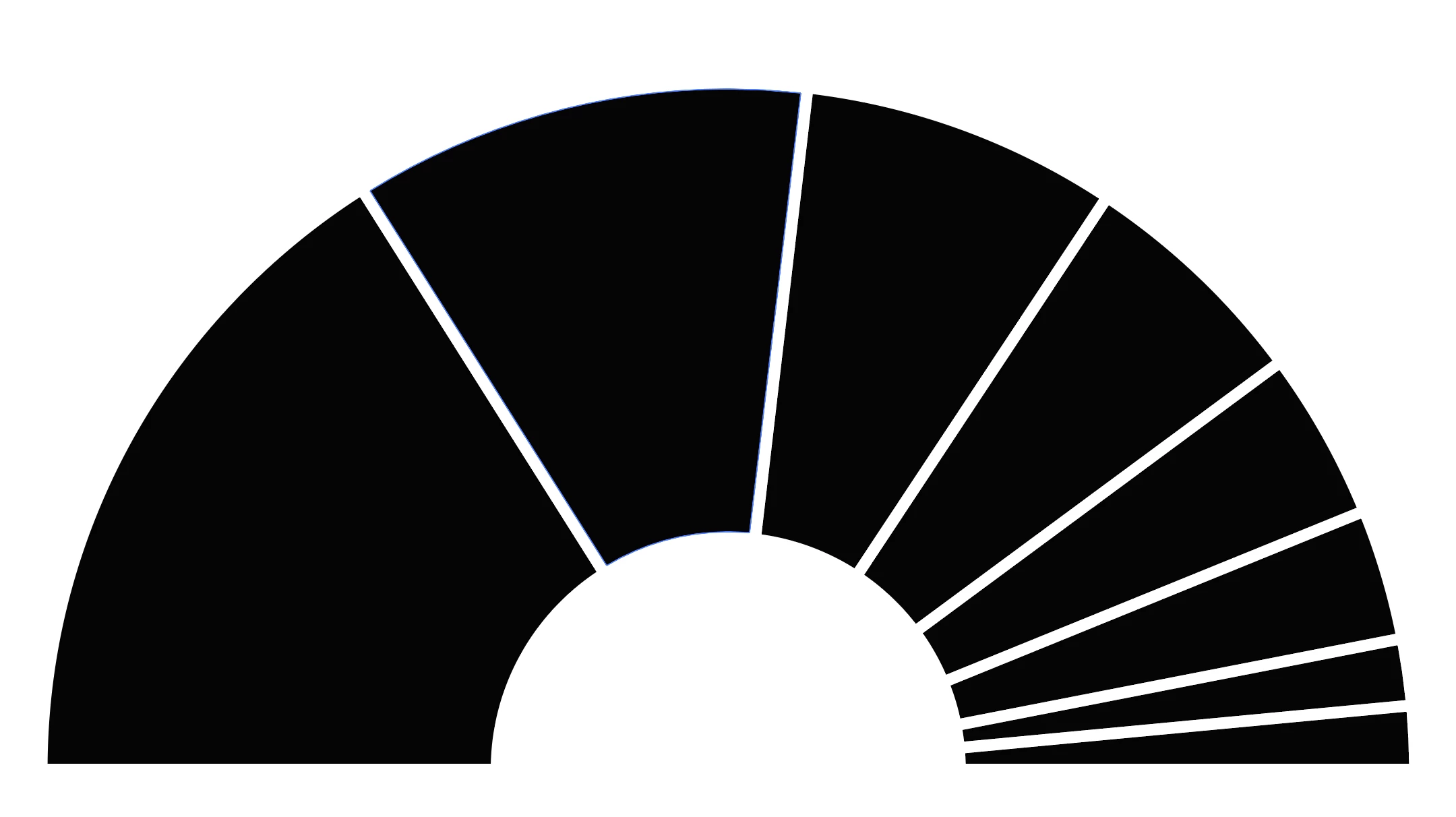
Thank you very much!

u

This topic has been closed for replies.
Correct answer Ten A

Here is an example code of creates sector.
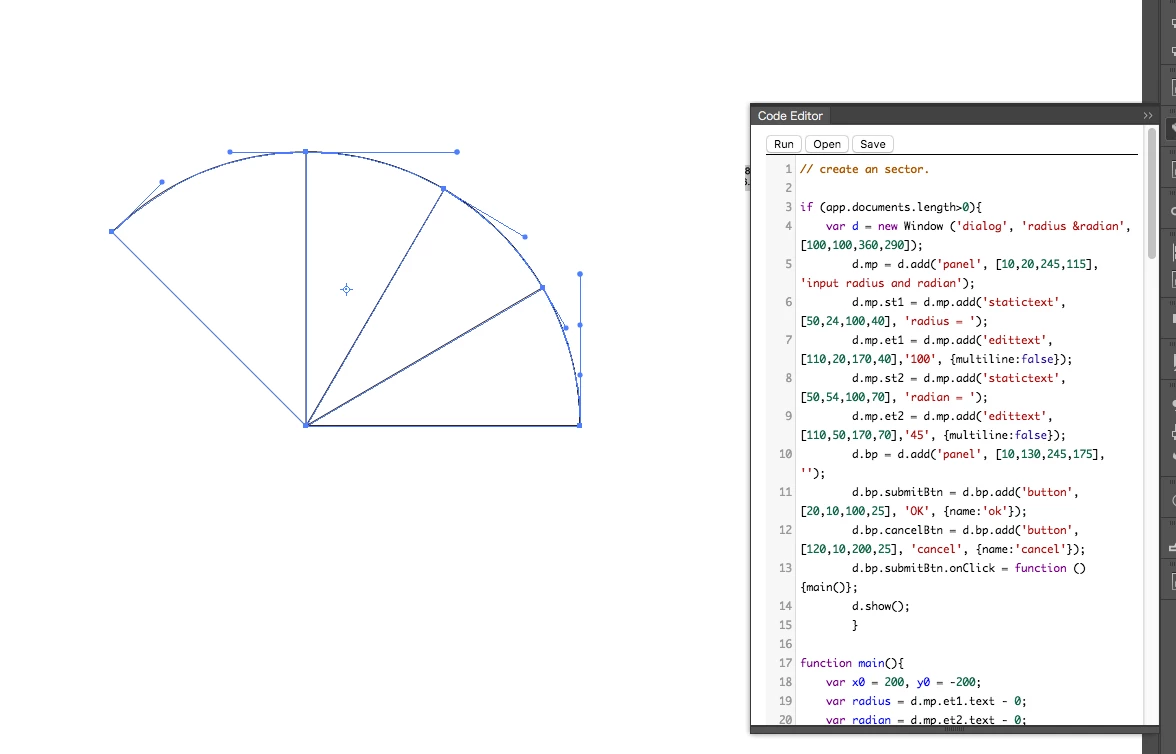
 

// create an sector.

if (app.documents.length>0){
	var d = new Window ('dialog', 'radius &radian', [100,100,360,290]);
		d.mp = d.add('panel', [10,20,245,115], 'input radius and degree');
		d.mp.st1 = d.mp.add('statictext', [50,24,100,40], 'degree = ');
		d.mp.et1 = d.mp.add('edittext', [110,20,170,40],'100', {multiline:false});
		d.mp.st2 = d.mp.add('statictext', [50,54,100,70], 'degree = ');
		d.mp.et2 = d.mp.add('edittext', [110,50,170,70],'45', {multiline:false});
		d.bp = d.add('panel', [10,130,245,175], ''); 
		d.bp.submitBtn = d.bp.add('button', [20,10,100,25], 'OK', {name:'ok'});
		d.bp.cancelBtn = d.bp.add('button', [120,10,200,25], 'cancel', {name:'cancel'});
		d.bp.submitBtn.onClick = function (){main()};
		d.show();
		}

function main(){
	var x0 = 200, y0 = -200;
	var radius = d.mp.et1.text - 0;
	var radian = d.mp.et2.text - 0;
	d.close();
	if (radian>180) alert("We support 0 to 180 degree.");
	var lnColor = new GrayColor;
	lnColor.gray = 100;
	
	var ln = app.activeDocument.pathItems.add();
	ln.stroke = true;
	ln.strokeColor = lnColor;
	ln.strokeWidth = 0.3;
	ln.filled =false;

	var pt0 = ln.pathPoints.add()
	pt0.anchor = Array(x0+radius, y0);
	pt0.rightDirection = Array(x0+radius, y0+(Math.sqrt (2)-1)/3*4*radius);
	var pt1 = ln.pathPoints.add();
	pt1.anchor = Array(x0, y0+radius);
	pt1.leftDirection = Array(x0+(Math.sqrt (2)-1)/3*4*radius, y0+radius);
	if (90<radian&&radian<=180) {
		pt1.rightDirection = Array(x0-(Math.sqrt (2)-1)/3*4*radius, y0+radius);
		var pt2 = ln.pathPoints.add();
		pt2.anchor = Array(x0-radius, y0);
		pt2.leftDirection = Array(x0-radius, y0+(Math.sqrt (2)-1)/3*4*radius);
		}
	if (radian<=90) {
		if (radian<90) mvPath(pt0, pt1, radian/90);
		pt0.leftDirection = pt0.anchor;
		pt1.rightDirection = pt1.anchor;
		var p2 = ln.pathPoints.add();
		p2.anchor = Array(x0, y0);
		p2.leftDirection = p2.anchor;
		p2.rightDirection = p2.anchor;
		ln.closed = true;
		} else if (90<radian&&radian<=180){
			if (radian<180) mvPath(pt1, pt2, (radian-90)/90);
			pt0.leftDirection = pt0.anchor;
			pt2.rightDirection = pt2.anchor;
			var p3 = ln.pathPoints.add();
			p3.anchor = Array(x0, y0);
			p3.leftDirection = p3.anchor;
			p3.rightDirection = p3.anchor;
			ln.closed = true;			
			}
	}

function mvPath(p0,p1,ratio){
	var pt = new Array();
	var nwPt = new Array();

	pt[0] = p0.anchor;
	pt[1] = p0.rightDirection;
	pt[2] = p1.leftDirection;
	pt[3] = p1.anchor;
		
	p0.rightDirection = linearSprit(pt[0], pt[1], ratio);
	p1.anchor = nwAnchor (pt[0], pt[1], pt[2], pt[3], ratio);
	p1.leftDirection = nwDirection (pt[0], pt[1], pt[2], ratio);
	return true;
	}

function linearSprit (p0, p1, t) { //linear bezier
	var dirPt = new Array();
	for (i=0;i<2;i++){
		dirPt[i] = p1[i] * t + p0[i] * (1 - t);
		}
	return dirPt;
	}

function nwDirection(p0, p1, p2, t){ //quadratic bezier
	var dirPt = new Array()
	for (i=0;i<2;i++){
		dirPt[i] = (Math.pow ((1 - t), 2) )* p0[i]
					+ 2 * (1 - t) * t * p1[i] 
					+ t * t * p2[i] ;
		}
	return dirPt;
	}

function nwAnchor(p0,p1,p2,p3, t){ //cublic bezier
	var spPt = new Array()
	for (i=0;i<2;i++){
		spPt[i] = (Math.pow ((1 - t), 3)) * p0[i]
					+ 3 * (Math.pow ((1 - t), 2)) * t * p1[i]
					+ 3 * (Math.pow (t, 2)) * (1 - t) * p2[i] 
					+ Math.pow (t, 3) * p3[i] ;
		}
	return spPt;
	}


10 replies

CarlosCanto
Community Expert
Community Expert
March 10, 2020

ExtendScript is not supported on mac anymore, but the script should run. Is he getting any error messages?

ulrickMzgn
Known Participant
March 10, 2020

I wrote the entire script on a mac 😉 But no, he's not getting any error messages. Thats the reason why we wanted to install est. So we can debug. 


We found a estk on github. Now we have a error message: "Cannot run script in target engine "Main" #1116" (Roughly translated from german)

ulrickMzgn
Known Participant
March 11, 2020

We did not find a solution to fix ESTK. But we found the original problem with the script: It was the fonts. Needed to install the right ones and weverything was working fine. Thanx all...

ulrickMzgn
Known Participant
March 10, 2020

Hey all!

my coworker wanted to follow along with my script. Two fiunny things: The script, thats working fine on my machine is not doing anything on his mac. Second: We wanted to install extendscript toolkit on his mac. We can't find the software neither in the CC-app nor on adobe.com. Any hints?

Ten A
Community Expert
Ten ACommunity ExpertCorrect answer
Community Expert
February 28, 2020

Here is an example code of creates sector.


// create an sector.

if (app.documents.length>0){
	var d = new Window ('dialog', 'radius &radian', [100,100,360,290]);
		d.mp = d.add('panel', [10,20,245,115], 'input radius and degree');
		d.mp.st1 = d.mp.add('statictext', [50,24,100,40], 'degree = ');
		d.mp.et1 = d.mp.add('edittext', [110,20,170,40],'100', {multiline:false});
		d.mp.st2 = d.mp.add('statictext', [50,54,100,70], 'degree = ');
		d.mp.et2 = d.mp.add('edittext', [110,50,170,70],'45', {multiline:false});
		d.bp = d.add('panel', [10,130,245,175], ''); 
		d.bp.submitBtn = d.bp.add('button', [20,10,100,25], 'OK', {name:'ok'});
		d.bp.cancelBtn = d.bp.add('button', [120,10,200,25], 'cancel', {name:'cancel'});
		d.bp.submitBtn.onClick = function (){main()};
		d.show();
		}

function main(){
	var x0 = 200, y0 = -200;
	var radius = d.mp.et1.text - 0;
	var radian = d.mp.et2.text - 0;
	d.close();
	if (radian>180) alert("We support 0 to 180 degree.");
	var lnColor = new GrayColor;
	lnColor.gray = 100;
	
	var ln = app.activeDocument.pathItems.add();
	ln.stroke = true;
	ln.strokeColor = lnColor;
	ln.strokeWidth = 0.3;
	ln.filled =false;

	var pt0 = ln.pathPoints.add()
	pt0.anchor = Array(x0+radius, y0);
	pt0.rightDirection = Array(x0+radius, y0+(Math.sqrt (2)-1)/3*4*radius);
	var pt1 = ln.pathPoints.add();
	pt1.anchor = Array(x0, y0+radius);
	pt1.leftDirection = Array(x0+(Math.sqrt (2)-1)/3*4*radius, y0+radius);
	if (90<radian&&radian<=180) {
		pt1.rightDirection = Array(x0-(Math.sqrt (2)-1)/3*4*radius, y0+radius);
		var pt2 = ln.pathPoints.add();
		pt2.anchor = Array(x0-radius, y0);
		pt2.leftDirection = Array(x0-radius, y0+(Math.sqrt (2)-1)/3*4*radius);
		}
	if (radian<=90) {
		if (radian<90) mvPath(pt0, pt1, radian/90);
		pt0.leftDirection = pt0.anchor;
		pt1.rightDirection = pt1.anchor;
		var p2 = ln.pathPoints.add();
		p2.anchor = Array(x0, y0);
		p2.leftDirection = p2.anchor;
		p2.rightDirection = p2.anchor;
		ln.closed = true;
		} else if (90<radian&&radian<=180){
			if (radian<180) mvPath(pt1, pt2, (radian-90)/90);
			pt0.leftDirection = pt0.anchor;
			pt2.rightDirection = pt2.anchor;
			var p3 = ln.pathPoints.add();
			p3.anchor = Array(x0, y0);
			p3.leftDirection = p3.anchor;
			p3.rightDirection = p3.anchor;
			ln.closed = true;			
			}
	}

function mvPath(p0,p1,ratio){
	var pt = new Array();
	var nwPt = new Array();

	pt[0] = p0.anchor;
	pt[1] = p0.rightDirection;
	pt[2] = p1.leftDirection;
	pt[3] = p1.anchor;
		
	p0.rightDirection = linearSprit(pt[0], pt[1], ratio);
	p1.anchor = nwAnchor (pt[0], pt[1], pt[2], pt[3], ratio);
	p1.leftDirection = nwDirection (pt[0], pt[1], pt[2], ratio);
	return true;
	}

function linearSprit (p0, p1, t) { //linear bezier
	var dirPt = new Array();
	for (i=0;i<2;i++){
		dirPt[i] = p1[i] * t + p0[i] * (1 - t);
		}
	return dirPt;
	}

function nwDirection(p0, p1, p2, t){ //quadratic bezier
	var dirPt = new Array()
	for (i=0;i<2;i++){
		dirPt[i] = (Math.pow ((1 - t), 2) )* p0[i]
					+ 2 * (1 - t) * t * p1[i] 
					+ t * t * p2[i] ;
		}
	return dirPt;
	}

function nwAnchor(p0,p1,p2,p3, t){ //cublic bezier
	var spPt = new Array()
	for (i=0;i<2;i++){
		spPt[i] = (Math.pow ((1 - t), 3)) * p0[i]
					+ 3 * (Math.pow ((1 - t), 2)) * t * p1[i]
					+ 3 * (Math.pow (t, 2)) * (1 - t) * p2[i] 
					+ Math.pow (t, 3) * p3[i] ;
		}
	return spPt;
	}


ulrickMzgn
Known Participant
February 28, 2020

Wow! Thank you very much. I think I'll leave it like I have it now (because time). But this is gold for future projects...

ulrickMzgn
Known Participant
February 28, 2020

So guys... Thank you so much. You saved my A double S with "app.executeMenuCommand". Unbelievable I could live without this before. Here's the JSON to pie chart tool I came up with:

Go get the json.js and a .json-file with something like:

{
    "party": [
        {
            "name": "XXX",
            "colorvalue": "e3000f",
            "result": "28.52"
        },
        {
            "name": "YYY",
            "colorvalue": "000000",
            "result": "27.64"
        },
        {
            "name": "ZZZ",
            "colorvalue": "707070",
            "result": "13.93"
        },
        {
            "name": "AAA",
            "colorvalue": "46962b",
            "result": "10.69"
        },
        {
            "name": "BBB",
            "colorvalue": "d8d8d8",
            "result": "6.38"
        },
        {
            "name": "FFF",
            "colorvalue": "c8c8c8",
            "result": "5.89"
        },
        {
            "name": "DDD",
            "colorvalue": "c8c8c8",
            "result": "5.57"
        },
        {
            "name": "LLL",
            "colorvalue": "808080",
            "result": "1.38"
        }
    ]
}

 And then use this:

#include "json2.js";
// global vars
var file = new File;
var sourceFolder = new Folder;
var destFolder = new Folder;
var fldr = "";
var check = 0;
var check2 = 0;
var JSONfiles = new Array();
var elements = new Array();
var mm2pt = 2.834645;
var www = 82 * mm2pt;
var hhh = 55 * mm2pt;
var rrr = 50 * mm2pt;
var ttt = 25 * mm2pt;
var thisDoc;
/////////////////testfile
testFile = new File("/Users/Ulrich.Einweg/Documents/uliProjects/PNP_Wahlgrafiken/02_txt/data.json");
testData = readJSON(testFile);
setLayout(testData);
/////////////////
function readJSON(fil) {
    fil.open("r");
    var jsonString = fil.read();
    fil.close();
    try{
        var myJSON = JSON.parse(jsonString);
    } catch(e){
        alert("ERROR: " + fil.name + "\n" + e);
    }
    return myJSON;
}

function setLayout(myData){
    //_____________get graph parameters
    var oParties = myData.party;
	//_____________new Document and set width and height:
	thisDoc = app.documents.add(DocumentColorSpace.CMYK, www, hhh);
    //_____________new grey default color
    thisDoc.defaultFilled = true;
    thisDoc.defaultStroked = false;
    var newRGBColor = new RGBColor();
    newRGBColor.red = 200;
    newRGBColor.green = 240;
    newRGBColor.blue = 240;
    thisDoc.defaultFillColor = newRGBColor;
    //_____________draw background:
    var bg = thisDoc.pathItems.rectangle(hhh, 0, www, hhh);
 
	drawPieChart(oParties);
		
    redraw();
}

function drawPieChart(parties){
	
    var barCount = parties.length;
    var currentAngle = 0;
    
    for (i = 0; i<barCount; i += 1){
        var currentParty = parties[i];
        
        var col = hexToRgb ("#" + parties[i].colorvalue);
    	var newRGBColor = new RGBColor();
    	newRGBColor.red = col.r;
    	newRGBColor.green = col.g;
    	newRGBColor.blue = col.b;
    	thisDoc.defaultFilled = true;
    	thisDoc.defaultFillColor = newRGBColor;
    	thisDoc.defaultStroked = false;
    	var outerCircle = thisDoc.pathItems.ellipse((hhh + rrr)/2, www/2 - (rrr)/2, (rrr), (rrr));
    	
    	var col = hexToRgb ("#aabbcc");
    	var newRGBColor = new RGBColor();
    	newRGBColor.red = col.r;
    	newRGBColor.green = col.g;
    	newRGBColor.blue = col.b;
    	thisDoc.defaultFilled = true;
    	thisDoc.defaultFillColor = newRGBColor;
    	thisDoc.defaultStroked = false;
    	var innerCircle = thisDoc.pathItems.ellipse((hhh + (rrr-ttt))/2, www/2 - (rrr-ttt)/2, (rrr-ttt), (rrr-ttt));
    	
    	innerCircle.selected = true;
    	outerCircle.selected = true;
    	
    	app.executeMenuCommand("group");
    	app.executeMenuCommand("Live Pathfinder Subtract");
    	app.executeMenuCommand("expandStyle");
    	
    	var ring = thisDoc.selection[0];
        thisDoc.selection = null;
        
        var shape = thisDoc.pathItems.add();
        var pathPoints = new Array();
        pathPoints.push([www/2, hhh/2]);
        pathPoints.push(calculatePointOnSquare(rrr/2, currentAngle, www/2, hhh/2));
        var newAngle = currentAngle + Number(currentParty.result)/100*360;
        if(newAngle > 360){
            newAngle = 360;
        }
        if(currentAngle < 45 && newAngle > 45){
            pathPoints.push(calculatePointOnSquare(rrr/2, 45, www/2, hhh/2));
        }
        if(currentAngle < 135 && newAngle > 135){
            pathPoints.push(calculatePointOnSquare(rrr/2, 135, www/2, hhh/2));
        }
        if(currentAngle < 225 && newAngle > 225){
            pathPoints.push(calculatePointOnSquare(rrr/2, 225, www/2, hhh/2));
        }
        if(currentAngle < 315 && newAngle > 315){
            pathPoints.push(calculatePointOnSquare(rrr/2, 315, www/2, hhh/2));
        }
        
        currentAngle = newAngle;
        pathPoints.push(calculatePointOnSquare(rrr/2, currentAngle, www/2, hhh/2));
        shape.setEntirePath(pathPoints);
        shape.closed = true;
        shape.filled = true;
        shape.stroked = false;
        var col = hexToRgb ("#" + parties[i].colorvalue);
    	var newRGBColor = new RGBColor();
    	newRGBColor.red = col.r;
    	newRGBColor.green = col.g;
    	newRGBColor.blue = col.b;
    	shape.fillColor = newRGBColor;
    	
    	shape.selected = true;
    	ring.selected = true;
    	
     	app.executeMenuCommand("makeMask");
    	app.executeMenuCommand("Live Pathfinder Crop");
    	app.executeMenuCommand("expandStyle");
    	app.executeMenuCommand("ungroup");
    	
    	var element = thisDoc.selection[0];
    	elements.push(element);
    	
    	thisDoc.selection = null;
    }
	
	redraw();
	
	var strokeRGBColor = new RGBColor();
	strokeRGBColor.red = 255;
	strokeRGBColor.green = 255;
	strokeRGBColor.blue = 255;
	
	for (i = 0; i<elements.length; i += 1){
	    element = elements[i];
	    element.selected = true;
        element.stroked = true;
        element.strokeColor = strokeRGBColor;
        element.strokeWidth = 1;
    }
    
    app.executeMenuCommand("group");
    
    var chartGroup = thisDoc.selection[0];
    if(chartGroup){
        m  = app.getScaleMatrix(100,-100);
        chartGroup.transform(m);
        chartGroup.rotate(180);	
    }
    var aaa = -90;
     for (i = 0; i<barCount; i += 1){
        var currentParty = parties[i];
        
    	var dotRGBColor = new RGBColor();
    	dotRGBColor.red = 0;
    	dotRGBColor.green = 0;
    	dotRGBColor.blue = 0;

        aaa += Number(currentParty.result)/200*360;
        var point = calculatePointOnCircle((rrr - ttt/2)/2, aaa, www/2, hhh/2);
        aaa += Number(currentParty.result)/200*360;
        var dot;
        if(point[0] < www/2-5){
            dot = thisDoc.pathItems.rectangle(point[1] , 2*mm2pt, point[0] - 2*mm2pt, 0.2);
        } else {
            dot = thisDoc.pathItems.rectangle(point[1] , point[0], www - point[0] - 2*mm2pt, 0.2);
        }
        dot.stroked = false;
        dot.filled = true;
        dot.fillColor = dotRGBColor;
     }
    
	redraw();
	
}

function calculatePointOnCircle(r, angleInDegrees, startX, startY){
    var xxx = 0.0;
    var yyy = 0.0;
    var angle = (angleInDegrees % 360) * Math.PI /180;
    xxx = r * Math.sin(angle);
    yyy = r * Math.cos(angle);
    
    return [xxx+startX, yyy+startY];
}

function calculatePointOnSquare(r, angleInDegrees, startX, startY){
    var xxx = 0.0;
    var yyy = 0.0;

    var angle = (angleInDegrees % 360) * Math.PI /180;
    
    angleModPiOverTwo = angle % (Math.PI/4);

    if (angle >= 0 && angle < Math.PI / 4){
        xxx = r;
        yyy = r * Math.tan(angle);
    } else if (angle >= Math.PI / 4 && angle < Math.PI / 2) {
        xxx = r * Math.tan(Math.PI/2 - angle);
        yyy = r;
    } else if (angle >= Math.PI / 2 && angle < 3*Math.PI/4) {
        xxx = -1 * r * Math.tan(angle % (Math.PI/4));
        yyy = r;
    } else if (angle >= 3*Math.PI/4 && angle < Math.PI) {
        xxx = -1 * r;
        yyy = r * Math.tan(Math.PI - angle);
    }  else if (angle >= Math.PI && angle < 5*Math.PI/4) {
        xxx = -1 * r;
        yyy = -1 * r * Math.tan(angle % (Math.PI/4));
    } else if (angle >= 5*Math.PI/4 && angle < 3*Math.PI/2) {
        xxx = -1 * r * Math.tan(3*Math.PI/2 - angle);
        yyy = -1 * r;
    } else if (angle >= 3*Math.PI/2 && angle < 7*Math.PI/4) {
        xxx = r * Math.tan(angle % (Math.PI/4));
        yyy = -1 * r;
    } else {
        xxx = r;
        yyy = -1 * r * Math.tan(2 * Math.PI - angle);
    }
    return [xxx+startX, yyy+startY];
}

function hexToRgb(hex) {
  var result = /^#?([a-f\d]{2})([a-f\d]{2})([a-f\d]{2})$/i.exec(hex);
  return result ? {
    r: parseInt(result[1], 16),
    g: parseInt(result[2], 16),
    b: parseInt(result[3], 16)
  } : null;
}

function HSVtoRGB(h, s, v) {
    var r, g, b, i, f, p, q, t;
    if (arguments.length === 1) {
        s = h.s, v = h.v, h = h.h;
    }
    i = Math.floor(h * 6);
    f = h * 6 - i;
    p = v * (1 - s);
    q = v * (1 - f * s);
    t = v * (1 - (1 - f) * s);
    switch (i % 6) {
        case 0: r = v, g = t, b = p; break;
        case 1: r = q, g = v, b = p; break;
        case 2: r = p, g = v, b = t; break;
        case 3: r = p, g = q, b = v; break;
        case 4: r = t, g = p, b = v; break;
        case 5: r = v, g = p, b = q; break;
    }
    return {
        red: Math.round(r * 255),
        green: Math.round(g * 255),
        blue: Math.round(b * 255)
    };
}

Now I just have to do the text. And then I'll make it loop through a selectable folder and ouput everything to PDF.

So thx again,

Uli

CarlosCanto
Community Expert
Community Expert
February 28, 2020

why can't you recolor the pie slices? you have done everything perfectly so far. Great Job!!


ulrickMzgn
Known Participant
February 28, 2020

Hey Carlos,

I can recolor the slices. But I don't know which piece is which, because they are all ordered randomly each time you run the script. But I found a solution, will post it later...


PS: Dou you guys have the same problem on this page when you click on "reply", the button disappears but no edit field appears? Have to restart my browser and go to this page from the start page. Then it works...

ulrickMzgn
Known Participant
February 27, 2020

Hey all,

I tried your approach and at first it looked very promising.

https://drive.google.com/open?id=1St5glLK2msPsuQFewJJ-wMaSxPhads1W

(You probably have to set the path to data.json to an absolute value)


The only problem I have is, that I can't reference the single slices (for coloring):

function drawPieChart(parties){
	
    var barCount = parties.length;
    
	var col = hexToRgb ("#" + parties[0].colorvalue);
	var newRGBColor = new RGBColor();
	newRGBColor.red = col.r;
	newRGBColor.green = col.g;
	newRGBColor.blue = col.b;
	thisDoc.defaultFilled = true;
	thisDoc.defaultFillColor = newRGBColor;
	thisDoc.defaultStroked = false;
	var outerCircle = thisDoc.pathItems.ellipse((hhh + rrr)/2, www/2 - (rrr)/2, (rrr), (rrr));
	
	var col = hexToRgb ("#aabbcc");
	var newRGBColor = new RGBColor();
	newRGBColor.red = col.r;
	newRGBColor.green = col.g;
	newRGBColor.blue = col.b;
	thisDoc.defaultFilled = true;
	thisDoc.defaultFillColor = newRGBColor;
	thisDoc.defaultStroked = false;
	var innerCircle = thisDoc.pathItems.ellipse((hhh + (rrr-ttt))/2, www/2 - (rrr-ttt)/2, (rrr-ttt), (rrr-ttt));
	
	var col = hexToRgb ("#116633");
	var newRGBColor = new RGBColor();
	newRGBColor.red = col.r;
	newRGBColor.green = col.g;
	newRGBColor.blue = col.b;
	thisDoc.defaultFilled = true;
	thisDoc.defaultFillColor = newRGBColor;
	thisDoc.defaultStroked = false;
	var cutters = new Array();
	var currentAngle = 0;
	
	 for (i = 0; i<barCount; i += 1){
    		var currentParty = parties[i];
    		currentAngle += Number(currentParty.result)/100*360;
			var cutter = thisDoc.pathItems.rectangle(hhh/2 + rrr, www/2, 1, rrr);
			cutter.rotate(-currentAngle, true, true, true, true, Transformation.BOTTOM);
			cutters.push(cutter);
    }
	
	redraw();
	
	for (i = 0; i<barCount; i += 1){
    		cutters[i].selected = true;
    }
	innerCircle.selected = true;
	
	app.executeMenuCommand("group");
	app.executeMenuCommand("Live Pathfinder Add");
	app.executeMenuCommand("expandStyle");
	
	var cutOut = thisDoc.selection[0];
	outerCircle.selected = true;
	
	app.executeMenuCommand("group");
	app.executeMenuCommand("Live Pathfinder Subtract");
	app.executeMenuCommand("expandStyle");
	app.executeMenuCommand("ungroup");
	
	var chartGroup = thisDoc.selection;
	for (i = 0; i<chartGroup.length; i++){
		chartGroup[i].name = "Item"+i;
	}
}


Then I tried something completely different: Wanted to do this with an stroke gradient:

function drawPieChartGradient(parties){
	var pieRadius = rrr - ttt/2;
	var allBars = "";
    var barCount = parties.length;
     //_____________get max value
    var maxValue = 0;
    for( i = 0; i < parties.length; i++){
           maxValue = Math.max(maxValue, parties[i].result);
    }
    
    var myPie = thisDoc.pathItems.ellipse(hhh/2 + pieRadius/2, www/2 - pieRadius/2, pieRadius, pieRadius);
    
     var newGradient = app.activeDocument.gradients.add();
	newGradient.name = "NewGradient";
	newGradient.type = GradientType.LINEAR;
  	var pieStops = newGradient.gradientStops;
  	var currentRampPoint = 0;
  	while (pieStops.length <= barCount*2){
  		pieStops.add();
  	}
	 for (i = 0; i<barCount*2; i += 2){
    		var currentParty = parties[i/2];
    		var currentStop = pieStops[i];
    		currentRampPoint = (currentRampPoint > 100)?100:currentRampPoint;
            currentStop.rampPoint = currentRampPoint;
            currentRampPoint += Number(currentParty.result);
            var col = hexToRgb ("#" + currentParty.colorvalue);
            var newRGBColor = new RGBColor();
            newRGBColor.red = col.r;
            newRGBColor.green = col.g;
            newRGBColor.blue = col.b;
            currentStop.color = newRGBColor;
            if(parties[i/2+0]){
            	var currentParty = parties[i/2+1];
    			var currentStop = pieStops[i+1];
    			currentRampPoint = (currentRampPoint > 100)?100:currentRampPoint;
            	currentStop.rampPoint = currentRampPoint;
            	currentRampPoint += 0.01;
            	currentStop.color = newRGBColor;
            }
    }


  // construct an Illustrator.GradientColor object referring to the newly created gradient
  var colorOfGradient = new GradientColor();
  colorOfGradient.gradient = newGradient;

  myPie.stroked = true;
  myPie.strokeWidth = ttt/2;
  myPie.strokeColor = colorOfGradient;
  myPie.rotate(-90);
}

But I cant set the gradient "along stroke" via script.


Anyway, I have one other idea. If that doesn't work, I'll go full "processing". Get back to you later...

Thanks so far!!

pixxxelschubser
Community Expert
Community Expert
February 26, 2020

@rcraighead,

here are all the findings of the last years (app.executeMenuCommand("String")

https://community.adobe.com/t5/illustrator/js-cs6-executemenucommand/m-p/5904747?page=1

(luckily the link is back in forum - was lost since the new forum software started)


Have fun

😉

rcraighead
Legend
February 26, 2020

@pixxxel_schubser

Thanks! In the past I had a dedicated browser tab for that post.

CarlosCanto
Community Expert
Community Expert
February 26, 2020

you can draw a pie chart via Variable Data, but it's probably more fun to build the pies from scratch.


draw a Circle, a Rectangle on top of the bottom half, then draw skinny Rectangles for pie dividers


then, Select All and apply Minus Front PathFinder


ulrickMzgn
Known Participant
February 26, 2020

Problem is, I dont see a possibility to use pathfinder within a script...

Thx anyway...

rcraighead
Legend
February 26, 2020

I use "executeMenuCommand" to script Pathfinder process:

app.executeMenuCommand("makeMask");

app.executeMenuCommand("Live Pathfinder Crop");

app.executeMenuCommand("expandStyle");

Legend
January 20, 2020

Polar Grid is under the line segment tool. You can create the grid according to your own parameters, and then merge or delete sections as needed to obtain the chart you want.

ulrickMzgn
Known Participant
January 21, 2020

Ah, than you very much! Will check how I can use this inside a script...

ulrickMzgn
Known Participant
February 26, 2020

Hi ALL again,

so aparently you cant draw either a polar grid nor a pie chart via script. Does anyone habe an idea how to draw a circle segment or an arc via script?

Thank you very much.

Legend
January 20, 2020

For this, I would use polar grid. Set segments to create the smallest one, then merge sections. 

ulrickMzgn
Known Participant
January 20, 2020

Thx. But if you are talking about warp distortion -> arc. That does not make a nice circle. If not: sorry, never heard of polar grid.