CassC1746
Participant
March 27, 2020
Answered

DXF/DWG Plug-in Download

  • March 27, 2020
  • 7 replies
  • 22684 views

I recently attempted to convert (export) a file to .dxf as I have 1000times, but the option was no longer in my drop down menu. Anywhere! I did some digging and saw to do a search under illustrator plug ins, specifically "illustrator formats".  It's not there! I did a search on my computer and it doesn't show up at all! I went to Adobe help and found the file for the updated plug in for dfx/dwg and it says to:


Installation instructions
  • Download the DFX/DWG plugin.

    • For Windows, download DxfDwg.aip.
    • For Mac OS, download AiCS3dfx.dmg.
  • Quit Illustrator CS3 if it is running.
  • Mac Only: Mount AiCS3dxf.dmg to access the DxfDwg.aip file.
  • Navigate to the "Illustrator Formats" folder in the Illustrator CS3 installation folder.

    • Default location for Windows: C:\Program Files\Adobe\Adobe Illustrator CS3\Plug-ins\Illustrator Formats
    • Default location for Mac OS: /Applications/Adobe Illustrator CS3/Plug-ins/Illustrator Formats

    Please be aware that the path names might be different on your machine if you have installed a non-English version of Illustrator CS3. In this case, please navigate to the appropriate corresponding folder.

  • Remove the existing DxfDwg.aip file from this folder and move it to another folder outside of the Illustrator application directory. Renaming the file is not sufficient as Illustrator may attempt to load the file regardless of its filename/extension.
  • Copy the new DxfDwg.aip plug-in to the Illustrator Formats folder.
  • Start Illustrator CS3.
     
     
    The only problem is, I can't find a file of the download anywhere. I feel like I'm missing something obvious, but there is no link to download!!!!? HEEEEELP!

Correct answer Vishnu Thilakan

@CassC1746 @waleed amer @BeDazzle @renél80416020 @Mike Witherell 


Illustrator Max-2023 (27.0) Update 

[Windows Update - no idea about Mac]

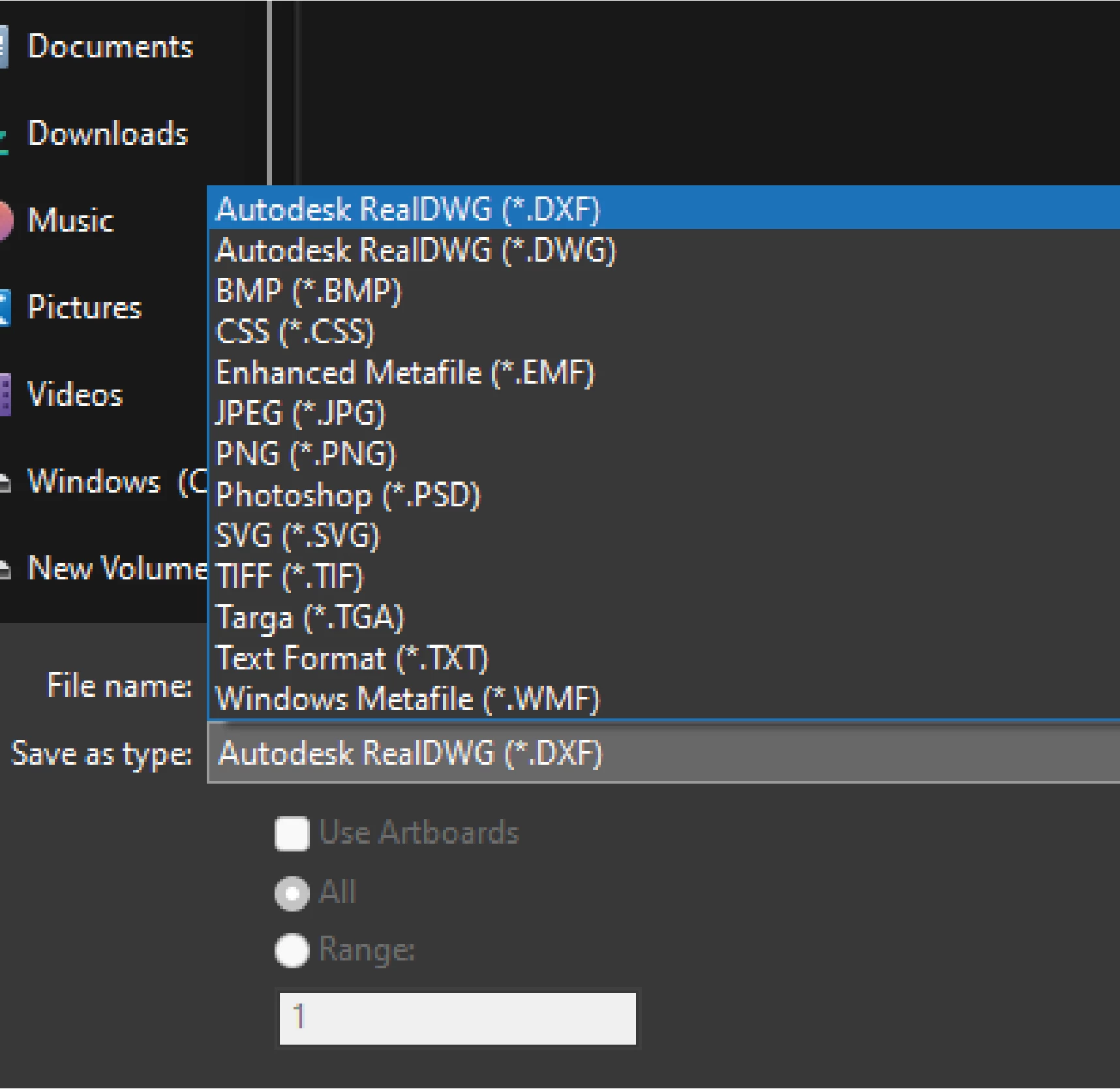
After this update you will get .dxf update in export panel. It is the first export option now.

No plug-in required.


7 replies

Participant
January 28, 2023

SOLVED:  EXPORT OPTIONS RESTORED. DXF,DWG ETC......

   My export options were very limited and did not include dxf, dwg. Everything I read everywhere claimed they should be there. I checked my creative cloud app. and read that my illustrator was up to date. I uninstalled anyway and re-installed and now I have all the save options including DWG. and DXF.

Participant
January 28, 2023

CORRECTION-  I only have the option to export dwg, dxf when I tried a small object. When I try to export the file I need to export the options are gone again, Is there an export size limit to DWG ? My artboart size is 240 inches by 96 inches. There must be , because when I copy and paste aportion of my artboard into a new document this one 61"x 96:  it now has the options again to export dwg.  DEVELOPERS - Please enlarge the area we can work in and export to dwg from. 

waleed amer
Participant
October 3, 2022

how to export dxf from illustrator 2022

Vishnu Thilakan
Vishnu ThilakanCorrect answer
Inspiring
October 19, 2022

@CassC1746 @waleed amer @BeDazzle @renél80416020 @Mike Witherell 


Illustrator Max-2023 (27.0) Update 

[Windows Update - no idea about Mac]

After this update you will get .dxf update in export panel. It is the first export option now.

No plug-in required.


Inspiring
August 3, 2022

I think the only way to get this feature is to download an older version 25.3 which you can do from the Creative Cloud app.

Find Illustrator in the list of installed apps. Under the 3 dots on the right select Other Versions.

This worked for me.

Inspiring
September 1, 2022

The real correct answer is that Export As - DWG has been restored in Illustrator 26.5.

Don't know why it was dropped but happy to have it back.

Mike Witherell
Community Expert
Community Expert
September 8, 2021

Just wondering if it is available under the File > Scripts?

Mike Witherell
Participant
August 19, 2021

facing the same issue here 😞

marliton
Community Expert
Community Expert
September 2, 2021

Hi. Are you working in a M1 Mac? If yes, the latest Illustrator version is M1 native and it removed the DXF and DWG export option but you can run Illustrator in rosetta mode and get those options again.


Marlon Ceballos
Participant
June 9, 2021

Did you ever find the download link? I am unable to locate it either.

renél80416020
Inspiring
February 14, 2022

Bonjourn,

Celui de la version CS6

[link removed by moderator]

Il y a sans doute un autre fichier en plus...

René

Nouveau lien

https://e1.pcloud.link/publink/show?code=XZE7VLZ2By5zGlN9k71teAAP1ihJkAQ301k


Participant
May 1, 2020

I just ran into this same issue. Figured out that if you try to Save As the dropdown for DwG doesnt exist, however, if you go to File-Export it does. I am running v23.0.1