


Participant
June 17, 2017
Answered

Error -54 in Illustrator CC 2017

  • June 17, 2017
  • 11 replies
  • 44592 views

Hi,

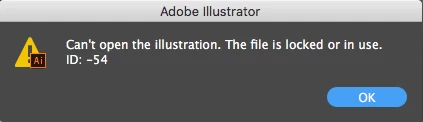
I'm getting an error message when I start up Illustrator that says: "Can't open the illustration. The file is locked or in use."  ID:-54 (pictured below)

Someone please help! I've already uninstalled and reinstalled several times.
    Correct answer 安安25097886j5u4

    I solved this problem by changing mac's system preferences.

    system preferences > security & privacy > privacy > full disk access > check adobe illustrator and photoshop

    11 replies

    christianr14605096
    Participant
    December 14, 2022

    You can dowload the file to your computer. After that you can open it normaly.

    安安25097886j5u4Correct answer
    Participant
    July 27, 2022

    I solved this problem by changing mac's system preferences.

    system preferences > security & privacy > privacy > full disk access > check adobe illustrator and photoshop

    Participant
    January 13, 2025

    Worked perfectly for the "cclibrary is damaged and can't be opened" notification that popped up with Sequoia and Photoshop.

    Participant
    June 15, 2022

    I dragged the file from the saved folder to my desktop and opened it from there... for some reason, it worked. 

    Participant
    June 14, 2022

    Just had the same issue. I was on a PC, using a PC server. Just got a Mac and had an issue with the file not being able to open. I copied it to the HD from the PC server. There was an error message about how I could not copy file ... but it copied anyway???? So ... it opened, I made a change, saved to HD .... THEN copied it to server and opened it ... no problem.

    Participant
    June 14, 2022

    OK ... problem is when I save .ai file as .pdf THEN open .ai file later ITS LOCKED AGAIN!

    Participant
    February 6, 2022

    FEB 2022. None of the rename, re dowload, move to hard drive options work and now instead of working on a project I'm spending hours trying to fix this. I love paying $800 to lose all the work I create. There is next to no help on this matter.


    Participant
    February 9, 2022

    Yes, this started up for me a couple of days ago too. It also does involve Dropbox, but the aforementioned fixes are not quite working either. A couple of times the setting them to Local has helped, but not always.

    Participant
    February 10, 2022

    Sorry to hear you are also in this situation Lisa, my original post was at peak frustration and I have since opened a after effects file with the vector I made in illustrator (that wont open) and then selected "show in finder" and I managed to get some form of the art work back but I still don't see this as acceptable in terms of supporting docs to fix this or in the error messaging (you cant even copy the error message to google as text selection on the pop up doesn't work)

    Im using western digitals home cloud duo and I'm sure that has something to do with the issue but I'm not hardware savvy so I guess ill just save local and hate that I spent money on my own storage device just to have this problem.

    Participant
    January 14, 2022

    Hi Team,

    I am facing the same issue, i have created a plugin using SDK, its simple Hellp Word sample plugin, when i try to install .AIP file inthe illustrator i am getting the same error. "Can't Open the Illustration. The file is locked or in use. ID: -54"

    i am new in the plugin developmenet, using the Xcode adn C++ for creating the plugin. please help me out to install the plgin.


    Thanks

    Amit 

    Participant
    January 31, 2022
    I changed the file name manually outside of illustrator and then was able
    to open the previously locked file.
    Participant
    February 6, 2022

    im using a western digital my cloud and this is driving me nuts. I had hoped the rename would get me back in action but no luck. Fustration is high!

    Participant
    November 30, 2021

    I had this same issue with a drive file. I renamed the file in drive, redownloaded and was able to successfully open it! 

    Participant
    July 15, 2020

    For me, the issue was Dropbox smart sync. After CTRL clicking the containing folder and selecting "Smart Sync>Local", I was then able to open the file in illustrator 2020

    KT3!
    Participant
    March 19, 2021

    Thank you! After looking/trying several options this solution finally fixed the error and gave me access to my working files again! 

    Participant
    May 21, 2021

    What did you try? I'm having this same issue when trying to access a file from a different computer to the one I created it on via dropbox. I have also tried to duplicate it (error message said file cannot be read) and I have tried to take it out of dropbox but this didn't help either!

    Known Participant
    June 24, 2020

    June 2020 and this issue is still very much prevelant. I have just bought a new MacBook and have installed illustrator and I am trying to open my work from OneDrive and it gives me this error. 
    error -54

    why am I paying adobe money?? 

    Monika Gause
    Community Expert
    Community Expert
    June 24, 2020

    What happens when you move the file to the local harddrive?

    Also: is a printer installed, set up as default printer and turned on? If not, install a PDF printer.

    Known Participant
    May 4, 2022

    Same happens to me even after I move files to local HD. 

    julietc30864518
    Inspiring
    December 18, 2017

    I updated to Illustrator CC2018 and get the same message when I launch the program and try to make a new document.  It makes no sense. Here is what I see every time.  Can anyone please help?

    Monika Gause
    Community Expert
    Community Expert
    December 18, 2017

    So this is High Sierra? Is it updated to the latest version?

    Which file system?

    julietc30864518
    Inspiring
    December 18, 2017

    I am on Sierra.  I usually wait just a little before I update my operating system to get the bugs fixed.