
Participant
November 18, 2010
Answered

Error loading plugins/ Missing Plugins while launching Illustrator on Windows machine.

  • November 18, 2010
  • 30 replies
  • 84470 views

Hello,

I've updated to  version 24.12 of CC Illustrator and am receiving a plugin error message (pictured below) when I launch the app. When I click OK and enter the app, my tool menu is missing. If someone can assist me in addressing this issue it would be appreciate. Thanks!
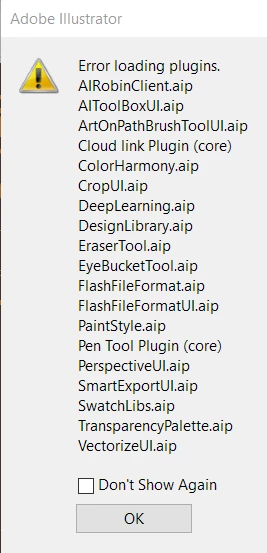


{Renamed by MOD}

 

Correct answer Anshul_Saini

Hi there,


We are sorry about the trouble. We have consolidated the most popular solutions that help in fixing this issue. I would request you to please try the steps mentioned in this help article (https://helpx.adobe.com/illustrator/kb/plugin-missing-issue.html) and let us know how it goes.


Please feel free to reach out if you still need assistance. We'd be happy to help.


Thanks & Regards,
Anshul Saini

30 replies

Nykk_Deetronic
Inspiring
January 6, 2022

Thats why I do not update anything.

As far as I remember - this should solve problem:

- Hold CTRL key and doubleclick on AIllustrator icon.

- This should reset prefs to default and load all plugins.


I hope this helps. All best 🙂

Participant
August 10, 2021

Today after working in Illustrator it randomly stopped working with the following load error.  Any suggestions on how to fix this?  I tried restarting and re-installing but still the same issue:


{Renamed by MOD}

Community Expert
August 10, 2021

Have a look at the following article and see if it helps

https://helpx.adobe.com/illustrator/kb/plugin-missing-issue.html

-Manan

-Manan
Participant
August 1, 2021


{Renamed by MOD}

Anshul_Saini
Community Manager
Community Manager
August 2, 2021

Hi there,


Sorry about the trouble you are facing. This issue has been reported by a few other users as well in the past. Could you please share the OS and version of Illustrator?

I would suggest you to please try the steps shared in this help article (https://helpx.adobe.com/illustrator/kb/plugin-missing-issue.html) and let us know how it goes. Also, if you need help following the steps mentioned in the help article shared, please take a look at this response (https://community.adobe.com/t5/illustrator/error-loading-plugins-while-launching-illustrator-2020-24-1-2-on-windows-machine/m-p/11153043#M178050).


Thanks & Regards,

Anshul Saini

Participant
July 31, 2021
Hello, I have a problem opening the program, I get a window of "error loading plugin" I have the same problem with "creative cloud desktop" help, what should I do?


{Renamed by MOD} 

Community Expert
August 2, 2021

Hi @carla_3333,

See the following article if it helps

https://helpx.adobe.com/illustrator/kb/plugin-missing-issue.html

-Manan

-Manan
carolh99139453
Participant
July 27, 2021

problem with loading and when I uninstall and re install I am unable to go to defaul apps for example and add EPS to open in Illustrator.  errors are:  
Error loading plugins: AIRobinClient.aip
AppBarControls.aip
Experimentation.aip
OnBoarding.aip

SmartExportUI.aip
TaskManagerUK.aip

VulcanService.aip

svgFileFormatUI.aip

Can anyone help? 


{Renamed by MOD}

carolh99139453
Participant
July 27, 2021

apologies - meant to say just cant use illustrator - wont open? any ideas following on from above?

Participant
June 8, 2021

I keep getting an error message before Illustrator can load that the docinfo.aip plugin won't load. CC says Illustrator is up to date. Didn't have this problem when I first downloaded it, it kind of just randomly stopped working. Any fix? I've tried uninstalling and reinstalling to no avail. 

Charu Rajput
Community Expert
Community Expert
June 8, 2021

Hi,

Please share some information as

1. Which version of Illustartor

2. OS


Best regards
Participant
May 18, 2021

 Hello I need help with , I got this error and I can not solve it, I did all kinds of advice given on YouTube etc and it did not work. Thanks.


Mike_Gondek10189183
Community Expert
Community Expert
May 19, 2021

Try manually moving it out of that folder, and then start Illustrator.


some others had this issue, but not resolved

https://illustrator.uservoice.com/forums/601447-illustrator-desktop-bugs/suggestions/32271853-artstyle-aip

Known Participant
February 25, 2021

OK, tried all suggestions, no good. Windows 10, latest cloud version. Reset plugins to open with AI as per suggestion below, renamed illustrator folders to .old, repaired C++..., still getting long list of failing plugins on load plus error 'Operation can not be completed because of an unknown error [>MIT]'


Is this a new and more persistent version of the problem?

Nykk_Deetronic
Inspiring
February 26, 2021

I forgot how I fixed this but once it Adobe CS started working - I've disabled all updates (especially as I just wanted working versions, not latest), disabled desktop app updates too and cloud updates. As I wrote, my malware fight lasts for nearly 9 months and I've managed to get working PC faster than it used to be 2-3 years ago I upgraded it with gfx card. What I did helped me solve many issues with Win10 (clicked on Reset, overwrite old system with default settings and then - revert back Win10 image file I backupped on USB hd in September 2020! After this - I upgraded (or downgraded) some of non working Adobe CS programs (I see that I have 2 versions of Illustrator opening: one on icon (where it displays year 2020!) and other version when I doubleclick on .ai file (then shows Illustrator as it is from 2019?). I do not touch anythibg, disabled every single update for any software (including Win10 too), system works and created just few weeks ago final working system (January 2021) as image backup on usb hard disk. I hope my (nightmare) experience helps somebody 🙂

Participant
January 3, 2021

I am using illustrator 2020 and I was facing the same error but all the tools appeared after repairing Microsoft Visual C++ 2015-2019 (x64)

Participant
December 4, 2020

Hi Srishti, I have tried every step that you have given and the problem remains. I am using V 25.0.1 and Windows 10 home which is fully updated. Please help!! I've been trying to fix this for almost a week.