
Participant
November 18, 2010
Answered

Error loading plugins/ Missing Plugins while launching Illustrator on Windows machine.

  • November 18, 2010
  • 30 replies
  • 84470 views

Hello,

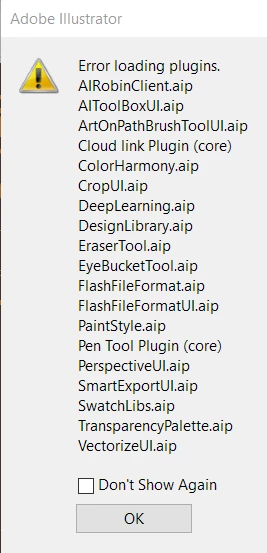
I've updated to  version 24.12 of CC Illustrator and am receiving a plugin error message (pictured below) when I launch the app. When I click OK and enter the app, my tool menu is missing. If someone can assist me in addressing this issue it would be appreciate. Thanks!


{Renamed by MOD}

 

Correct answer Anshul_Saini

Hi there,


We are sorry about the trouble. We have consolidated the most popular solutions that help in fixing this issue. I would request you to please try the steps mentioned in this help article (https://helpx.adobe.com/illustrator/kb/plugin-missing-issue.html) and let us know how it goes.


Please feel free to reach out if you still need assistance. We'd be happy to help.


Thanks & Regards,
Anshul Saini

30 replies

Participant
October 8, 2020

I just started using the software and constantly get this error. Ive tried to repair C++, removed and reinstalled, edited Adobe files listed from other similar issues, and NO fix. PS, Ive NEVER installed any 3rd party plugins either.


{Renamed by MOD}

Monika Gause
Community Expert
Community Expert
October 8, 2020

Could those be third party plugins?

In that case: please ask their producer if they are compatible with that version.

Participant
July 15, 2020

Illustrator crashes after launching, It shows the error message "Error loading plugins...List of .aip files"

Monika Gause
Community Expert
Community Expert
July 15, 2020

Please show a screenshot.

WHich version and system is it?

Is this a fresh install?

Participant
June 30, 2020

Hi!

Starting around June 20 I can no longer load Illustrator.

Instead a popup says "Error loading plugins" and lists about 20 plugins, two of which are "core".

The Illustrator Start page then shows, but clicking any existing or new project causes a crash.


Attempts to resolve:

  • Restarted windows
  • Uninstalled / Installed several versions of AI from 23.0.x to 24.2.1 (most current)
  • Stopped antivirus (Avast) and checked for quarantined files (none)
  • Checked the plugins directory. The mentioned missing plugin files are missing.


System

  • windows 10 latest update
  • Microsoft surface laptop 2
  • CC installed and a few other Adobe apps which all start properly
  • No other plugins manually installed (was always default install)


Any help appreciated!

Community Expert
July 1, 2020

Try the steps mentioned in the following link

https://helpx.adobe.com/illustrator/kb/plugin-missing-issue.html


-Manan

-Manan
Participant
June 18, 2020

I hopped on Illustrator this morning and I had an error come up saying it can't load a bunch of the plugins. I was using it yesterday and I never had one issue. Does anyone have any suggestions on what the problem could be?


Community Expert
June 18, 2020

You did not tell which OS are you using, nor the version of Illustrator, also the names of the missing plugins. See if the following link describes your issue, if not then come back with the information i asked

https://helpx.adobe.com/illustrator/kb/plugin-missing-issue.html


-Manan

-Manan
Participant
June 11, 2020

Hello, this is my first time using Illustrator, after a fresh install using the Creative Cloud App, I try to launch the program and it fails to start.


When running the diagnostic tests, Test 1 goes well but in Test 2 I get an error message saying: "Missing required plugins. PDFFormat.aip PDFSuite.aip"


When I click on Attempt to Launch Again, I get the same error message for Diagnostic Test 3, 4 and 5, and then the application never starts.


I can find PDFFormat.aip PDFSuite.aip in the following location:


C:\Program Files\Adobe\Adobe Illustrator 2020\Support Files\Required\Plug-ins


 With read, write and execute permissions for all users.


I've tried to clear the preferences, uninstall, use the CleanerTool and delete all Adobe related files, but then I get the exact same error.


I'm using:

  • Windows 10 Enterprise (Version 1809)
  • Intel(R) Core(TM) i7-7700HQ CPU @ 2.80GHz
  • 16GB RAM
  • CC AdobeIllustrator 2020 21.4.3
  • GeForce GTX1050 with the latest Studio Driver 442.92


And this is the beginning of the crash report, I can post the rest if necessary:

<crash exception="EXCEPTION_ACCESS_VIOLATION" exceptionCode="0xc0000005" instruction="0x00007FF86808D1E5">

<backtrace crashedThread="0">

<thread index="0">

<stackStatement index="0" address="0x00007FF86808D1E5" symbolname="PDFLibraryRegisterRNG"/>

<stackStatement index="1" address="0x00007FF868094EA9" symbolname="PDFLibraryRegisterRNG"/>

<stackStatement index="2" address="0x00007FF8680959A8" symbolname="PDFLibraryRegisterRNG"/>

<stackStatement index="3" address="0x00007FF8680421D9" symbolname="ASFileSysSetDefaultTempPath"/>

<stackStatement index="4" address="0x00007FF8810E742A" symbolname="main"/>


{Renamed by MOD}

Monika Gause
Community Expert
Community Expert
June 11, 2020

Did you disable your antivirus for the install?

Participant
June 11, 2020

Hi Monika thanks for your reply. Unfortunately I can't disable it since it's my work computer and I have no control over those settings. Is there something else I can try?


Manuel

Participant
June 9, 2020

Hi,

I'm also having the same issue.

However I have discovered that on loading Illustrator (24.1.3 (64-bit) on Windows 10 Pro Version 1909) for the first time after a reinstall the error doesn't occur. But it does the second or subsequent times that I open it.

But if I rename or delete the preference files, or if I reset the preferences using Edit>Preferences>General>Reset preferences, then on opening/reopening Illustrator the plugins all load with any errors. Seems to me that this may be an issue with writing/reading the prefence files?

Kind regards

John

Participant
October 8, 2020

I have similar issue. Ive tried everything stated above and no luck. ....And I have NO plugins installed other than clean install.

Monika Gause
Community Expert
Community Expert
October 8, 2020

SignLab is not a native part of Illustrator.

Participant
June 4, 2020

Hola, a mi lo que me funciono es que esta actualizacion te crea un archivo que se llama (conclicted copy) de cada unos de los plugins y archivos, lo busque desde el explorador, los elimine y con eso me permitio abrir de nuevo el programa ya sin conflictos

Srishti Bali
Community Manager
Community Manager
May 26, 2020

Hi All,


This has been reported by a few other users as well. Please try the steps shared on this help article (https://helpx.adobe.com/illustrator/kb/plugin-missing-issue.html) and let us know how it goes.


If you need help following these steps, please take look at this response (https://community.adobe.com/t5/illustrator/error-loading-plugins-while-launching-illustrator-2020-24-1-2/m-p/11153043#M178050)


Regards,

Srishti

Srishti Bali
Community Manager
Community Manager
May 21, 2020

Hi Sarah,


Sorry to hear about the trouble you are facing with Illustrator. That's definitely not a typical experience with the application. 

You may try the steps shared on this help article (https://helpx.adobe.com/illustrator/kb/plugin-missing-issue.html). If that doesn't help, could you please confirm which OS you are working on? Are there any recent changes made to your system? For example, any antivirus, system updates or web extensions installed recently. 


Regards,

Srishti

Participant
May 22, 2020

Hi Srishti,


Thank you for your response.

I tried to follow the steps in the article you've provided but unfortunately, the Control Panel also appears to be missing (pictured above) and I am unable to go through the steps.

I am working on Windows 10 Pro and haven't made any system updates or added any web extensions that I am aware of but I do have Norton Security Online which automatically takes care of anti-virus system stuff in the background. My OS is also set-up to make automatic system updates  as well. 


Charu Rajput
Community Expert
Community Expert
May 22, 2020

Hi,

For Control Panel, did you try from Window -> Control. See attached screenshot. This option must be checked.

Best regards
Participant
May 20, 2020

I'm just a hobbiest.  Haven't run Illustrator in a while.  Updated to the latest and nothing works:

I get a massive list of plugins that won't work.  The only ones I've ever downloaded were the Astute Graphics ones and they weren't on the list of errors

There are no tools on the left of the screen when Illustrator loads


I've read multiple reason's for the toolbar and nothing has worked.  There isn't even an option on the Windows dropdown to show them


I've deleted preferences and uninstalled/reinstalled Illustrator and the Creative Cloud multiple times

Same issues every time

I'm about ready to cancel my subscription.  Seems if you don't use this stuff every day, its not worth keeping up with the updates

Monika Gause
Community Expert
Community Expert
May 21, 2020

Did you turn off your antivirus when installing?

Did you run the Cleaner tool in between uninstalling and reinstalling?


This looks like issues with installing the software.