
Participant
November 18, 2010
Answered

Error loading plugins/ Missing Plugins while launching Illustrator on Windows machine.

  • November 18, 2010
  • 30 replies
  • 84470 views

Hello,

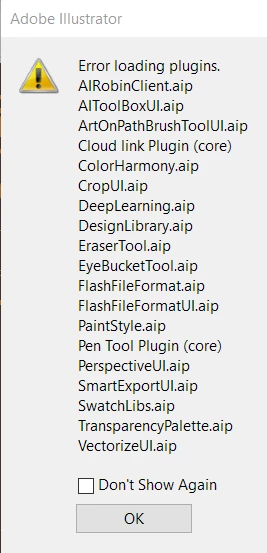
I've updated to  version 24.12 of CC Illustrator and am receiving a plugin error message (pictured below) when I launch the app. When I click OK and enter the app, my tool menu is missing. If someone can assist me in addressing this issue it would be appreciate. Thanks!


{Renamed by MOD}

 

Correct answer Anshul_Saini

Hi there,


We are sorry about the trouble. We have consolidated the most popular solutions that help in fixing this issue. I would request you to please try the steps mentioned in this help article (https://helpx.adobe.com/illustrator/kb/plugin-missing-issue.html) and let us know how it goes.


Please feel free to reach out if you still need assistance. We'd be happy to help.


Thanks & Regards,
Anshul Saini

30 replies

ramonab40693189
Participant
May 20, 2020

Whenever I open Illustrator it says there is an error loading a long list of plugins. The plugs are common everyday tools like the pen, pencil, and colors and swatches. They are also the standard tools and not third-party.


I have tried everything to fix the problem and even uninstalled and reinstalled multiple times. Does anybody know how to fix this issue?


{Renamed by MOD}

Doug A Roberts
Community Expert
Community Expert
May 20, 2020

What version of Illustrator and what operating system are you using?

Participant
February 22, 2020

Hi there.

after upgrade from 23.1 to 24.0.2 I've lost my plugin for Summa Cutter.

Does any one know where to find a new plugin.

i have been on Summa support but it seems that they only supports macOS and i'm running Windows

10 pro.

It's a big issue becaurse I need to create OPUS reg. marks on my design before printing

Larry G. Schneider
Community Expert
Community Expert
February 22, 2020

Easiest would be to reinstall AI 23 and do your marks there, then transfer to the new file.

Participant
February 23, 2020
Long live the youtube channel, today I found the solution, and for others with the same problem if your running windows on your pc.
Every time there is a update in Ai and you lose the Summa plugin, you have to download and install the plugin again.
summa.eu/downloads/vinylcutter/
the plugin hide itself in Summa Cutter Tools
enjoy
Participant
October 25, 2019

Illustrator is not loading...I have an "Error loading plugins. CharParaStyles.aip" error. It gives me an option to run in safe mode but it will crash and quit when I start working. How do I fix this?

Monika Gause
Community Expert
Community Expert
October 25, 2019

Which version? Which system? Is this a fresh install?

Participant
October 25, 2019

Not a fresh install...I have been running it on the same PC for years. I am not in front of the machine right now but I would guess it is the most current version of the CC since those update automatically right? I always assumed they did 😉

jose_miguel_fidel
Participant
June 3, 2019

I'm getting a loading plugins error when starting Adobe Illustrator, followed by an "operation cannot complete because of an unknown error"

prompt.

I have tried reinstalling both Ai and CC and restarting in all possible orders, I've deleted ALL Adobe folders in AppData, reset preferences. Reinstalled C++ redistributeables since 2005, deleted Adobe folders in Program Files. Nothing seems to be working.

Illustrator does start but the panels and plugins do not show.

Just a blank Ai window opens. Some of the plugins can be shown manually but the other panels and the plugins mentioned in the error are unusable .

I have also tried using the Creative Cloud Cleaner tool but that also did not work.

Bani Verma
Community Manager
Community Manager
June 4, 2019

Moving this query to Illustrator​ community, experts here will be able to help you better.

thesandmancan
Participating Frequently
June 30, 2018

Okay guys, I feel like I've searched everywhere...

Illustrator is failing to execute the original plugins and extensions, and I can't find any forum, or video to help. It will eventually start itself in safe mode, but i'm not able to do anything after I start a new document. I believe that something is blocking the extensions from loading, but I have no idea where else to look.

Here's what I've tried,

1. Completely uninstalled Illustrator, and CC

2. Ran the CC cleaner and reinstalled all of CC and Illustrator

3. Updated all C++ files

4. Made sure Nvidia is updated

5. Disabled my firewalls

6. Tried running everything in admin mode

(Yes my computer meets all system requirements of CC and Illustrator, before this issue with illustrator I was running CC and Photoshop just fine in the past. Also, I haven't installed any third party extensions or plugins, so to my knowledge, I haven't done anything to corrupt or change any original files.)

I've had this problem from the start, I know you guys have felt this helpless frustration... Any and all help is appreciated, I just don't know where else to look.

Thank You in advance.

Monika Gause
Community Expert
Community Expert
June 30, 2018

I assume you're working on Windows? Which one?

Did you already rebuild the preferences?

Did you have a trial version installed? Or maybe a previous version of Illustrator?

Can you please post the exact error message?

kavalib17706254
Participating Frequently
June 3, 2018

I am using windows 10 latest version and using the creative cloud, facing issues in the latest version, I am unable to solve them. Please help me, anyone. I have tried in different ways, Installed MSVCP110.DLL, Uninstall ADOBE Creative Cloud SETUP AND Reinstalled. Checked all updates in windows 10, Paused antivirus also. Stopped the firewall.  Still, it’s not working Please help me in case if I missed anything.

Monika Gause
Community Expert
Community Expert
June 4, 2018

Please contact Customer Care.

Contact Customer Care

You need to be logged in and then at the bottom of the page there should be a chat option.

kavalib17706254
Participating Frequently
June 5, 2018

Thank you, Monika... I have tried so many times to contact the people ( 800-833-6687 ) on this number. but it's always switched off.

lovisal38599305
Participant
May 29, 2018

Error message

Missing required Plugins 
ExpandS

ShapeConstruction Suite

What shall I do? How do I solve it?

Keeping my fingers crossed someone will know the answear!

Bill Silbert
Community Expert
Community Expert
May 29, 2018

Have these plugins worked before? What operating system are you on? Have you perhaps recently upgraded to an operating system which does not support CS3?

lovisal38599305
Participant
May 29, 2018

Hi Bill!

Thank you for your quick reply!

I guess the plugins have worked before, I have never even noticed them! And I have never reinstalled Cs3 myself before.

I am on Windows 10 and I havnt upgraded my system, I just suddenly got an error message and then had to reinstall Cs3

Participating Frequently
May 29, 2018

Hello, I don't understang why this append to me. i just install the free version and this is what i see when Illustrator star :

After that, Illustrator start but in i have nothing and i can't do anything, look :

i don't even have the "Tool" menu, the workplace, and if I go to "Edition" and "Preferences", nothing append !

Please help me, I have just installed the free version, nothing else, what is this probleme ?!

Mylenium
Legend
May 29, 2018

Reinstall the program with sufficient user permissions.

Mylenium

Participating Frequently
May 29, 2018

i already did this 3 times !

Participant
May 15, 2018

OS : Win7 x64

I can't running Illustrator. So I delete the program and folders. Even All of Adobe programs.

Then i running AdobeCreativeCloudCleanerTool and restart my computer.

Reinstall Illustrator..

I also Install older version..

But I can fix it..

Help me plz...

(I didn't install any other plugin.)

Monika Gause
Community Expert
Community Expert
May 15, 2018

Is your antivirus turned off when installing?

Participant
May 15, 2018

Um... Nope..My Antivirus program is running always...

November 18, 2010

Any one!

When I try to launch illustrator I get an error saying it is missing plugins PDF  Format.aip.

I am unable to get the program loaded it stops loading altogether.  I have tried reinstalling the program as well no luck.

I am on  a PC with Windows XP needed to replace hard drive and do a new reinstall of Adobe CS4.

Everything is updated and installed fine.  Photoshop and others work fine   Just Illustrator.


Did search on the net not much help there can any help here!

I can not even find a plug in called PDFFormat.aip!!

Why would Illustrator need a PDF plugin?

Any suggestions!

Inspiring
November 18, 2010

It is in the packages under required and in the plug ins folder.

On the Mac you can access the packages by control clicking the application's icon and going to show packages, You can try rgiht clicking on the PC or look in the properties panel and see if it is there.

I originally was going to suggest you repair the permission for the Application.

Other wise you will have to use the clean up script to uninstall and try again.

Here are the packages

November 18, 2010

Yes,  I found the plugin, It is there.  I also found 2 others in other folders of the Adobe package as well.

I do not use Fireworks much but it is having a loading problem as well.  I am not getting the same error it just states an internal error and stops.

I have looked at both of the crash reports and the both end with the same file name were I believe the problem maybe.  psapi.dll

<binaryImage start="0x76bf0000" end="0x76bfb000" type="__TEXT" path="C:&#92;WINDOWS&#92;system32&#92;psapi.dll"/>

I came acrosss a comment in another posting about a similar issues  and was wondering if this is true

"machine="Intel(R) Pentium(R) D CPU 2.80GHz"

Based on that - no, there's no workaround. You are working on an old processor that is no longer officially supported with CS4."

If so then I need to just stop trying to fix this, this is the same process i habe on my machine as well.

Please, this program was working on this system for the last year or so with no problems so

it should not be the processor not being able to handle this program.