


Get clean arrays from Illustrator Collections for hassle free looping
How many times have you been writing a function or a loop that attempts to touch all elements of a collection, like swatches or layers or groupItems, only to find that when the code finished, only approximately half of the elements had been processed?? If it has happened to you as often as it has happened to me, you'll quickly be able to identify the issue and apply the appropriate facepalm to your forehead. But what a headache it is to get to that point of easy recognition and finally break bad habits and start spending more mental energy on "what direction should this loop go? will i be deleting or moving or adding anything?
What if we didn't have to worry about that? What if we had access to tools more like modern javascript that can remove the tedium and the need for spending mental energy on things that don't matter to what we want to accomplish so that we can stay focused on the bigger picture?
By adding one line of code (or simply prepending one short function call to some array prototype function like forEach() or filter()) you can forget about whether or not your loop will be affecting the index of the items you want to manipulate. Additionally, creating a standard array out of a collection makes it easier for you to dictate the order in which things are processed as well as dictate the stacking order of the processed art. Collections give you access to the zOrder() method, but this can get pretty cumbersome if you're not just trying to put something at the top or bottom or move it up/down once. With a standard array, you can sort it using your own callback function to dictate the sorting behavior, and then it will be guaranteed that specific art will process when and finish where you want it, without ever having an indexing issue as a result of collections' "collapsing" and "expanding" behavior when things are added/deleted/moved.
All you need is this:
afc(app.activeDocument,"layers"); //if you prefer a more verbose function name, you can use arrayFromContainer()

//or

afc(myLayer,"pageItems");
Then this can easily be follwed by an array prototype function(s)
afc(myLayer,"pageItems").forEach(function(item){item.moveToBeginning(destLayer)});
or, let's say you wanted all the textFrames on myLayer whose name matches a certain regex?
afc(myLayer,"textFrames").filter(function(frame){return frame.name.match(/regex/i)});
then of course you could tack a forEach() onto the end of that or a map() or whatever you want.
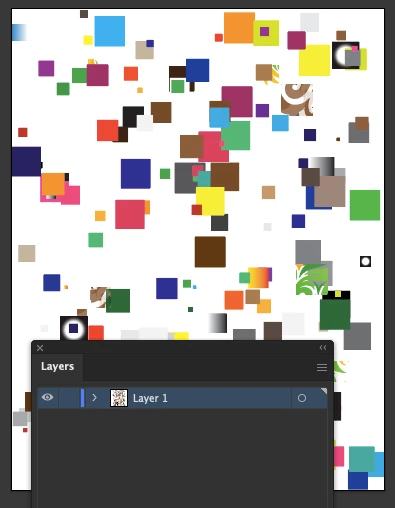
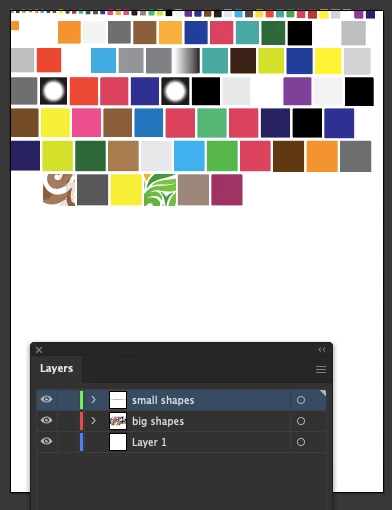
Say you have a big messy artboard with lots of disconnected/disjointed stuff on it and you want to just sort it out so it's easier to see and manage.. let's sort them all by size, then place them in a neat grid, then move any large items into a "large items" layer and same treatment for small items. you can easily do all of this in just a couple minutes of coding if you're not bogged down with too much minutiae. like this:
var doc = app.activeDocument;
var bigLayer = doc.layers.add();
bigLayer.name = "big shapes";
var smallLayer = doc.layers.add();
smallLayer.name = "small shapes";


var curPos = [0, 0]
var spacing = 5;
afc(layers[2], "pathItems").sort(function (a, b) {
	return a.area > b.area
}).forEach(function (path) {
	if(path.width >= 15 && path.width <= 35)
	{
		//delete any item between 15 and 35 pt wide
		path.remove();
		return;
	}
	//send the path to the back of the layer to maintain the sort order of the paths
	path.moveToEnd(path.width < 15 ? smallLayer : bigLayer);
	path.position = curPos;
	curPos[0] += path.width + spacing;
	if (curPos[0] > doc.width - path.width) {
		curPos[0] = 0;
		curPos[1] -= path.height + spacing;
	}
});
before:
after:
It may not seem like much, but it has absolutely changed the way I code for illustrator (and improved the cleanliness of the code) and it has drastically improved my ability to produce very rapid prototypes to test out ideas and concepts without wasting time coding for edge cases and trying to handle possible silly errors. Maybe you will also find it useful. Here's the github link and the source code:
https://github.com/wdjsdev/public_illustrator_scripts/blob/master/array_from_container.js
**Updated 22 August, 2022**
added support for passing in an array of parent containers and childTypes. A use case example would be "i need all the textFrames and pathItems on layers[0] and layers[1]". You can pass in an array for both arguments to get back a conglomerate array of multiple item types from multiple parents, like so:
var myItems = afc([layers[0],layers[1]],["pathItems","textFrames"]);Also updated how default values are handled and improved error handling for container/childType mismatches.
And on the github page, there is a comprehensive test function at the bottom.
function afc ( containers, childTypes )
{
	const CHILD_TYPE_OPTIONS = [ "pageItems", "layers", "pathItems", "compoundPathItems", "groupItems", "swatches", "textFonts", "textFrames", "placedItems", "rasterItems", "symbolItems", "pluginItems", "artboards", "selection", "characterStyles", "paragraphStyles", "brushes" ];
	const DEFAULTS = { "app": "documents", "SwatchGroup": "swatches", "Document": "layers", "GroupItem": "pageItems", "CompoundPathItem": "pathItems", "TextFrame": "textRanges", "Selection": "pageItems", "all": "all", undefined: "pageItems" };
	var result = [];

	if ( !containers.toString().match( /array/i ) )
	{
		containers = [ containers ];
	}
	if ( !childTypes.toString().match( /array/i ) )
	{
		childTypes = childTypes || DEFAULTS[ ctn ] || ( function () { $.writeln( "No childTypes given. Defaulting to pageItems" ); return "pageItems"; } )();
		childTypes = [ childTypes ];
	}


	function loopArray ( array, callback )
	{
		for ( var i = 0; i < array.length; i++ )
		{
			callback( array[ i ], i );
		}
	}

	loopArray( containers, function ( curContainer )
	{
		//validate containers
		var ctn = curContainer.typename;
		if ( !ctn.match( /app|adobe|document|layer|group|compound|text/i ) )
		{
			$.writeln( "ERROR: afc(" + containers.name + "," + childTypes + ");" );
			$.writeln( "Can't make array from this containers. Invalid containers type: " + containers.typename );
			return;
		}

		loopArray( childTypes, function ( curChildType )
		{
			if ( !curContainer[ curChildType ] )
			{
				$.writeln( "ERROR: afc(" + containers.name + "," + childTypes + ");" );
				$.writeln( "Can't make array of " + curChildType + " from this container." );
				return;
			}

			for ( var i = 0; i < curContainer[ curChildType ].length; i++ )
			{
				result.push( curContainer[ curChildType ][ i ] );
			}

		} );
	} )

	return result;
}
 AdChoices