BOT10
Participant
April 4, 2018
Answered

GPU preview greyed out.

  • April 4, 2018
  • 22 replies
  • 63722 views

Hi,

I am having a problem with my gpu preview. It's greyed out and I can't enabled it. On the performance tab, it says gpu is compatible and available. I can check the box in gpu performance and animated zoom, but somehow I can't enabled it. This is not the 1st time that it happened. It happens every now and then and it happened again today. I decided to ask it here in the forum cause I'm really pissed that I can't use it again. My gpu drivers and illustrator are both updated.

I am using a dual screen. 1 is a monitor-tablet Huion gt-191 and the other 1 is just a normal 23" Samsung monitor.

Here's the specs of my pc:

CPU: Intel I5-6600

RAM: 8GB

GPU: Nvidia Gtx 1060 6gb

I hope you guys can help me. I really need to use my illustrator as I have work to do. I can't work without the GPU preview

Thanks!

PS. sorry for the bad english. Not my 1st language

Correct answer MegaTorque-01

Hi @sevenK @MegaTorque-01,


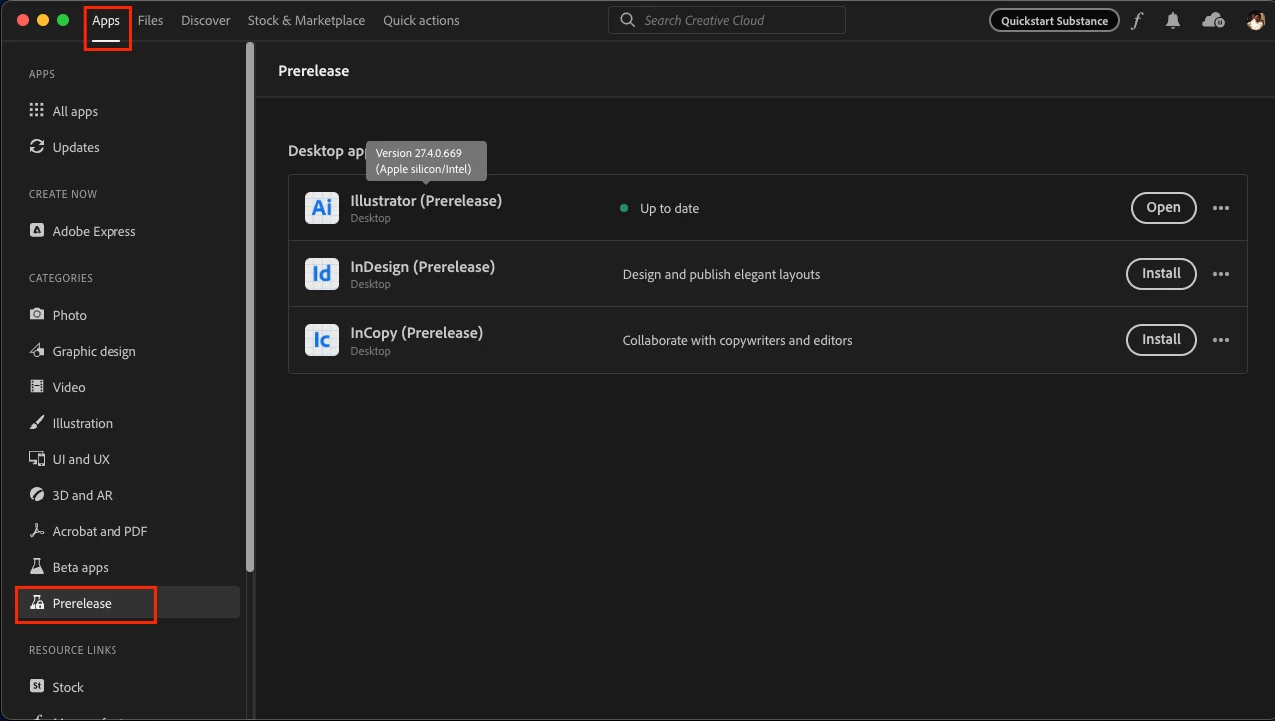
I am glad to inform you that we have tried addressing the issue in a pre-release build, v27.4-669, which is now available on Creative Cloud Desktop under the Prerelease Section.


I also wanted to let you know that I have tried the files shared by jschmed and Sevenk, and I could not replicate the same behavior on this build on both Windows & Mac machines.


Would you all mind giving it a try and letting us know if the issue has been resolved for you as well? Your feedback will help us ensure that the final release is as stable and reliable as possible.


Steps to enroll in the Prerelease program and install the prerelease build on your machine are as follows:
Please click this link (www.adobeprerelease.com/) and go to the “Available Program” section to join the Illustrator prerelease.
Then accept the Prerelease agreement and do the following steps to install the Prerelease v27.4-669:
- Close Illustrator
- Go to the Creative Cloud Desktop app > Prerelease section under apps.
- Click on install. (This will not replace the existing installation of the Release build of Illustrator).


Thank you for bringing this issue to our attention, and we appreciate your patience & cooperation in helping us resolve this issue.


Best,

Anshul Saini


Anshul, I noticed that Illustrator 27.4 was available to me download this morning and GREAT NEWS!! The GPU problem appears to be resolved! I opened up 2 files that I know definitely did not work, and today I have both files open on my PC at the same time and they appear to be very solid - GPU acceleration all the way. The scrolling speed of the screen appears to be improved as well, very smooth! I'm not sure what you guys did in the background but this looks absolutely great now!!

22 replies

Participant
August 2, 2021

Go to preference> performance> check mark the gpu option...viola!

sevenK
Inspiring
August 2, 2021

Nope ... of course the gpu option was/is enabled ... has nothing to do with that.

yugeafria
Participating Frequently
June 14, 2021

I work when only activate my GPU setting.


Ensure that GPU Performance is enabled (Preferences > Performance).

sevenK
Inspiring
June 15, 2021

We do assume with experiencing this problem we know that GPU Performance needs to be activated in the preference panel. 

pentagramwookie
Inspiring
April 21, 2021

Similar issue in Illustrator 2021 (25.2.1) on macOS. In my case, the only workaround that is working for me so far is to only work with linked images. As soon as I embed an image 'View Using GPU' is greyed out and everything gets clunky and slow.


If I hit undo after embedding an image it doesn't fix the bug. Quitting or restarting the computer doesn't necessarily help either. All I need to do is save the file with linked images and re-open it for View Using GPU to work correctly.

sevenK
Inspiring
June 15, 2021

Not quite the case. I usually only work with linked files and kinda had it fixed as I had written here before. Strangly though I recently have experienced the problem again with files that used to work without a problem and now all of a sudden the GPU preview stopped working with these files. I had to take out the profile of the linked image in Photoshop and update the picture in the artwork to get it to work again. Very strange. 

Benardo72
Participant
March 5, 2021

Hi there

I have had this issue several times. Tried restarting and creating a new document. finally went into preference and click the Performance tab and click enable GPU.  Hope this helps others..


minimumsix9977
Known Participant
March 19, 2021

On behalf of the users, "Adobe Professionals," moderators, and myself in this thread, I'm a little ashamed not a single person suggested checking this first. Achum's Razor, ya'll. 

Monika Gause
Community Expert
Community Expert
March 19, 2021
quote

On behalf of the users, "Adobe Professionals," moderators, and myself in this thread, I'm a little ashamed not a single person suggested checking this first. Achum's Razor, ya'll. 


By @minimumsix9977


You are asking why no one suggested this? You might want to re-read the original question (from 2018):


"I am having a problem with my gpu preview. It's greyed out and I can't enabled it. On the performance tab, it says gpu is compatible and available. I can check the box in gpu performance and animated zoom, but somehow I can't enabled it."


The thread opener clearly says that specifically this option does not work. So it won't make any sense telling them to just turn it on, right?

Participant
July 26, 2020

Hi.i dont know if anyone already solved their problem or not,but i wanted to share on how i solve mine.all i did was close gpu tweak software.then the gpu preview not greyed out anymore.hope this helps.

Monika Gause
Community Expert
Community Expert
July 26, 2020

Thank you for this information. I didn't even know that this kind of software exists. Is it some third party extension or application or is this built into some systems or comes with video cards?

exxco
Participant
November 26, 2020

Its am monitoring software wich at leat 85% or more PC gamers had instaled for monitoring temps, FPS and Overclocking the GPU. And its not the first time that RTSS (Riva Tuner Statistic Server) conflicts with other softwares. 

Participant
April 28, 2020

Its a bit late, but in case someone else goes "through" it. I have an RTX 2080 max Q card. I did everything that has been mentioned. It still did not work. At the end of the day, it was RivaTuner Statistic Server that was running in the Background that caused the problem. I just had to turn > Show on Screen Display > off, and everything was back to normal.

Participant
May 12, 2020

My god.


Thank you so much. Built a new rig and I spent COUNTLESS hours reinstalling drivers and CC second guessing myself. My workflow literally reduced in half because it was greyed out and at some point thought that my card is too "new" (RTX 2070 Super).


Tried your fix thinking why would a simple graphics statistics overlay be the cause of not being able to "turn on" a WHOLE gpu function. I think this is a very specific problems for those of us who like to monitor our graphics performance in games so no wonder I couldn't find a solution other than "check your drivers."


Well this fixed it. So thankful you decided to post this fix. Literally. So. Frustrated. So glad I can get back to designing full potential again. Thank you thank you thank you!

Participant
December 9, 2020

Your welcome Bro. Glad i could help 🙂

Inspiring
March 30, 2020

I have this problem too with one document.  To fix it, I copy and paste the artwork into a new document.  

Participant
February 12, 2020

I fixed it by restarting computer so i can again zoom normally 


Rishabh_Tiwari
Community Manager
Community Manager
February 12, 2020

Hi there,


Glad to hear it has been resolved! In case if this happens more often, you can also refer to this help article: https://helpx.adobe.com/in/illustrator/kb/gpu-performance-errors-troubleshooting-workarounds.html 


Feel free to reach out if you run into any other questions or issues in the future.


Regards

Rishabh

Known Participant
February 29, 2020

I have had customer help take this issue and not get back with a fix. No one can figure it out.  I am working on the weekend and this is happening again. Very frusterating. 

Jeighms
Participant
October 1, 2019

I'm having the exact same issue on a 2018 MBP with AMD Radeon Pro 560 and 16g of ram. My MacOS is up to date. My Illustrator is up to date. I've reset my preferences, uninstalled and re-installed creative cloud and all my adobe apps. Nothing is working. I've sent my system info to Adobe but have yet to hear back. Would really appreciate a solution for this, currently my 2012 Macbook is running Illustrator faster than my one-year-old model.

Monika Gause
Community Expert
Community Expert
October 1, 2019
Please contact Customer Care. http://helpx.adobe.com/contact.html
Inspiring
April 3, 2019

This might be less of a solution and more of a workaround... but I have the same problem too and I figured out that this only happens when I open Illustrator by opening an illustrator file. So when Illustrator is not open and I open an illustrator file, GPU preview is not available. If I then close the file and open it again while Illustrator stays open, GPU preview works normally.

Hope that helps!

Inspiring
September 17, 2019
gees... couldn't believe that's true after trying it out right now. what a weird bug... and even weirder it's not fixed yet.