BOT10
Participant
April 4, 2018
Answered

GPU preview greyed out.

  • April 4, 2018
  • 22 replies
  • 63722 views

Hi,

I am having a problem with my gpu preview. It's greyed out and I can't enabled it. On the performance tab, it says gpu is compatible and available. I can check the box in gpu performance and animated zoom, but somehow I can't enabled it. This is not the 1st time that it happened. It happens every now and then and it happened again today. I decided to ask it here in the forum cause I'm really pissed that I can't use it again. My gpu drivers and illustrator are both updated.

I am using a dual screen. 1 is a monitor-tablet Huion gt-191 and the other 1 is just a normal 23" Samsung monitor.

Here's the specs of my pc:

CPU: Intel I5-6600

RAM: 8GB

GPU: Nvidia Gtx 1060 6gb

I hope you guys can help me. I really need to use my illustrator as I have work to do. I can't work without the GPU preview

Thanks!

PS. sorry for the bad english. Not my 1st language

Correct answer MegaTorque-01

Hi @sevenK @MegaTorque-01,


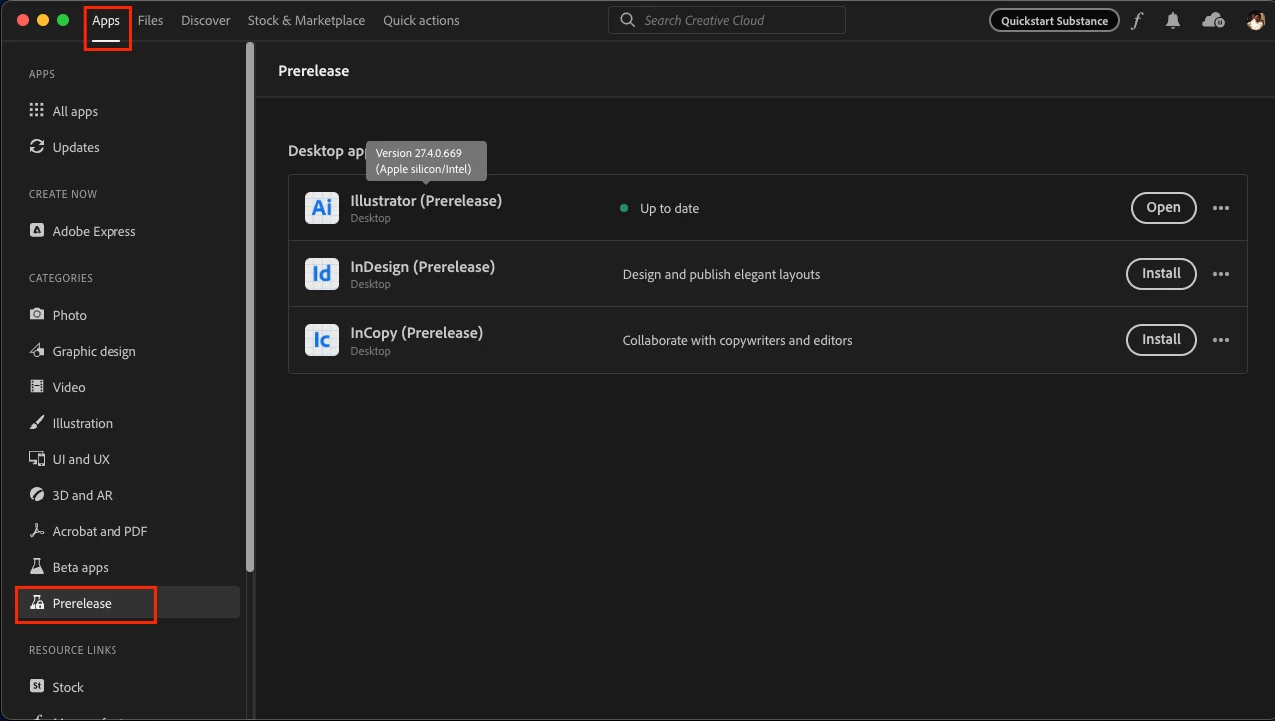
I am glad to inform you that we have tried addressing the issue in a pre-release build, v27.4-669, which is now available on Creative Cloud Desktop under the Prerelease Section.


I also wanted to let you know that I have tried the files shared by jschmed and Sevenk, and I could not replicate the same behavior on this build on both Windows & Mac machines.


Would you all mind giving it a try and letting us know if the issue has been resolved for you as well? Your feedback will help us ensure that the final release is as stable and reliable as possible.


Steps to enroll in the Prerelease program and install the prerelease build on your machine are as follows:
Please click this link (www.adobeprerelease.com/) and go to the “Available Program” section to join the Illustrator prerelease.
Then accept the Prerelease agreement and do the following steps to install the Prerelease v27.4-669:
- Close Illustrator
- Go to the Creative Cloud Desktop app > Prerelease section under apps.
- Click on install. (This will not replace the existing installation of the Release build of Illustrator).


Thank you for bringing this issue to our attention, and we appreciate your patience & cooperation in helping us resolve this issue.


Best,

Anshul Saini


Anshul, I noticed that Illustrator 27.4 was available to me download this morning and GREAT NEWS!! The GPU problem appears to be resolved! I opened up 2 files that I know definitely did not work, and today I have both files open on my PC at the same time and they appear to be very solid - GPU acceleration all the way. The scrolling speed of the screen appears to be improved as well, very smooth! I'm not sure what you guys did in the background but this looks absolutely great now!!

22 replies

Known Participant
February 6, 2019

This is not a single machine or monitor problem. I have the same issue on a new Dell with dual monitors. Happens intermittently on either or both screen. Running Xeon multicore with Intel Turbo Max Boost on Win 10 Pro for Workstations. However, everything worked fine until the infamous Windows upgrade to version 1809. Since then, a lot of issues with CC 2019 apps.

Monika Gause
Community Expert
Community Expert
April 4, 2018

Can you try and disconnect one of the external monitors?

When was your last restart?

Also: to solve individual issues, the forum is not the best place. Customer Care can log into your machine:

Contact Customer Care

BOT10
BOT10Author
Participant
April 5, 2018

https://forums.adobe.com/people/Monika+Gause  wrote

Can you try and disconnect one of the external monitors?

When was your last restart?

Also: to solve individual issues, the forum is not the best place. Customer Care can log into your machine:

Contact Customer Care

Tried both restarting and disconnecting the other monitor but nothing works. I installed the 2017 version and somehow it is working perfectly in there.

Monika Gause
Community Expert
Community Expert
April 5, 2018

Please contact Customer Care. We can't help you on the forum with this. They need to take a look inside your system.