Participating Frequently
January 24, 2018
Answered

Help! My file does not save the overprints !!

  • January 24, 2018
  • 3 replies
  • 1825 views

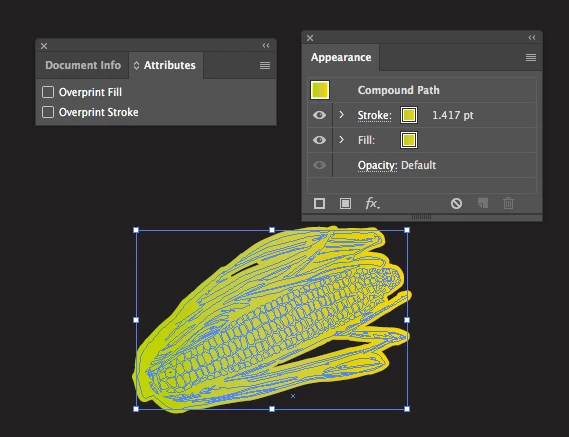
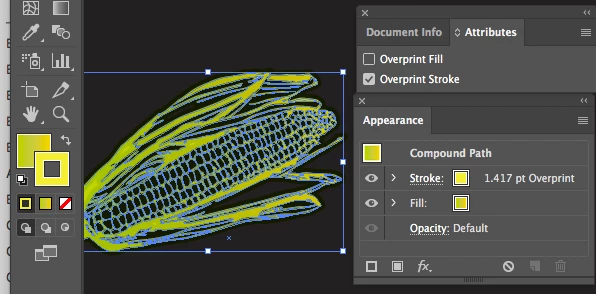
Hi! I need your help, I work in prepress for flexography, when it comes to working on my file, everything is saved very well (image)

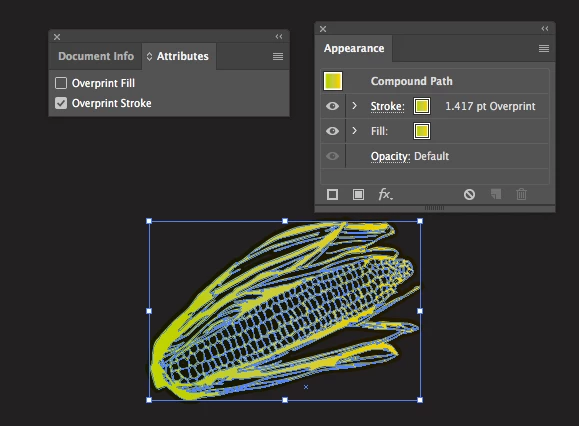
When I open the file again, just to verify that everything is fine, I am surprised that my pre-press was not saved! Disable my overprints. (image)

Can you help me please?
    This topic has been closed for replies.
    Correct answer Mike_Gondek10189183

    Your problem is that your have a gradient on stroke. You can make this look correct on screen before slosing the file

    When you reopen teh overprint goes away as you have discovered.

    AS a test put put a solid color on the stroke that holds after reopening the file, so the problem is gradient strokes.

    Use object >> path >> outline stroke and your probelm will  be fixed.

    http://files.kaleidoscopechicago.com/_FI2NI8JJJR0sIR

    file_overprint_Outline stroke.ai

    2.6 MB

    The URL will expire on Feb 24.

    An even easier solution is to set the stroke blend mode in transparency to multiply.

    http://files.kaleidoscopechicago.com/_gQ2AB9FohRssZR

    file_overprint_stroke-multiply.ai

    2.6 MB

    The URL will expire on Feb 24.

    3 replies

    iqfariasAuthor
    Participating Frequently
    January 25, 2018

    Any solution or suggestion?

    Mike_Gondek10189183
    Community Expert
    Mike_Gondek10189183Community ExpertCorrect answer
    Community Expert
    January 25, 2018

    Your problem is that your have a gradient on stroke. You can make this look correct on screen before slosing the file

    When you reopen teh overprint goes away as you have discovered.

    AS a test put put a solid color on the stroke that holds after reopening the file, so the problem is gradient strokes.

    Use object >> path >> outline stroke and your probelm will  be fixed.

    http://files.kaleidoscopechicago.com/_FI2NI8JJJR0sIR

    file_overprint_Outline stroke.ai

    2.6 MB

    The URL will expire on Feb 24.

    An even easier solution is to set the stroke blend mode in transparency to multiply.

    http://files.kaleidoscopechicago.com/_gQ2AB9FohRssZR

    file_overprint_stroke-multiply.ai

    2.6 MB

    The URL will expire on Feb 24.

    iqfariasAuthor
    Participating Frequently
    January 25, 2018

    Thank you very much! MikeGondek I would have to work it that way

    Mike_Gondek10189183
    Community Expert
    Community Expert
    January 24, 2018

    The attributes panel is still around, but most people use the multiply blending mode in the transparency palette. Is easier to proof your work, and you can set multiply at the path, group or layer level (use your appearance panel to determine what level your selection is).

    iqfariasAuthor
    Participating Frequently
    January 24, 2018

    Thank you, it is very useful, that method, but would it be an error of the illustrator that does not mark the overprint of the stroke

    Mike_Gondek10189183
    Community Expert
    Community Expert
    January 24, 2018

    Can you post a copy of the the corn using dropbox or similar ftp link? Might be the construction of the corn, how you are selecting the object.

    Does this happen with anything else, are you trapping the file is why you need overprints?

    Monika Gause
    Community Expert
    Community Expert
    January 24, 2018

    carlosf22049503  schrieb

    When I open the file again, just to verify that everything is fine, I am surprised that my pre-press was not saved! Disable my overprints. (image)

    Can you please describe exactly step by step what you are doing and what exactly does not get saved and how exactly you come to that conclusion.

    iqfariasAuthor
    Participating Frequently
    January 24, 2018

    Of course! the file has to be in CMYK, to do this process, you make a square as a background (black) and you make a figure in vector, you put a yellow gradient, and in the stroke you apply with the same gradient. There is an option in the attributes panel, click overprint stroke and you will see that the trace is hidden with the black color, and you save the file in .ai. Try to open again, and you have to see again the stroke on the black, which is the problem that my file has, does not save the overprint of the stroke. I hope and you can help me find the mistake!