
Participant
September 27, 2018
Answered

How can I export these groups as a PNG file?

  • September 27, 2018
  • 3 replies
  • 2238 views

I want to export a group as one PNG file. I have attached a screenshot below. I want to export the "Tropical Storm Icon" paths as one PNG, but I can't seem to figure out how to do so. Any help is appreciated. Thanks!
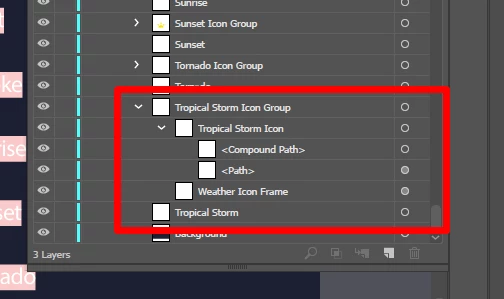
    This topic has been closed for replies.
    Correct answer chanaart

    If you do not have creative cloud your only way of doing it is basically isolating the group as a new file and export it : Save for the web which is now Save for the web legacy.

    One of the reasons designers were so excited about the new export panel is also that now you can just export a selection!

    I get it that you have only CS5. Is it time to upgrade? So many great new features since CS6 on the cloud...

    Chana

    3 replies

    Muqqarib Hassan
    Inspiring
    September 27, 2018

    Select the Image and then click on file and then click on Export and then Click on Export as.Then select a png file type and then click okay.

    chanaart
    Community Expert
    Community Expert
    September 27, 2018

    You can also select just the group and Export the selection.

    File: Export Selection:

    and save.

    Inspiring
    September 27, 2018

    chanaart  wrote

    File: Export Selection:

    nice!

    I'm still with CS5 and without that feature

    chanaart
    Community Expert
    chanaartCommunity ExpertCorrect answer
    Community Expert
    September 27, 2018

    If you do not have creative cloud your only way of doing it is basically isolating the group as a new file and export it : Save for the web which is now Save for the web legacy.

    One of the reasons designers were so excited about the new export panel is also that now you can just export a selection!

    I get it that you have only CS5. Is it time to upgrade? So many great new features since CS6 on the cloud...

    Chana

    Inspiring
    September 27, 2018

    hide everything except the objects you want then File > Export and choose PNG for 'Save as type'

    You can hide objects by clicking their eye icon in the layers panel. Another way is to hide non selected objects with a shortcut. Select the objects you want Then assuming you are on a PC, on your keyboard hold down Ctrl, Shift, and Alt keys and then press 3.

    You can select objects (groups, paths, etc) in the Layers panel by clicking the little circle next to their names. Hold Ctrl key on your keyboard for selecting multiple objects.