


Minus Front
Known Participant
November 28, 2023
質問

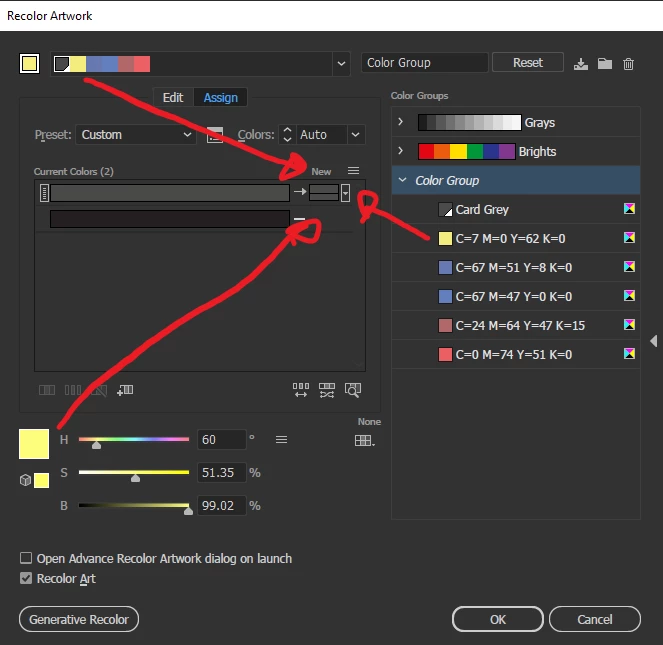
How do I apply a colour from Harmony Rules or Color Group to the NEW colour box in Recolor Artwork?

  • November 28, 2023
  • 返信数 1.
  • 320 ビュー

So I want to pick a colour from the 'harmony rules' list (isn't that why it's there?) and apply it to the NEW box in the Recolor Artwork window.


Click spamming, dragging or voodoo have failed me so far.


I realise I could copy + paste the hex code from a colour from the Harmony Rules into the swatches and then go back to this window and double click on the NEW box and apply the colour now saved in swatches but I am sure this workaround is not how this was intended to be used.


Any help much appreciated.
このトピックへの返信は締め切られました。

返信数 1

Monika Gause
Community Expert
Community Expert
November 28, 2023

You can try and go into Edit mode (see the two tabs). In there right click that yellow swatch and make it the base color. Does that work?

Minus Front
Minus Front作成者
Known Participant
November 28, 2023

Hi thanks for your reply. No I don't seem to be able to get it to work.


I just don't understand what is the point in allowing us to pick colour palettes from that menu, edit their indiviual colours but not be able to apply them to the NEW box. I am sure I am missing something?


If I could just add one of them colours from the harmony rules directly onto swatches instead that would be alright but that is not even an option..

Monika Gause
Community Expert
Community Expert
November 28, 2023

You can create a swatches group from them. But then you cannot directly use that swatch to apply it to just one specific row.