
How do you write a loop for a function that runs an Action Script on one individual item completely before re-running the loop on the next item in the selection?
---------------------------------------------------
Adobe Illustrator CC 2018 — Javascript
---------------------------------------------------
Hi everyone,
I'm trying to write a script that involves creating an action and running it on each item within a selection, but I haven't been able to get the action script to run on each item individually in order, rather than having it all happen at the same time.
I understand how to loop through all selected items for the native built-in Illustrator functions like selected.textRange.characterAttributes.size = fontSize; but I'm unclear on how to loop custom functions to run on each individual item of the selection completely before moving onto the next selected item.
---------------------------------------------------
MAIN BLOCK OF EXAMPLE CODE HERE:
---------------------------------------------------
function runActionScript(){
// code for Action Script goes here.
}
for( var i = 0; i < selected.length; i++ ){
runActionScript( selected );
$.sleep(1000);
app.redraw();
}
Hopefully, that's enough information to see what I did wrong and how we can fix it. I'm sure I'm making a very simple rookie mistake with how I'm writing the loop to run on each individual item of the selection.
I've seen some mentions on other posts within the forums about using $.sleep(1000) and app.redraw(); to create a pause in the script, but it didn't seem to work for me.
---------------------------------------------------
MORE DETAILS BELOW:
---------------------------------------------------
What's happening is that the part of the action script involves:
- Outlining the selected text
- Labeling the selected text with an attribute note: "selectToMerge"
- Duplicating the selected item
- Moving the duplicated item
- Selecting all objects with the "selectToMerge" note
- Merging all "selectToMerge" items.
So it needs to run the script on each item in the selection completely before running it on the next item. Right now it seems to run the script on all of the items either together or separately but at the exact same time—either way, it causes everything to merge into one object, instead of having separate merged shapes. Hope that makes sense:
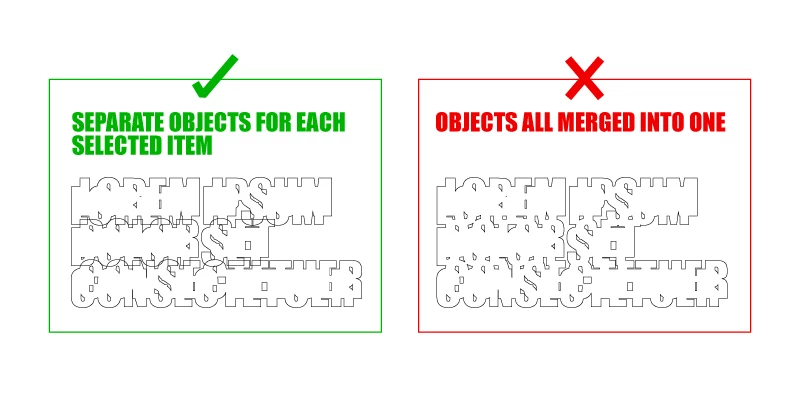
The actual script I'm working on is a lot more complex with many other unrelated steps involved, but if the block of code above isn't enough, I have a more extended (but still simplified) example code below that focuses just on the part that creates the action and tries to run the action script for each selected item.
WARNING: Since the loop I wrote doesn't work properly, there are some errors when it runs. It basically re-runs multiple times based on the number of items you select. So if you decide to try and run this script as is for yourself, select only two or three live text frames to test, and just click "Continue" / "Stop" until it's done. Also, it's meant to be run on live text frames:
#target Illustrator
// If a document is open, start the script:
if( app.activeDocument ){
// FIRST, DEFINE VARIABLES & FUNCTIONS //////////////////////////////////////////////////
var doc = app.activeDocument;
var selected = doc.selection;
// Create Temporary Action to Load and Unload
// Based on example script written by Adobe Forums User: et3d
// Date: August 11, 2017
// URL:
// Which was based on:
// "Creating a dynamic action to use with app.doScript() method." guide written by Adobe Forums User: Silly-V
// Date: February 10, 2017
// URL:
// Many, many thanks to both Silly-V & et3d for sharing the immensely helpful information.
function createAction ( actionString, set ) {
var fpath = Folder ( "~/Desktop/" )
var f = File ( fpath + set + '.aia' );
f.open( 'w' );
f.write( actionString );
f.close();
app.loadAction( f );
f.remove();
}
function runActionScript(){
var set = 'Example Set';
var action = 'outlineDupMoveMerge';
var actionString = [
"/version 3",
"/name [ 11",
" 4578616d706c6520536574",
"]",
"/isOpen 1",
"/actionCount 1",
"/action-1 {",
" /name [ 19",
" 6f75746c696e654475704d6f76654d65726765",
" ]",
" /keyIndex 0",
" /colorIndex 0",
" /isOpen 1",
" /eventCount 7",
" /event-1 {",
" /useRulersIn1stQuadrant 0",
" /internalName (adobe_createOutline)",
" /localizedName [ 15",
" 437265617465204f75746c696e6573",
" ]",
" /isOpen 0",
" /isOn 1",
" /hasDialog 0",
" /parameterCount 0",
" }",
" /event-2 {",
" /useRulersIn1stQuadrant 0",
" /internalName (adobe_attributePalette)",
" /localizedName [ 17",
" 4174747269627574652053657474696e67",
" ]",
" /isOpen 0",
" /isOn 1",
" /hasDialog 0",
" /parameterCount 1",
" /parameter-1 {",
" /key 1852798053",
" /showInPalette 4294967295",
" /type (ustring)",
" /value [ 13",
" 73656c656374546f4d65726765",
" ]",
" }",
" }",
" /event-3 {",
" /useRulersIn1stQuadrant 0",
" /internalName (adobe_move)",
" /localizedName [ 4",
" 4d6f7665",
" ]",
" /isOpen 0",
" /isOn 1",
" /hasDialog 1",
" /showDialog 0",
" /parameterCount 3",
" /parameter-1 {",
" /key 1752136302",
" /showInPalette 4294967295",
" /type (unit real)",
" /value 0.0",
" /unit 592476268",
" }",
" /parameter-2 {",
" /key 1987339116",
" /showInPalette 4294967295",
" /type (unit real)",
" /value -0.0",
" /unit 592476268",
" }",
" /parameter-3 {",
" /key 1668247673",
" /showInPalette 4294967295",
" /type (boolean)",
" /value 1",
" }",
" }",
" /event-4 {",
" /useRulersIn1stQuadrant 0",
" /internalName (adobe_sendBackward)",
" /localizedName [ 13",
" 53656e64204261636b77617264",
" ]",
" /isOpen 0",
" /isOn 1",
" /hasDialog 0",
" /parameterCount 0",
" }",
" /event-5 {",
" /useRulersIn1stQuadrant 0",
" /internalName (adobe_move)",
" /localizedName [ 4",
" 4d6f7665",
" ]",
" /isOpen 0",
" /isOn 1",
" /hasDialog 1",
" /showDialog 0",
" /parameterCount 3",
" /parameter-1 {",
" /key 1752136302",
" /showInPalette 4294967295",
" /type (unit real)",
" /value -21.2132034342",
" /unit 592476268",
" }",
" /parameter-2 {",
" /key 1987339116",
" /showInPalette 4294967295",
" /type (unit real)",
" /value -21.213203437",
" /unit 592476268",
" }",
" /parameter-3 {",
" /key 1668247673",
" /showInPalette 4294967295",
" /type (boolean)",
" /value 0",
" }",
" }",
" /event-6 {",
" /useRulersIn1stQuadrant 0",
" /internalName (adobe_setSelection)",
" /localizedName [ 13",
" 5365742053656c656374696f6e",
" ]",
" /isOpen 0",
" /isOn 1",
" /hasDialog 0",
" /parameterCount 3",
" /parameter-1 {",
" /key 1952807028",
" /showInPalette 4294967295",
" /type (ustring)",
" /value [ 13",
" 73656c656374546f4d65726765",
" ]",
" }",
" /parameter-2 {",
" /key 2003792484",
" /showInPalette 4294967295",
" /type (boolean)",
" /value 0",
" }",
" /parameter-3 {",
" /key 1667330917",
" /showInPalette 4294967295",
" /type (boolean)",
" /value 1",
" }",
" }",
" /event-7 {",
" /useRulersIn1stQuadrant 0",
" /internalName (ai_plugin_pathfinder)",
" /localizedName [ 10",
" 5061746866696e646572",
" ]",
" /isOpen 0",
" /isOn 1",
" /hasDialog 0",
" /parameterCount 1",
" /parameter-1 {",
" /key 1851878757",
" /showInPalette 4294967295",
" /type (enumerated)",
" /name [ 3",
" 416464",
" ]",
" /value 0",
" }",
" }",
"}"
].join( "\n" );
createAction( actionString, set );
app.doScript( action, set );
app.unloadAction( set, "" );
}
// THEN, START SCRIPT ////////////////////////////////////////////////////////////
// If something is selected, run the script:
if( selected.length > 0 ){
for( var i = 0; i < selected.length; i++ ){
// If all selected items are text frames, run the action script:
if ( selected.typename === "TextFrame" ){
runActionScript( selected );
$.sleep(1000);
app.redraw();
}
// If one or more of the selected selected items is not a text frame, display message:
else{
alert( "One or more of the selected items is not a text frame. Please select a text frame and try again." );
}
}
}
// If nothing selected, display message:
else{
alert( "Nothing is selected. Please select a text frame and try again." );
}
}
// If no document is open, display message:
else{
alert( "No document found. C'mon man, get it together." );
}
 AdChoices