Participating Frequently
April 13, 2016
Answered

how to center text vertically in illustrator

  • April 13, 2016
  • 6 replies
  • 75441 views

In my colored text box I can center type horizontally but how do I center it vertically?

Correct answer Mike_Gondek10189183

Unfortunatley after many many years of asking for this, Illustrator still has not added this feature to text frame options.

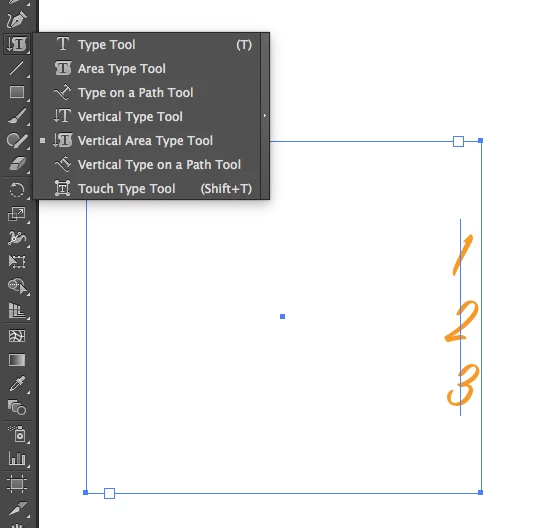
The closest you can get is to draw a rectangle, click with the vertical type tool (But that will only allow you one character per line.)
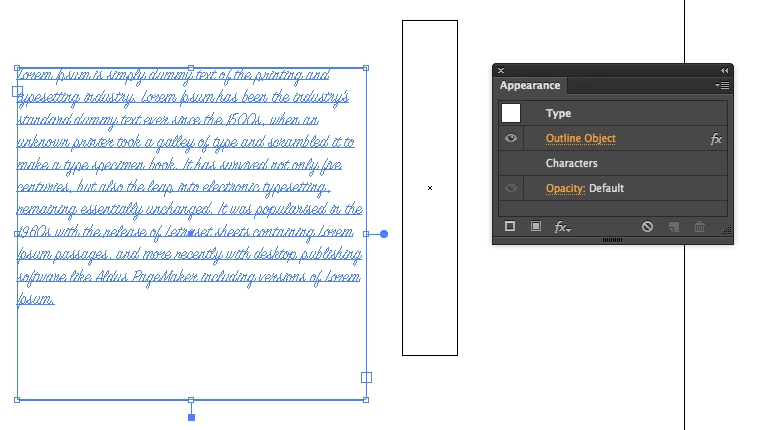
You could do this with the align palette. You would need to select another element to align against (eg: a rectangle filled with none). You need to add an outline effect to the type, and in the align flyout menu turn ON use preview bounds.
6 replies

Inspiring
September 15, 2020


Doug A Roberts
Community Expert
Community Expert
September 15, 2020

For the benefit of future readers; this was added in the most recent update, 24.3.

Inspiring
September 15, 2020

Very cool! Thanks for clarifying 'great-bear's post. Was wondering if this was a recent update. 🙂

Kurt Gold
Community Expert
Community Expert
July 26, 2020

John, I'm afraid that your approach is still not the solution that many users are looking for.


It is rather well-known that there are (bumpy) workarounds in Illustrator, but they are cumbersome.


To get an idea what is requested in that case, you may just take a look at InDesign's capabilities when it comes to vertically justify type inside text objects.

July 26, 2020

In case anyone is seeing as of July 2020, I'm not sure if this was fixed in an update or if it was just always hidden. To adjust text vertically in a textbox in Illustrator you need to expand the "character" pane and adjust the "baseline shift". That will allow you to move the text in the textbox upwards or downwards.

Known Participant
August 20, 2018

How? HOW is this not built into Illustrator? 2018, I can 3D revolve and perspective map, but I can't vertically center text in a box?

Monika Gause
Community Expert
Community Expert
August 20, 2018

ahainen  schrieb

How? HOW is this not built into Illustrator? 2018, I can 3D revolve and perspective map, but I can't vertically center text in a box?

If you want it, you can post it here: http://illustrator.uservoice.com

Mike_Gondek10189183
Community Expert
Mike_Gondek10189183Community ExpertCorrect answer
Community Expert
April 13, 2016

Unfortunatley after many many years of asking for this, Illustrator still has not added this feature to text frame options.

The closest you can get is to draw a rectangle, click with the vertical type tool (But that will only allow you one character per line.)

You could do this with the align palette. You would need to select another element to align against (eg: a rectangle filled with none). You need to add an outline effect to the type, and in the align flyout menu turn ON use preview bounds.

Participating Frequently
April 13, 2016

Mike ... This is crazy!!  As many things that Illustrator has to offer I can't believe it has no text frame options and you can't center type vertically in a box.  InDesign makes it so easy. 

I can make it work by using the rectangle tool .. making my colored box then doing a separate box with the type in it and manually centering the type in the colored box.  That seems to work and is the simplest for my simple mind but WOW.

Thanks for trying to help me!!

Mike_Gondek10189183
Community Expert
Community Expert
April 13, 2016

I agree, this is on my top ten list of Illustrator feature requests.

Not sure how precise you want to be, but assigning the effect >> outline object works actually better than InDesign, if you are looking to center on the type based upon the lowest descender, and tallest ascender. Indesign centering depends on the font, and some are not perfect on centering vertically if you measure, but for most people being close is good enough.

Kurt Gold
Community Expert
Community Expert
April 13, 2016

Currently in Illustrator there are just some bumpy workarounds to do it.

Depends on what you are talking about: Point type or Area type.

A common workaround is to use the Convert to Shape effect, but in many cases this is just foolish. Guess you can find some suggestions by using the forum search.

Reasonably centre aligning text vertically (like in InDesign or some other applications) is not available in Illustrator.