


Inspiring
Oct 16, 2024 7:55 PM UTC
Answered

Illustrator 2025: Pencil tool now has no Fidelity.

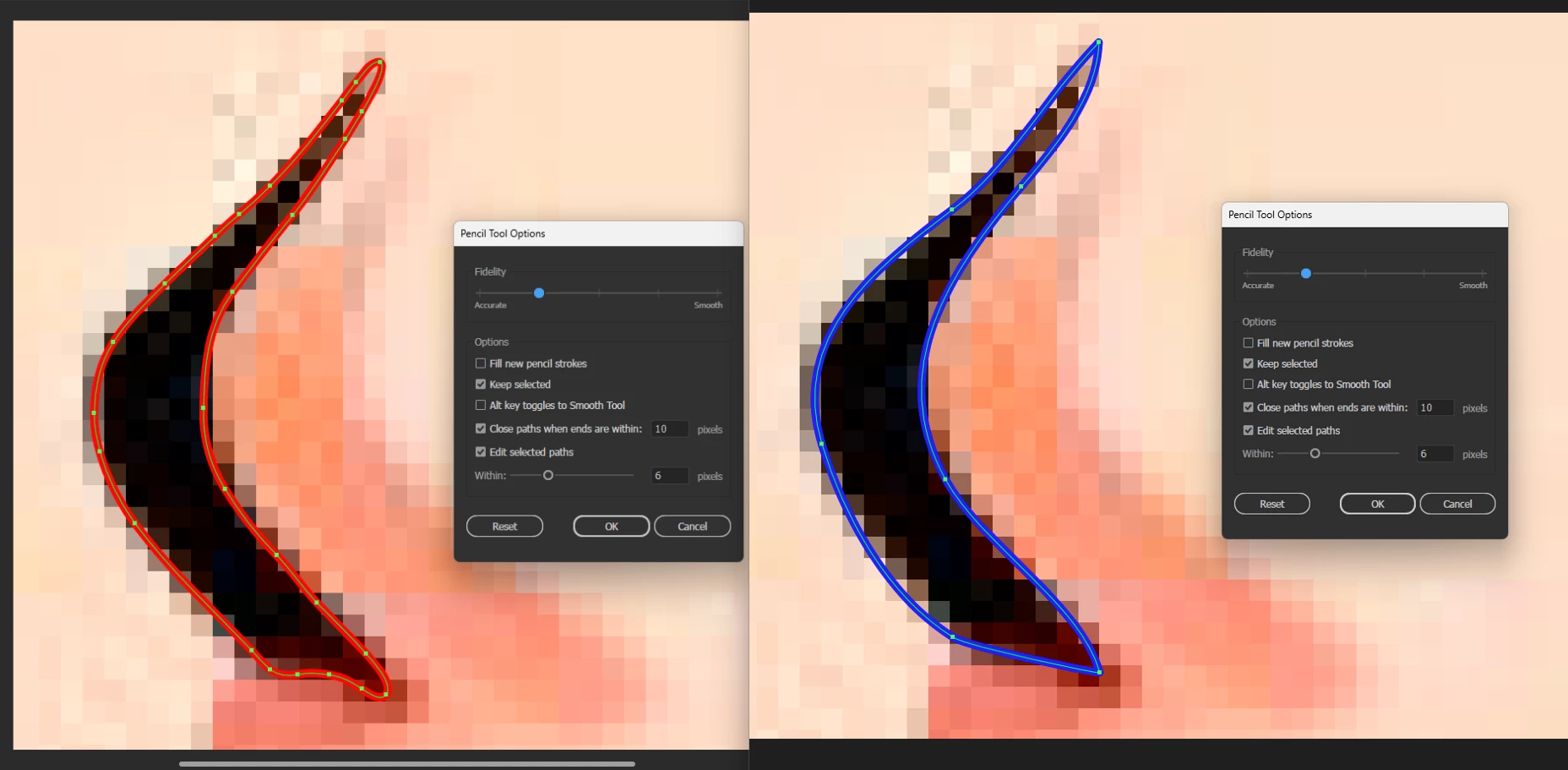
Installed the new Illustrator 2025 and now the Pencil tool can't draw an accurate line to save its digital life. Experience taught me to not delete the old version, so I tried the same line in the previous version with the same settings. Image attached shows what I should be able to draw on the left (red line): I can accurately trace the shape and even round the ends to not be sharp. 'Illy' 2025 on the right (blue line): every time I try to redraw/adjust a line throws a new part of it out of place. And forget rounding the sharp corners. I've un-checked all the 'Snap to...' options on both versions of Illustrator and can't think of anything else to tweak to fix this. Any ideas? (Coworker has the same issue, but others in the dept. do not. ??)



Anubhav M
Anubhav MCorrect answer
Community Manager
Oct 29, 2024 9:30 PM UTC

Hello everyone,

Our product team has tried fixing this problem with the latest update for Illustrator v29.0.1. Would you mind updating Illustrator to check if it helps resolve the problem?

Looking forward to hearing from you.


Anubhav

29 replies

Anubhav M
Community Manager
Anubhav MCommunity ManagerCorrect answer
Community Manager
Oct 29, 2024 9:30 PM UTC

Hello everyone,

Our product team has tried fixing this problem with the latest update for Illustrator v29.0.1. Would you mind updating Illustrator to check if it helps resolve the problem?

Looking forward to hearing from you.


Anubhav

Translate
lomaxdAuthor
Inspiring
Oct 29, 2024 9:33 PM UTC

Anubhav,

It seems to have fixed things. Thank you so very much!

Translate
lomaxdAuthor
Inspiring
Oct 29, 2024 6:34 PM UTC

Hey All,

I just installed the latest version 29.0.1 and the pencil tool seems to be working again. On the Fidelity setting I tried the most accurate and the second from the left also and it felt closer to normal (I use those the most). If any other brave souls with a moment of spare time are willing to confirm, that would be great.

Translate
Participant
Oct 29, 2024 7:05 PM UTC

I can confirm this!! I just checked when I saw your notification come through and it looks like all the version 29.0.1 pencil tool fidelity settings are working correctly for me now. It's not behaving at all like it was when I first downloaded the latest version. Super happy about this fix as I use the pencil tool constantly!

Translate
wotUwant
Participating Frequently
Oct 28, 2024 3:23 PM UTC

What has Adobe been up to, what have they done to their core products? Yes, I have just found this out too, set to 'fully accurate' it is totally useless in 2025 - just roughs out all of the carefully drawn detailed trace (as if the tool was set to 100% smooth), I have reverted to 2024 until Adobe fixes this, it is safer I think. (I needed to revert to 2024 InDesign too). See thread... https://community.adobe.com/t5/indesign-discussions/indesign-2025-lagging-on-macbook-air-with-m3-chip/td-p/14915197/page/3

Translate
Participant
Oct 23, 2024 4:12 PM UTC

Same issue, I've posted on it elswhere. It was recommended to disable live feedback on tool options as a way to correct this, but I have not been able to find this option... has anyone tried this and if so, where is this option?  (I'm on Mac).


Translate
lomaxdAuthor
Inspiring
Oct 23, 2024 4:38 PM UTC

rfliegler,

The only reference I can find regarding live feedback in Illustrator deals with document sharing over the cloud. I wonder if someone was referring you to Real-Time Drawing and Editing. I've not used this preference, but I just tried both on and off with no change in Pencil Tool problems.


Translate
Participant
Oct 21, 2024 6:32 PM UTC

I'm having this same problem, I notcied as soon as I opened the 2025 version. Sounds like there's just a few of us with this issue so far but I saw someone say it happened in 2014 and the issue was resolved. Unfortunate but I'm just using the 2024 version until it gets fixed, hopefully that's soon though. Thanks for your post, glad I found some type of explanation as to what's going on!

Translate
Participant
Oct 25, 2024 5:19 PM UTC

Update, it looks like Illustrator 2024 was automatically uninstalled so I'm forced to use the 2025 version now? I've never dealt with an issue like this so not sure how to handle it. Cleaned out my Finder cache today, not sure if it's because of that. Please tell me I didn't do this to myself lol.

Translate
Monika Gause
Community Expert
Community Expert
Oct 25, 2024 5:54 PM UTC

https://community.adobe.com/t5/illustrator-discussions/separate-objects-in-the-pattern-without-getting-duplicates/m-p/14942397#M424928


also: disable automatic updating

disable automatic deleting of older version.

Translate
Known Participant
Oct 17, 2024 12:39 AM UTC

Thank you @lomaxd  for making this post

This is a major issue affecting both me and my coworkers as well. I’ve made an extensive post about it here:
Ai2025 - The Pencil tool has become unusable again! There's no accuracy—it’s too smooth!!!

The last time this happened was in 2014, and I posted about it back then too. Adobe fixed it back then...:
PLEASE PLEASE adobe. The new pencil tool has become unusuble to me

...but now, in 2025, it’s broken again, making Illustrator unusable for many of us until this gets resolved

@Kurt Gold @Monika Gause

Translate
Kurt Gold
Community Expert
Community Expert
Oct 16, 2024 9:05 PM UTC

As per your screenshot you are using the Windows version of Illustrator.


I just tried it with the latest Illustrator version (29.0) on Windows 10 and cannot reproduce your complaint.

Translate
lomaxdAuthor
Inspiring
Oct 16, 2024 9:19 PM UTC

Thanks Kurt. Neither could a handful of coworkers on the same setup as I have. There's only two of us that seem to have this issue here in this office. I would presume this is not a widespread issue based on the ratio here. What we really need is someone to guide us to a solution and not necessarily a role-call of how many have the problem. I hope it's a setting we've overlooked, but I've been using Illy since '98 and like to think I've covered the bases. Thanks for looking into it.

Translate
Monika Gause
Community Expert
Community Expert
Oct 16, 2024 9:25 PM UTC

Did you already try the obvious?

Reboot the computer and reset the preferences?

Translate