July 4, 2022
Answered

Illustrator 3D render issue

  • July 4, 2022
  • 6 replies
  • 14412 views

Hello! 

I am creating some simple 3D objects in Illustrator but the rendered result has some wierd pixelated dots all over it. I tried adjust other options but still get the same problem. 
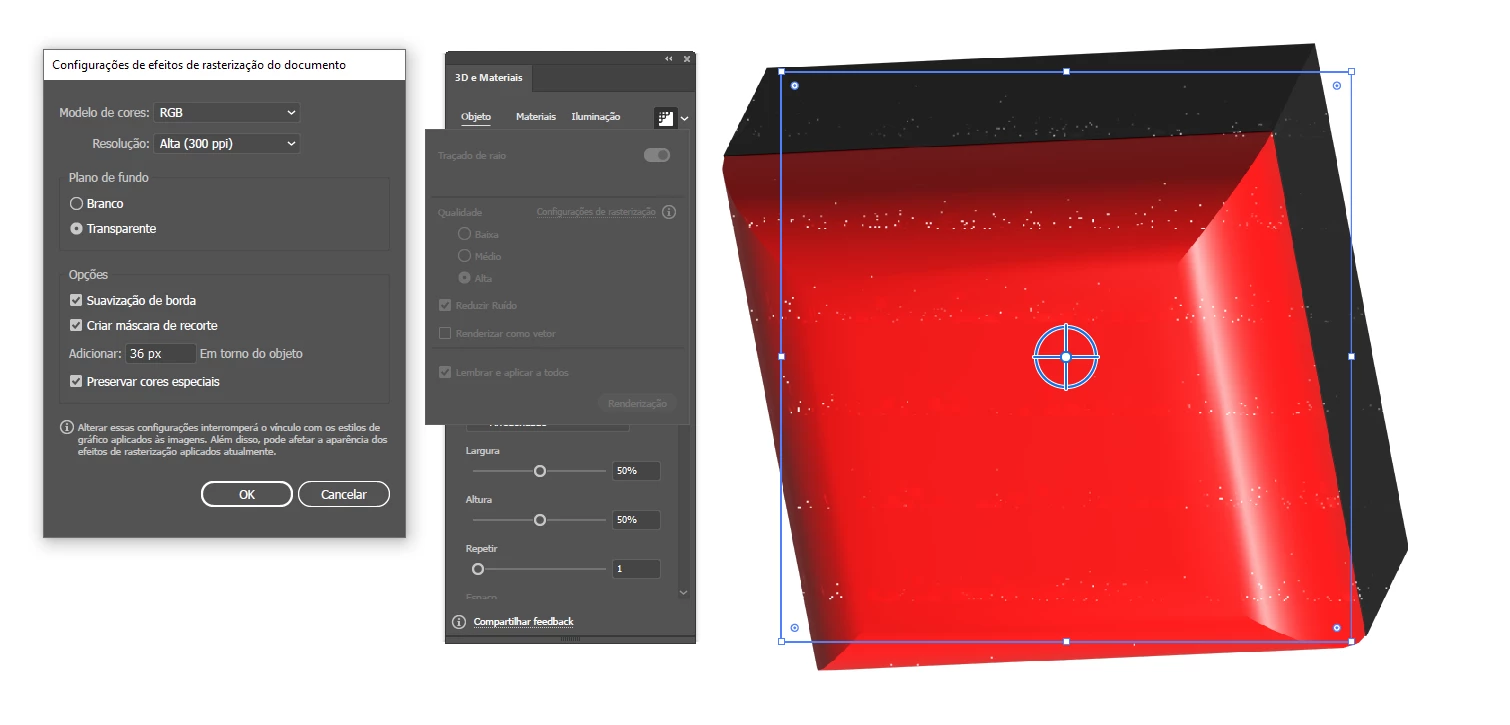
 

This topic has been closed for replies.
Correct answer ZBalling

Thanks for sharing this, @Slava Zamberg & @Rebecca Balatresi. We are glad to hear that updating the drivers helped you both.


Please feel free to reach out if the issue resurfaces in future or if you run into any other issues.


Thanks & regards,

Anshul Saini


This is officialy fixed in 517.48.

6 replies

Slava Zamberg
Participant
September 22, 2022

Today I updated my graphics card driver, there are no more artifacts. (Driver: Nvidia Studio ver 517.40)

Rebecca Balatresi
Participating Frequently
September 22, 2022

I upgraded too my GPU drivers and I also upgraded Windows 11 in the same time: no more white dots in the rendering. One of the two updates worked!

Anshul_Saini
Community Manager
Community Manager
September 23, 2022

Thanks for sharing this, @Slava Zamberg & @Rebecca Balatresi. We are glad to hear that updating the drivers helped you both.


Please feel free to reach out if the issue resurfaces in future or if you run into any other issues.


Thanks & regards,

Anshul Saini

Anshul_Saini
Community Manager
Community Manager
September 8, 2022

Hi @Jiltedone , @영찬256839483dj5 & @Rebecca Balatresi,


We are sorry for the trouble. Would you mind trying the custom settings showcased below in the screenshot on the objects and checking if that helps?

2100 PPI - Custom Settings


72 PPI - Default Settings


Note: Rendering the objects as a vector is not supported for Materials and graphics with gradients or raster content which may lead to not-so-good quality.
 

However, if you are still facing issues, would you mind sharing the download link to the file with me via DM or here?


I will be looking forward to your response.


Thanks & Regards,
Anshul Saini

Rebecca Balatresi
Participating Frequently
September 9, 2022
Hi,

thanks for your help.
I tried to rasterize as you specified but the problem is still there and
there is no particular difference with a resolution or another.
See the file .ai I shared and the screenshot too.

https://shared-assets.adobe.com/link/08fb2c4a-7977-44ad-7daf-ede70392450d

Waiting for your kind reply,
Rebecca Balatresi

--
AVVISO DI RISERVATEZZA: Il testo e gli eventuali documenti trasmessi
contengono informazioni riservate al destinatario indicato. La
comunicazione è confidenziale e la sua riservatezza è tutelata legalmente
dal D.Lgs 196/2003 e ss.mm (Codice in materia di protezione di dati
personali). La lettura, la copia, l’uso non autorizzato o qualsiasi altra
azione derivante dalla conoscenza di queste comunicazioni sono
rigorosamente vietate. Se si ritiene di non essere il destinatario di
questa comunicazione o se la si è ricevuta per errore, si prega di darne
immediata comunicazione. Prima di stampare questa e-mail assicurati che sia
effettivamente necessario.
Rebecca Balatresi
Participating Frequently
September 9, 2022

As a vector worked, but as you said rendering the objects as a vector is not supported for Materials and graphics with gradients or raster content which may lead to not-so-good quality. Amy other suggestion to solve the issue completely?

Participant
August 26, 2022

same problem 
amd 3700x

3070

windows 11 pro 21H2

Participating Frequently
September 1, 2022

I have the same problem, unchecking the reduce noise makes the result really sketchy and i am forces to rasterize and edit in Photoshop to smooth things out. Is there not real solution to this problem.

Intel 8300H, NVIDIA RTX 2060.

Anshul_Saini
Community Manager
Community Manager
July 15, 2022

HI @3060479 @Kheng25211018huwv,


We are sorry for the trouble. Would you mind trying resetting the Illustrator preferences?

If that doesn't help, would you mind sharing a few details like:

  • The exact version of OS & Illustrator
  • Small recording demonstrating the issue. It would be really helpful for us.
  • Share the download link to the sample file in which the issue is replicable.
  • GPU make & model
  • Screen resolution of your display
  • External monitor(s) make & model if used any.


We are here to help. We just need more info.


Thanks & Regards,
Anshul Saini

Participant
July 25, 2022

Hi @Anshul_Saini ,

I'm facing the same problem here.


Thanks for the support,

João Peixoto

Anshul_Saini
Community Manager
Community Manager
July 25, 2022

Hi @joao.peixoto,


Sorry for the trouble, and thanks for sharing the details. The file you have shared is private. Would you mind sharing it publically? If yes, please ensure that the "Anyone with the link can view" & "Save a Copy" options are enabled.


Looking forward to it.


Regards,

Anshul Saini

Bill Silbert
Community Expert
Community Expert
July 4, 2022

Are those dots still there when you export or print the object? If they are only showing up in your screen view try turning off GPU Performance in the Performance section of Illustrator's preferences.

Participant
July 12, 2022

Hi,

I'm currently having the same issue with pixelated dots after the ray tracing. I have tried turning the GPU performance on and off and update it but still does not work.

Monika Gause
Community Expert
Community Expert
July 4, 2022

3D and materials is currently a raster based effect. If the Raytracing options have no effect, then that's that.


Is your graphic card compatible?
