August 4, 2012
Answered

illustrator 5.5 crashes when scrolling through font list

  • August 4, 2012
  • 18 replies
  • 38009 views

I'm running on a macbook pro OS 10.7.4 and illustrator 5.5 crashes everytime I open a new document, select the type tool and scroll through the font list from the font menu list. It scrolls about 25% down the list then crashes the software.
This topic has been closed for replies.
Correct answer Wade_Zimmerman1

No solution, just a workaround.

double click the current font name to highlight it.

start typing the name of the font you would like to use.

When the balance of the font name is highlighted, hit return.

Note that this is actually faster than having the computer render all of the different fonts in the scroll list.

I have been doing this for the past 6 weeks, and don't miss the font list a bit.

Hope this helps.


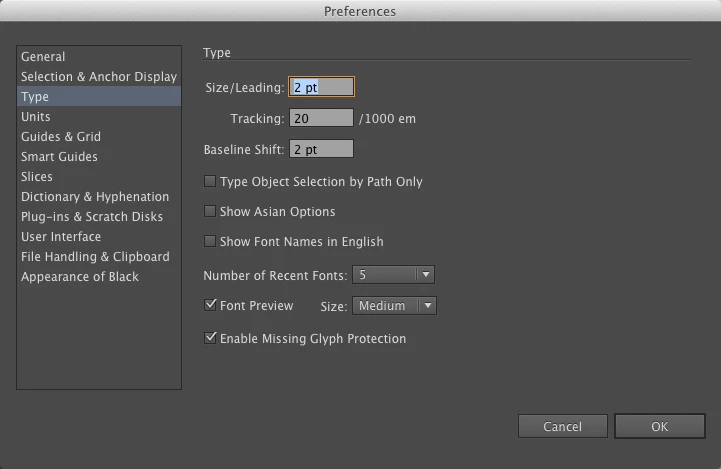
Try this turn off Font Preview and if that doess not work Try turning of Enable Missing Glyph Protection if that does not work turn off both in the Illustrator preference.

It is just a guess.

18 replies

Participant
March 12, 2019

I found this link really helpful
[Solved] How to Fix Windows Update Error 80070103

Bascally:

Launch Font Book > Select All > Validate Fonts > Delete anything with a big red 'X'

Then you can turn Font preview back on and it shouldn't crash (so far...)

xanderglactic
Participant
September 28, 2016

So I have been having the same issue, and I may have found a solution.

1. I deleted all "USER" fonts from font book. (this may or may not effect anything but I did it anyways)

2. In Illustrator go to "Type Preferences" menu - Disable "FONT PREVIEW" and Enable "SHOW FONT NAMES IN ENGLISH"

3. Mission Complete.

After doing this the crash issue seems to have been laid to rest. I've scrolled up and down through the fonts in both windowed font tools and top menu font window. All is well.

I hope this helps everyone out.

ClothRabbit
Participant
September 14, 2017

YAY!!! this works! Thank you so, so much!

For everyone reading this, once you've selected "SHOW FONT NAMES IN ENGLISH" you can then re-activate "FONT PREVIEW" and you will be able to see the font previews again without it crashing. So glad someone solved this as it was driving me nuts!!

ClothRabbit
Participant
September 27, 2017

**UPDATE** to the message above, this does work but I'm having to continually do it. I just click & un-click. It's a pain but I need to see the font previews.

JustJace-O3TSGk
Participating Frequently
December 4, 2015

This has been a GIGANTIC issue for me too. My version of Illustrator was fine before porting it to a new 2015 Macbook. I can't believe this hasn't been resolved at all.

Participant
September 1, 2015

Same problem - brand new computer running Yosemite with retina display.  Downloaded CS5.5 clean and entered in my old key.  Have not installed my extra fonts yet - ran a check of the fonts that came pre-installed with the computer.  No red X's, but I do have 22 "minor problems" - do I need to delete these 22 fonts that have yellow ! symbols? 

Meanwhile, turning off font preview DID work to avoid crashing, but using the up/down keys to scroll through (as opposed to track pad) did not.  Still crashed.  I def do NOT know all my fonts and rely on the font preview to help me choose, so that's going to add hours to my life.

I've noticed that some fields in Illustrator are low resolution, pixelated...I wonder if this is a retina compatibility issue?

My system is also crashing when I try to open or save using the drop down menu at top/center to go straight to recently used folders (lost an hour worth of work the first time that happened).  If I navigate to the folder using the menus on the left is OK, but it's an old habit to break to not reach for that drop down box.  I don't know what that is called to search for similar fixes or workarounds...ay yay any help there also appreciated.

Participant
July 7, 2015

To chime in on the issue with Illustrator CS5 crashing when using character preview, I see a lot of talk about "font corruption." It's frustrating one can't mention the word "font" and "crash" in the same sentence without Adobe or tech support people immediately assuming a "corrupt font."

I just purchased a new iMac 5k retina display. Reinstalled CS5, updated to latest version, I have NO add-on fonts. Illustrator crashed multiple times within the first 2-3 minutes of working on it. Adobe gives NO support what so ever! I'm thankful to find this thread because I've reduced the preview size of the font and that seemed to correct this problem for now.

I also have the issue when trying to save a file to google drive Illustrator crashes (that has nothing to do with Retina display or fonts?) Pretty frustrated that I upgrade computers to provide better productivity and actually end up with worse productivity with Adobe suite. Also, I find to suggest to "downgrade" software options or turn off certain software features that enhances productivity just to get the software to operate correctly an insult. Let's fix the software rather than always blaming the manufacturer of the computer or the end user. 

Monika Gause
Community Expert
Community Expert
July 7, 2015

CS5 is not officially supported on your brand new Mac with brand new system. This can be clearly taken from the official spec.

System requirements | Illustrator

Also: directly saving to networked volumes has never been a good idea when working with Illustrator.

Illustrator support for networks and removable media

robarisas
Participant
June 9, 2015

Hello,

For me, the only thing that has worked has been using FontExplorer XPro. If Font Preview is enabled I see some "weird" fonts marked in grey, deactivating those fonts in Font Explorer makes Illustrator "doesn't crash". I write it on brackets because Illustrator still crashes if you do scroll until fonts list bottom, if you stay between A to Z regular fonts (not those fonts separated by a line at the bottom) Illustrator doesn't crash, even using scroll.

I know that it's not a complete solution, but it's better than deactivating font preview, I hope it works for you.

Known Participant
March 25, 2015

You can try all of the "stuff" posted here above, ( It's the standard purge PRAM, purge cache, search for corrupted files, corrupted fonts, duplicate fonts, fresh install, new user, blah blah until your heads splits open ) but it's not going to fix it for you and it's a huge waste of time.

Who knows what is causing it.  But none of the fixes will work.  If you ask Apple they will say it's Adobe and if you ask Adobe they will say it's Apple's fault. 

For me it started when I upgraded to Yosemite.

Easiest fix is, as stated by "Member" above, turn off Font Preview in the preferences menu.

If you don't know the fonts well enough for this to be viable for you the other option is to not turn off Font Preview but use the arrow keys to move up and down the font list. 

The mouse or track pad will bomb it.  But the arrow keys do not.  This was also pointed out above.

I'm guessing the cloud version of Illustrator doesn't have this bug.  I don't know.  Photoshop and InDesign do not.

Participant
November 24, 2014

My work around is to turn off the font preview but scroll through my fonts through the font book to see the previews and then type in the font I want to try within Illustrator. This seems like it should be something Adobe could fix but it seems that through this thread, it's been going on for years! It's frustrating to pay so much for a computer and the software and have it not work flawlessly.

teresuhhh
Participant
November 29, 2014

I am also a designer, and have been having the same problems as everyone else. I just bought a Macbook Pro with retina display, and I am using Illustrator CS5.5. I have OS version 10.10, as I tried upgrading to Yosemite to see if by some miracle of God that would fix the problem but to no avail. This thread is years old with no solution, and I just bought a $3000 computer only to have the main program I work in crash religiously which is beyond ridiculous. Has anyone found a solution yet? Also, has anyone tried the tweeting suggestion mentioned above? I think that might be worth a shot for me if no one has tried already.

Larry G. Schneider
Community Expert
Community Expert
December 1, 2014

Have you tried verifying all your fonts using FontBook and deleting any questionable or duplicate fonts?

Participant
September 9, 2014

I have a new macbook pro with retina display. New out of the box August 2014. I am using Adobe Illustrator CS 5.5, operating system 10.9.4

I have tried some of the suggestions... Type preferences changed from medium to small, removed any fonts from font boos that had issues. Scroll fonts in illustrator using the arrows instead of track pad or mouse and IT STILL CRASHES! Any help or other suggestion wold be appreciated!!

September 9, 2014

Glosmo:  Turn off font preview.  It's the only thing that will work.  I was in exactly the same situation.  It sucks.  But turning off font preview stops it from crashing.  (guess as a designer it challenges you to know your fonts VERY well.....)

Participant
September 9, 2014

Yes that seems to work…. very frustrating but you DO have to know your fonts if you are a designer! This just forces you to do it. Hopefully Adobe will find a fix for this though. Hard to understand why issues such as this still happen after all these years. Thank you for your reply

Participant
August 21, 2014

try to change monitor resolution (on system preference).

at least it works... but its not retina...

sorry for my not good english.