

Le Monsieur
Participant
July 19, 2022
Answered

Illustrator - An Unknown error is detected. To help us investigate further... ShareWithAi@adobe.com

  • July 19, 2022
  • 14 replies
  • 16437 views

I just want to let everyone (and especially Adobe, obviously) know that this is still an issues in Illustrator v 26.3.1 on Windows. I installed Illustrator v26.3.1 fresh on a recently installed Windows 11 computer, and I encountered the same problem on my first attemt to save an .ai file.


The work-around that worked was unchecking BOTH "save in background" AND "export in background". Unchecking either one on its own still produces the error.


So if Anshul is right and it was fixed in v26.2.1 it has either regressed in v26.3.1 or it was fixed in the Mac branch of the code, but not in the Windows (11) branch of the code.


Either way it's still an active bug in Illustrator v26.3.1 on Windows 11.


P.S. The suggested "go to File and Package" etc message on the error dialog doesn't work. The "Package.." option is greyed out.
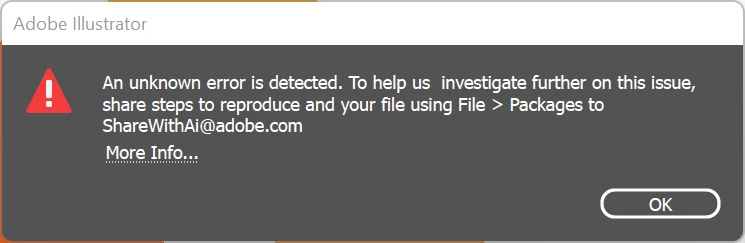


Last observation: This is a really bad bug to ship your software with, Adobe. You can't expect your customers, who pay a premium price for a premium product, to hunt down weird work-arounds to do something as basic as saving a file. And from the articles I found on this issues while looking for an answer it has been a bug for quite some time. That is, honestly, unacceptable. I hope you prioritize getting it properly fixed.

Correct answer kellybente

I had this problem on Sept 15, 2023. I systematically deleted elements until it would save properly. The offending element was legacy text.

14 replies

kellybenteCorrect answer
Participant
September 15, 2023

I had this problem on Sept 15, 2023. I systematically deleted elements until it would save properly. The offending element was legacy text.

Participant
September 15, 2023

Deleting this group solved the issue.


Participant
February 13, 2023

I had the same issue and found my problem.


I was working on my Illustrator project from my PC. The project is saved on my OneDrive. I went to a meeting and opened the project on my Macbook. In that meeting, I typed notes directly onto my project's artboard and saved the file. 


The next day, I opened it back up onto my other PC. (I work from my home, so I have multiple computers). I made some additional changes and hit save. Then that error came up. 


Then I noticed that the notes I had typed up were nowhere to be found. Then by accident, I clicked on a blank space and text box appeared with no text. I deleted them all then hit save again. The document saved. Turns out, I had corrupt text boxes.

Anshul_Saini
Community Manager
Community Manager
February 13, 2023

Wow, I'm sorry to hear that you had the same issue with Illustrator as others reported on this post, @Paula222857870i7l.

It sounds like you figured out what caused the problem, which is great! I really appreciate you reaching out and sharing your findings and workaround with others. That's so helpful!


May I ask if it's possible to share a file or screen recording demonstrating the issue? This way, we can share it with the product team, and they can see what's causing the problem. They may be able to create a potential fix for this issue in the future. Thank you for your time and for helping others with their Illustrator problems!


Looking forward to your response.


Thanks,

Anshul Saini

Participant
December 11, 2024

I would love some help with this also!


terngz
Known Participant
August 2, 2022

I have the same problem in 26.3.1 


Anubhav M
Community Manager
Community Manager
August 3, 2022

Hello @terngz,


Sorry to hear about this experience. I would request you try removing and reinstalling Illustrator using the Creative Cloud Cleaner Tool and share your observations.


Looking forward to your response.


Thanks,

Anubhav

Anshul_Saini
Community Manager
Community Manager
July 21, 2022

Hi @Le Monsieur,


We are sorry for the trouble and inconvenience caused by this issue. We haven't received any reports or comments of users reporting this after v26.2.1. I am sorry it is still causing trouble for you. I am afraid this is not replicable at our end. Would it be possible for you to have a remote session with us, and we will further investigate the issue? If yes, please send me your Adobe ID, Country & Timezone, phone number with country code, and at least two preferred days (excluding Saturday & Sunday) and time frames for a call over a private message.
To send a private message, click my profile picture and use the " Send a message" button.


Looking forward to your response.


Thanks & Regards,

Anshul Saini

Participating Frequently
January 23, 2025

Hello, I am currently having the same problem and I am using version 29.2.1. Can you help?

Monika Gause
Community Expert
Community Expert
January 23, 2025

@Remak Redüktör  schrieb:

Hello, I am currently having the same problem and I am using version 29.2.1. Can you help?


Did you already turn off "Save in background" in the preferences?