

Gavin Anderson
Participating Frequently
April 27, 2017
Answered

Illustrator CC 2017 Mac Extremely Slow

  • April 27, 2017
  • 3 replies
  • 17854 views

Per MikeGondek's advice, I am starting my own post.

I have  tried Mike's suggestion for resetting my OOBE & Cloud Cache, and also dumped my preferences. None of those helped.

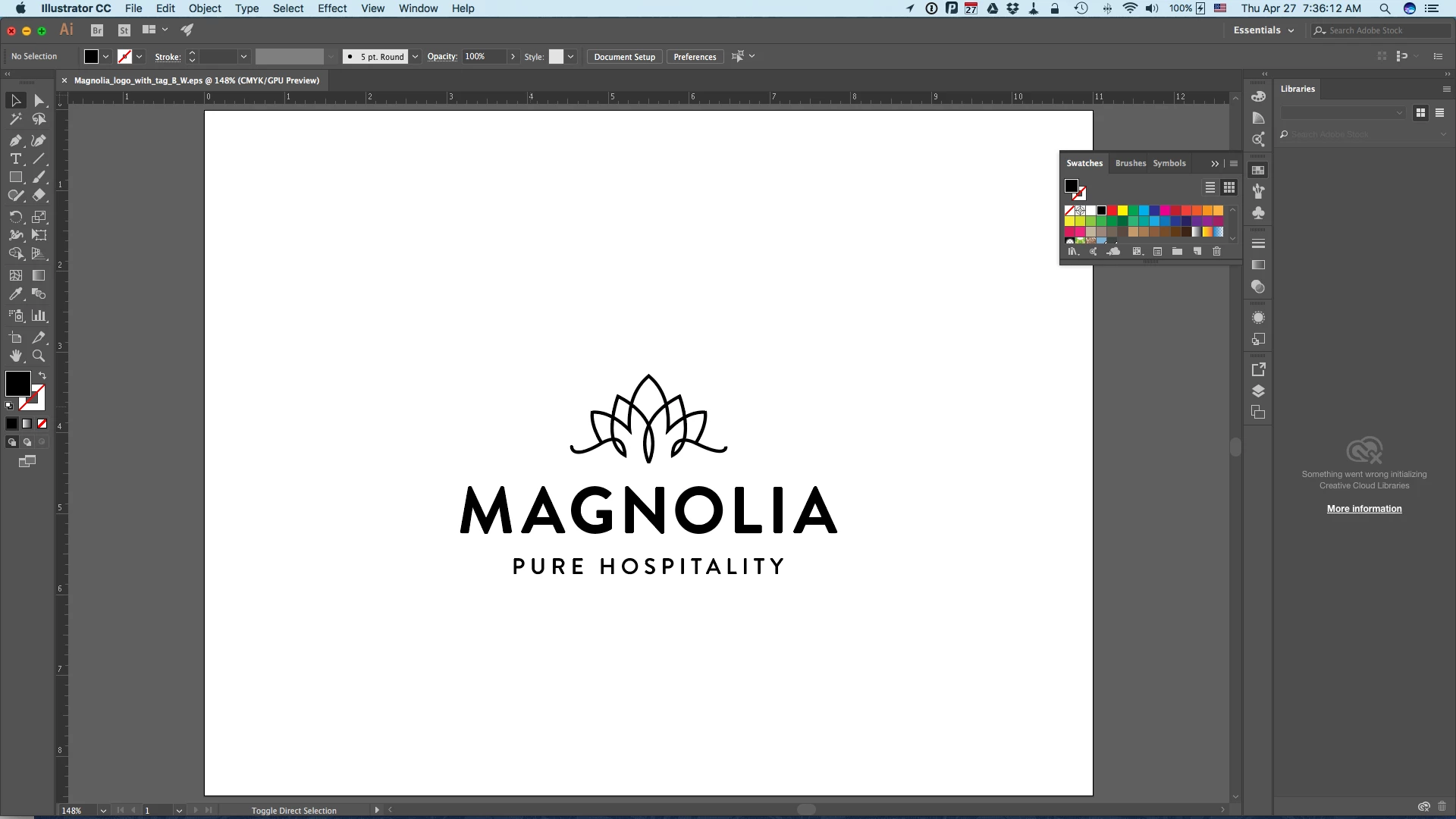
Opening a simple B&W Illustrator file took 00:01:42 (almost 2 minutes) with Illustrator already up and running. I added the trademark (™) symbol and closed and saved the file. Closing and saving the file took 00:0056 (almost a minute).
System stats:

iMac (21.5)

2.9 GHz Intel Core i5

16 GB 1600 MHz DDR3

NVIDIA GeForce GT 750M 1024 MB

Illustrator:

Adobe CC 2017.0.2 Release

Illustrator 21.0.2
This topic has been closed for replies.
Correct answer Mike_Gondek10189183

Yes yes yes that helps, what I originally suspected in your case. That error you have from the creative cloud trying to initialize should be your issue, and what we need to focus on resolving.

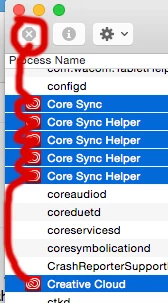
Restart, go straight to the cloud and quit. Check activity monitor that all Adobe and Adobe cloud are quit, you may need to force quit each Adobe process manually, wish you could select multiple items. Remove the OOBE files. Start the cloud and if you have no errors that Illustrator should work.

You may be able to avoid the activity monitor if you get a good quit from cloud. That is why I suggest a restart. But all the red icons you need to quit and here are most of them.

It is usually one of the 3 .db files, and you should notice atleast one of them get  smaller after cleansing.

3 replies

Participant
July 29, 2017

Hi Gavin, I'm no expert. I can only share my experience with illustrator 2017 feb. I was working on a A6 flyer with multiple (big files) images. It was taking forever to load, when I worked on it previously I had no problems. I discovered two things. 1- becuase I had downsized image files (I now had files that were 1100 dpi, 2300 dpi, etc. I re-rastered the images at 300 dpi, and that helped a bit, but not really. Then I kept seeing people talking about setting a postscript printer as default to help load illustrator faster. You think, How can that help? Beats me. But when you're as desperate as I was, anything was worth a try. I certainly solved my problem. I hope this helps. Good luck

Gavin Anderson
Participating Frequently
July 31, 2017

My problem is resolved now, but I'll certainly keep this in mind if it crops up again. You might go ahead and post details of how to set up a postscript printer, though, for others coming across this discussion, though.

Thanks!

Mike_Gondek10189183
Community Expert
Community Expert
July 31, 2017

Glad this has finally went away. Can you comment on what exactly may have been this issue, as I can unmark my answer as correct if needed.

Gavin Anderson
Participating Frequently
April 28, 2017

Adding your instructions for OOBE dump here, should some other poor sap need it later.

RESET CLOUD OOBE

Mac

Quit Illustrator & Creative Cloud (go to cloud icon on top right, click on gear icon, quit)

Mac Finder >> Shift Command G

enter: ~/Library/Application Support/Adobe/OOBE

Move your OOBE folder somewhere (eg: desktop)

Windows

Exit Creative Cloud app

remove the opm.db file located here: C:\Users\<user>\AppData\Local\Adobe\OOBE

Gavin Anderson
Participating Frequently
April 28, 2017

That did the trick! Thanks MikeGondek for sticking with me through this!

Files open in 8.7 seconds

Close and save in 3.5 seconds

Much better!!

Mike_Gondek10189183
Community Expert
Community Expert
April 29, 2017

Hi Gavin,

Glad to hear opening and saving is much faster now.

Thankyou for setting an example of how to post on the forums, by listing your operating system, plug-ins and providing good feedback and variables needed to  address your issue.

You may be doing this already, but you can also do a save as and turn OFF pdf compatible for an added speed increase and smaller file sizes.

Mike_Gondek10189183
Community Expert
Community Expert
April 27, 2017

Hi Gavin,

  • When did this start, do you still have CC2015 installed and does that work fine?
  • Do you use any other Adobe apps and how well do they function?
  • Did not see an Adobe cloud icon do you have that installed and updated?
  • When you flushed the OOBE, did you indeed quit the Adobe Cloud first?
  • Does the speed function normally when editing such as adding the ™ symbol.
  • Are you on a network, if so are you connecting with AFP or SMB and to a mac or wind server
  • What mac OS are you?
  • What other system software or Illustrator plug ins do you have installed, I recognize a few

Hang in there, being on the Mac am confident we will get this resolved.

Gavin Anderson
Participating Frequently
April 27, 2017
  • When did this start, do you still have CC2015 installed and does that work fine?

I believe this started with CC 2017. I still have CC 2015.3, and ran a test between the two. CC 2017 opened my test file in 1:41 and CC 2015 opened the text file in 1:44.

  • Do you use any other Adobe apps and how well do they function?

I use InDesign, Photoshop, and Acrobat DC, all of which seem to work fine.

  • Did not see an Adobe cloud icon do you have that installed and updated?

Yeah, that pretty much seems to decide on a daily/hourly basis whether it wants to show or not. Opened it up after reading your thread, though, and got this weird message.

  • When you flushed the OOBE, did you indeed quit the Adobe Cloud first?

Pretty sure, yes. There was no Creative Cloud icon showing in the status bar, and restarting Illustrator created a new set of those.

  • Does the speed function normally when editing such as adding the ™ symbol.

Yes, all editing seems normal. Drawing elements, adding/deleting swatches, etc.

  • Are you on a network, if so are you connecting with AFP or SMB and to a mac or wind server

Our files are stored on Windows (not my choice), but we access them through AFP. Before we talked IT into that, we were accessing via SMB, and that was unbearable!

  • What mac OS are you?

Oops, forgot to mention that detail. Sierra, latest public build.

  • What other system software or Illustrator plug ins do you have installed, I recognize a few

No other Illustrator plugins, except a font server: Universal Type Client. As far as System Software, what would you qualify on that. Giving a full list of software we run would be exhausting.

Left to right: Location (built-in service — probably had maps open sometime today, but that's a rarity), 1Password (password vault), PopChar (glyph chart), Fantastical (natural language alt to Mac's calendar app), Google drive, Dropbox, Hazel (RBA), keychain access (built-in service), Time Machine (built-in service), Bluetooth indicator (for the Magic Mouse 2).

Hope this helps.

Is there a way I can send one of these files and see how long it takes to open on your computer?

Mike_Gondek10189183
Community Expert
Mike_Gondek10189183Community ExpertCorrect answer
Community Expert
April 27, 2017

Yes yes yes that helps, what I originally suspected in your case. That error you have from the creative cloud trying to initialize should be your issue, and what we need to focus on resolving.

Restart, go straight to the cloud and quit. Check activity monitor that all Adobe and Adobe cloud are quit, you may need to force quit each Adobe process manually, wish you could select multiple items. Remove the OOBE files. Start the cloud and if you have no errors that Illustrator should work.

You may be able to avoid the activity monitor if you get a good quit from cloud. That is why I suggest a restart. But all the red icons you need to quit and here are most of them.

It is usually one of the 3 .db files, and you should notice atleast one of them get  smaller after cleansing.