

Mike_Gondek10189183
Community Expert
Community Expert
August 9, 2011
Answered

Illustrator files will not open, get text import options

  • August 9, 2011
  • 11 replies
  • 91250 views

A couple posts on this forums regarding this topic, but no answers.

Our files are from Dec 2008 on a server, and when opening .ai files get this:
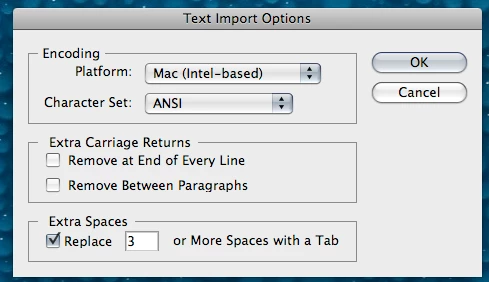
Choosing OK results is a blank file. The .ai files have a good looking amount of mb to them (eg: 1.9mb). The other non .ai fiels are fine.

I cannot even open the code in text wrangler, content recovery mode (shift opt command, with /enableContentRecovery 1) does not produce a _file.

    Correct answer Anshul_Saini

    Hi @mahbub26000899r1ga,


    Sorry about the trouble you are facing. This generally happens when the file has gotten corrupted or while opening a file from a network drive/ folder/location. Downloading the files to the desktop & working from there directly helps out in some cases. Also, sometimes files shared using google drive or similar services, or an external drive can corrupt an AI file. Sending the Illustrator file under a compressed zip file can help.


    I hope it helps you out.


    Thanks & Regards,

    Anshul Saini

    11 replies

    Participant
    September 7, 2022

    I need the solution. I'm facing the problem. Is it possible to fix the problem?


    Anshul_Saini
    Community Manager
    Anshul_SainiCommunity ManagerCorrect answer
    Community Manager
    September 13, 2022

    Hi @mahbub26000899r1ga,


    Sorry about the trouble you are facing. This generally happens when the file has gotten corrupted or while opening a file from a network drive/ folder/location. Downloading the files to the desktop & working from there directly helps out in some cases. Also, sometimes files shared using google drive or similar services, or an external drive can corrupt an AI file. Sending the Illustrator file under a compressed zip file can help.


    I hope it helps you out.


    Thanks & Regards,

    Anshul Saini

    Participant
    March 23, 2023

    March 2023, this just happened to me as well. I think it's because we had a power cut just as my file was saving. I upload all my files to Google drive, which is what I suspect caused the file to corrupt - it was trying to upload it as my computer shut down. Luckily I was able to get an eariler version from the version history in google drive otherwise I would've lost a whole day's work.

    Participant
    August 16, 2022

    Hello, this has just started happening to me.  My files are saved in Dropbox and I was trying to open them in AI.  I kept getting the same import error message.  The reoslution is to open the file in preview on the mac first and then open it in AI, this soreted the issue for me. 2022

    troyb79416876
    Participant
    August 9, 2022

    I am getting this issue with every file I created over a week ago.

    Text import options popup, click ok, the file is blank, however previews in my finder.

    Just upgraded illus a week ago to 26.4.1.

    Mac OS 12.5

    To say I am very concerned right is an understatement.

    Tried to open many files, all from the last year, to last week.

    urgent help required here.

    Participant
    June 21, 2022

    I am pretty sure this is absolutely an issue with Dropbox or perhaps some other way you have your files backup/syncing and working in the Cloud. I had to manually go into Dropbox, download my folders and files I needed, then work locally to get them to open. I am tech-challenged so don't ask me anymore questions about this, but I know it worked. Even Dropbox claims there are these issues for MAC users.

    Participant
    April 29, 2022

    I had the same issues with files saved in my OneDrive cloud, even when moving them onto my desktop, I got the same error. I went into my Timemachine backups, copied a version of the file across from that to my desktop and managed to open it that way. I had to relink all the linked files in the document, but at least I didn't have to recreate the file. 

    Gooseman15345793
    Participant
    August 5, 2021

    I had this issue with one of my files when my tablet battery died as I was saving it.


    I tried accessing the recovery data of illustrator, but nothing showed up. Luckily I use Dropbox and was able to use it's version control to restore the file. Hopefully that helps anyone that happens to have Dropbox 🙂

    Mystic_creator98BC
    Participant
    July 17, 2021

    not open this file and show the blank solve the propblem step by step...

    Participant
    January 9, 2020

    Another Solution - I had the same issue but the problem wasn't a corrupt file or server related (since my coworker could open the file just fine). I was opening the .ai file via Adobe Bridge, and had recently updated Bridge and selected to import all preferences from the old version. Thinking that might be the issue, I uninstalled Bridge and then re-installed it, but this time without importing anything from the older version. And it worked! I was able to open the .ai in the 2020 version without issue.

    Participant
    June 11, 2019

    I know this question is marked as answered, but I was getting exactly this behavior with several SVG files. It turns out, my problem was caused by the file extension being capitalized, i.e. .SVG instead of .svg.

    I spent quite a bit of time looking for an answer, so I'd like to share that info here since it was one of my top search results.

    Here's the SO thread that helped me out: https://superuser.com/questions/125564/adobe-illustrator-cant-open-svg-file

    Participant
    October 13, 2015

    I just lost a very important document the same way, Illustrator sucks!!