Participant
May 6, 2024
Answered

Illustrator on Windows - Launch Error: dxcore.dll

  • May 6, 2024
  • 12 replies
  • 22888 views

After use the cleaner tool and re-install the software, still fail to enter illustrator. Error message: dxcore.dll


Note: Renamed by Mod

This topic has been closed for replies.
Correct answer Tech26662476p000

I can confirm that once I installed the latest Beta Version of Adobe Illustrator that I was able to launch the program without the "dxcore.dll" error. I was also able to open multiple documents simultanously w/o issue.

----

In case anyone else doesn't know how to install beta apps:
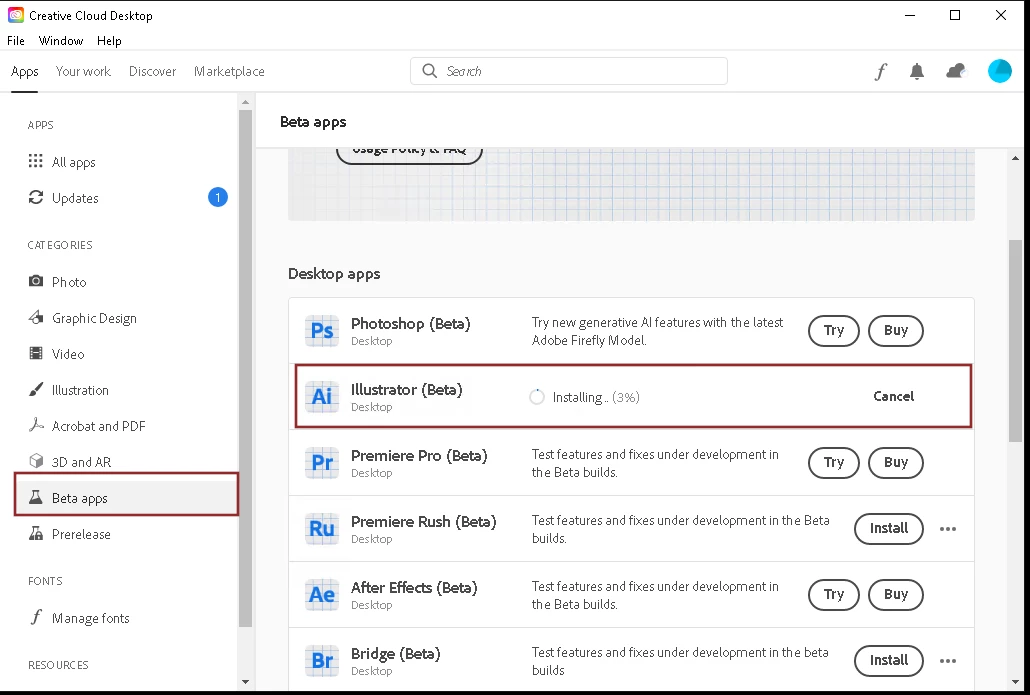

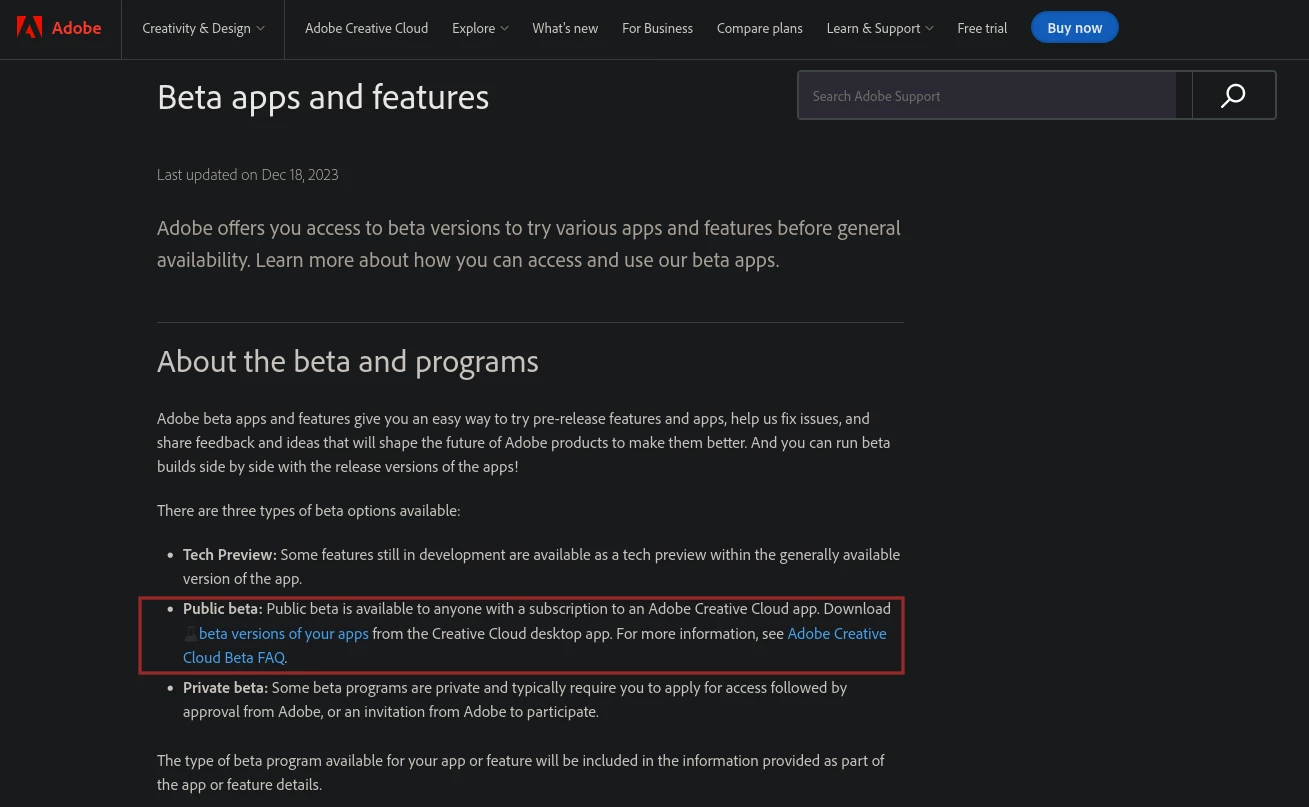
Or go to this page and click the link "beta versions of your apps"
https://helpx.adobe.com/creative-cloud/beta.html
 

12 replies

Participant
June 6, 2024

Had the same problem, uninstalling 28.5 and installing 28.4.1 resolved the issue.

Community Manager
June 8, 2024

Hello everyone,

Thank you for your patience. Our product team has made several improvements in the latest beta version of Illustrator 28.6 to address this issue. Could you please try installing the newest beta to see if it resolves the problem?


I look forward to your feedback.


Thanks,

Anubhav

Tech26662476p000Correct answer
Participant
June 9, 2024

I can confirm that once I installed the latest Beta Version of Adobe Illustrator that I was able to launch the program without the "dxcore.dll" error. I was also able to open multiple documents simultanously w/o issue.

----

In case anyone else doesn't know how to install beta apps:


Or go to this page and click the link "beta versions of your apps"
https://helpx.adobe.com/creative-cloud/beta.html


Community Manager
May 27, 2024

Hello everyone,

We are sorry to hear about your experience. Our team is aware of the problem and is investigating it. In the meantime, would you mind trying the suggestions shared in this Microsoft Community post (https://answers.microsoft.com/en-us/windows/forum/all/having-problem-with-dxcoredll/6f72afae-5f49-485b-b4fc-ab92e7606c98) and letting us know if they help?

Looking forward to hearing from you.


Thanks,

Anubhav

Participating Frequently
May 28, 2024

Yes, this has been attempted. SFC comes back clean without any indications of corruption.

Participant
May 28, 2024

I can also independently confirm that I ran SFC scans and DISM scans from the command line as detailed in the above help article.

With my systems there was nothing out of the ordinary with all tests passing w/o issue.

Participant
May 17, 2024

System admin here that runs Adobe Illustrator on a Windows 2019 Server for automated PDF processing and can confirm I am having the exact same issues. Seemed to appear last week after I installed some Windows updates, but I am unsure if the two are related.

Did some digging in the Windows/System32 files and it appears that dxcore.dll is no longer (or was never) installed on the system. Peeked at another desktkop workstation and dxcore.dll is present in the System32 folder of that system.

Performed various basic diagnostics such dism scans, reboots, application reinstalls to no avail. System is updated with latest features and patches from Microsoft.

The only work around I found that worked was doing a downgrade to version 28.4.1 using the creative cloud app. See instructions below:


Plausible explanation would seem maybe MS broke a dependency with a recent update by removing dxcore.dll from some server distributions? Or maybe new version of Illustrator introduced a dependency on this dxcore.dll and it is not present in server distributions.

Whatever the explanation, a bit annoying to work through and deal with. Hope that MS & Adobe can work out the dependencies and get the latest versions working on server environments.

Participating Frequently
May 17, 2024

I have come to the same coclusions on SVR2019 1809! What is interesting is that downgrading does not resolve the issue entirely. It does eventually break again. What has worked; in the server env (RDP) is to leave Ai open on one of the users sessions, and that allows other users to work with Ai and so far it has not crashed in about a week.


I did get a notice about Adobe security bulletin and Ai was in the affected list, so maybe a new update was released that we can try?


Seeing this is intermittent leads me to believe the dependecy on dxcore.dll could be a race condition with the API call failing due to some error being reported back from the API, or exit failure which could likely be trapped, but not killed. 


We do have an Radeon 6900XT card in the server.

Participant
May 16, 2024

I run illustrator on a windows and i have the same issues. even after reinstalling the program 2 times. 

Its not an OS issue, and its not a windows issue either, it must be an issue with the new version. 

Participant
May 13, 2024

Bonjour,

J'ai un problème avec le logiciel Illustrator, losque je veux lancer l'application, j'ai un message d'erreur qui dit que le code dxcore.dll est introuvable. J'ai désinstallé l'application et réinstallé mais c'est toujours pareil.

Qui peut m'aider ?

Elisabeth

Participant
May 22, 2024

Bonjour,

J'ai eu le même problème, même après avoir réinstallé Illustrator.

J'ai donc essayé d'installer la version 28.4 avec le Creative Cloud, et ça marche !

En espérant vous avoir aidé,


Richard

Community Manager
June 14, 2024

Hello @Property35454317nxee,

Sorry to hear about your experience. Our team has tried fixing this in the latest beta release of Illustrator. Would you mind installing Illustrator beta v28.6 591 or later and letting us know if it helps resolve the problem?

Looking forward to hearing from you.


Thanks,

Anubhav

Participant
May 9, 2024

Rolling back to a previous version worked for now. I'm posting in hopes Adobe will take a look.

Participant
May 9, 2024

Same problem, I just started seeing this issue 4-5 days ago as well. I tried basic things you advised but nothing fixed.

Participant
May 8, 2024

Same problem here. The error message says to re-install. So I uninstalled and re-installed it several times but still not working. Adobe should do better than this. I wonder if I'll get a message that it has been fixed, or if we'll just have to wait and keep guessing.

Community Manager
May 8, 2024

Hello @ISBA29581219fcpr,

We understand that encountering technical issues can be frustrating. Would you mind performing a clean reinstallation of the GPU drivers (Intel / NVIDIA / AMD) and setting the Graphics Preference to High-Performance for Illustrator (https://adobe.ly/3UAGTxM) and checking if it helps?

Also, try the following steps to reinstall the Microsoft Visual C++ Redistributable and share your observations:
- Close all Adobe apps

- Uninstall all currently installed Microsoft Visual C Redistributable packages
- Install the latest Microsoft Visual C Redistributable package from here: (https://adobe.ly/3UvpBC9)
- Relaunch Illustrator

Looking forward to hearing from you.


Thanks,

Anubhav

Participant
May 7, 2024

I was receiving the same dxcore.dll error message, so I uninstalled Adobe Illustrator 28.5 and reinstalled 28.4.1 and I am able to open AI now.  I wonder if there is an issue with the update?  Anyway, I hope that helps you for now.

Participant
May 8, 2024

Thank you. Just did the same and it now works.

Participating Frequently
May 8, 2024

So installing the lower version appears to temporarily work, then out of the blue dxcore.dll error occurs. 


We are usinger Terminal Services on Windows, and what seems to work, is if we leave Ai running and minimized on one users session, then all other RDP sessions can open Ai without the error. Not ideal, but calms the users down and is not creating support tickets for the time being.

Participating Frequently
May 7, 2024

This is very intersting. We just started seeing this issue two days ago as well. Tried installing older verions Ai and it intermittently hangs and then will not load and presents dxcore.dll not found error. Only work around we find is to uninstall Ai then re-install, then it works for a little bit. (Win Server 2019 1809 - 17763.5696)

kglad
Community Expert
Community Expert
May 7, 2024

update your os and graphics driver.

Participating Frequently
May 7, 2024

Yes all is updated to the most latest versions