


Inspiring
May 3, 2025
Answered

Is there any way to trim excess padding from text?

  • May 3, 2025
  • 3 replies
  • 524 views

Hi there,


I have a text rea with some text in it. If I select the text, we can see that the bounding box is pretty small:
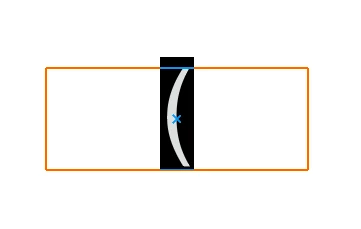
Now, if I rotate the text by 90 degrees, I expect the same thing to happen but instead, I get this:
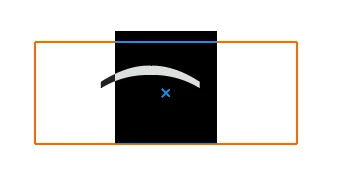
As you can see, the top and the bottom has this padding now that I dont want. I spent quite bit of time tweaking different options to see if I can eliminate this, but so far, I have not been able to come up with a solution.


What I am trying to do, is to add a bracket around text where the text is oriented horizontal but the brackets are oriented vertically, like this:

 

 But as you can see in the example above, the excess spacing is causing uneven spacing between the top and the bottom.


If anyone has idea how to fix this or better way to do this, please let me know. Thanks in advance!

Correct answer JollyPanda

I tried solution in this article (Solved: Why is there extra whitespace at the bottom of the... - Adobe Community - 12957125), and it seems like it's doing what I want.

3 replies

Ares Hovhannesyan
Community Expert
Community Expert
May 3, 2025

You can outline text or expand, create normal objects  and arrange them as you want. Just idea

Inspiring
May 5, 2025

I could do that but then I would lose the ability to edit the text right? The text might change in the future, so I would like to keep it in the editable state.

Monika Gause
Community Expert
Community Expert
May 3, 2025

Exactly how are you rotating the text?

Inspiring
May 5, 2025

I am using the "Character Rotation" in the Character panel. 

Monika Gause
Community Expert
Community Expert
May 5, 2025

I suspected that. 

The only thing you can try is apply the effect > Path > Outline object.

Then in the preferences turn on Use Preview bounds.

JollyPandaAuthorCorrect answer
Inspiring
May 3, 2025

I tried solution in this article (Solved: Why is there extra whitespace at the bottom of the... - Adobe Community - 12957125), and it seems like it's doing what I want.