
Issue: Object dimensions become huge after reopening a file, affecting tools and workflow
Hi everyone,
I’m experiencing a serious issue in Illustrator.
When I create a new document, everything works fine: objects display at the correct size on the artboard, and their dimensions in the Properties/Transform panel are accurate.
But after I save the file, close Illustrator, and reopen the same document, the objects still look visually correct on the artboard. However, in the Properties/Transform panel their dimensions suddenly become extremely large.
The problem is that once this happens, all Illustrator tools (transform, align, distribute, scaling, etc.) start following these incorrect giant dimensions, which makes it impossible to keep working normally in the same file. It also affects zoom and scroll performance, which become very slow or freeze.
So visually the artwork looks right, but Illustrator is treating it as if it were scaled to enormous values.
Has anyone else faced this? Could it be a units/scale mismatch or a known bug in how Illustrator handles saved files? Any workaround or fix would be greatly appreciated.
Thanks in advance!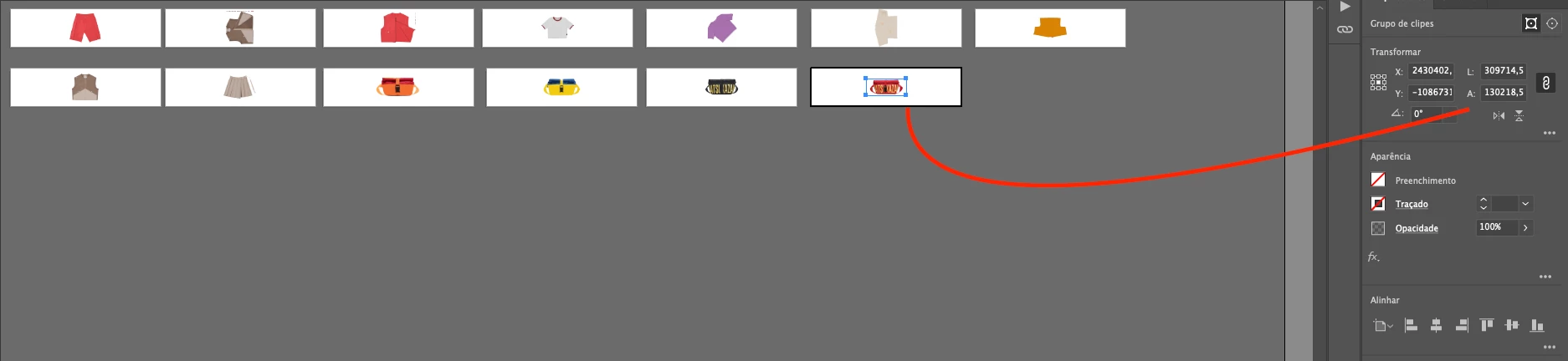



 AdChoices