
Participant
August 19, 2025
Answered

Issue: Object dimensions become huge after reopening a file, affecting tools and workflow

  • August 19, 2025
  • 22 replies
  • 5429 views

Hi everyone,

I’m experiencing a serious issue in Illustrator.

When I create a new document, everything works fine: objects display at the correct size on the artboard, and their dimensions in the Properties/Transform panel are accurate.

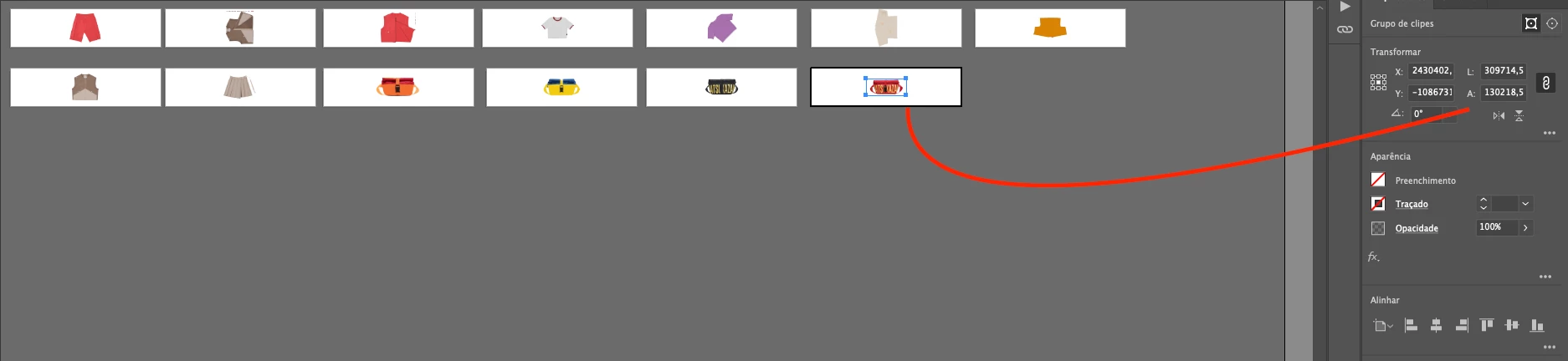
But after I save the file, close Illustrator, and reopen the same document, the objects still look visually correct on the artboard. However, in the Properties/Transform panel their dimensions suddenly become extremely large.

The problem is that once this happens, all Illustrator tools (transform, align, distribute, scaling, etc.) start following these incorrect giant dimensions, which makes it impossible to keep working normally in the same file. It also affects zoom and scroll performance, which become very slow or freeze.

So visually the artwork looks right, but Illustrator is treating it as if it were scaled to enormous values.

Has anyone else faced this? Could it be a units/scale mismatch or a known bug in how Illustrator handles saved files? Any workaround or fix would be greatly appreciated.

Thanks in advance!

Correct answer Abhishek Rao

Hi @efficient_portfolio6777,


I know how disruptive this issue can be, especially in the middle of important projects. The good news is that the team has already rolled out a fix for this in Illustrator 29.8.1, which is available now. Please give the suggestions shared in the pinned replies a try and update Illustrator to the latest version to see if that resolves it for you.


If you're still running into trouble after that, let me know here, so I can check back with the team.

Abhishek

22 replies

Inspiring
September 3, 2025

Workaround that may help someone recover some of their work:
I opened the corrupt AI file in Acrobat, saved it as an optimized PDF, and reopened in Illustrator. It said there was a problem with the size and it could open it with 'Honor scale on PDF import' to which I said yes. That almost worked (the width of my content was now 1940px instead of 1920px). Which I was able to scale to the correct size (scaling from the corrupt document to 0,20796319% doesn't work, the text doesn't scale correctly). 

Hope this helps someone! 

Participating Frequently
September 3, 2025

@reinko17602090 thank you for the tip! At this instance I do not know why this version it had not been put off.. that we can all go back to the previous working versions, and not have this inmmese risk of getting files corrupt and loosing days and days of work. I have this fear of loosing all, if I save, if I do more than 3 artworks, if artworks are different in sizes, things I have done so easily before this version..., if I change the units.. by the way, before, even if my UNITS were lets say in milimeters, I still could transform dimensions of an element and type  down "400pt" and it let me, now if the UNITS is in cm, all I type, even if I put "400 pt" is taken as "CM" (nos doing the correspondent mathematics ruling, 400 px are not 400 cm!!) for me there is a HUGE bug with UNITS / ARTWORKS / VIEW . Is a bummer, and I wish there was more feedback from the team, not us user telling each other how to deal with corrupt unreliable files....  and make crazy maniouvres to avoid loosing so much hours of work and delaying deadlines... I know all the team is under a lot of  preassure, but Adobe policies are so strict if you do not pay in terms, on the usage of the apps that is funny they are so loose when we can not use an app we all pay so much for. Or I speak for myself, it is a rather expensive suit for me. I write this with respect for the programmers,  mess can happen all ok, is more Adobe should not charge for a service is not giving , the least! and we should be able to get a access to a proper runnig version.

Participating Frequently
September 2, 2025
I've had this happen in a few files I'm working with now (in v29.7.1, MacOS). I've got a workspace with fifty eight 1920px x 1080px artboards on it (building out storyboards for a series of After Effects videos). When the scale gets corrupted each artboard increases 550576.7169px x 309699.4033px. My fonts which were previously around 54pt, are now showing up at 14,337.93pt. I can't just copy each artboard and paste into a new document because each of my artboards is now much larger than the maximum canvas bounds.


THANKFULLY, the Overlord plugin (I'm on v1.26) doesn't seem to notice an issue, because I'm still able to 'Push Selection to AE' and the contents of the Artboards arrive in AE at the proper pixel dimensions.

Makerman111111
Participating Frequently
September 2, 2025

Same thing happening here. Everytime I save the document it gets larger dimensionally. 

Participant
September 2, 2025

I am experiencing the same issue on a Mac.
MacOS:   15.5 (24F74)
Illustrator:   29.7.1

Adobe Employee
September 2, 2025

Plese share a file if possible.

Participating Frequently
September 2, 2025

I tried to attach an ai file, but it's not letting me, says the extension doesn't match the file type. Can I zip it? Or can I email it somewhere?

Participant
September 1, 2025

Just dropping a note to say that I have also been experiencing this problem for a few weeks, and it's incredibly frustrating! Spending a lot of time copying artwork across to new file saves at the moment. I'm hoping to troubleshoot later this week using the suggestions here, but eager to hear if there is an official fix for this from Adobe. 

Community Manager
September 1, 2025

Hello @Ket_,

I'm sorry to hear you're having similar trouble with Illustrator. Could you confirm the version of the OS/Illustrator installed and share a link to a sample file along with a small screen recording of your exact workflow and the problem, so I can check it with the team?

Looking forward to hearing from you.

Anubhav

Participant
August 27, 2025

Hi everyone!

I wanted to give you an update on the issue I reported earlier.

I uninstalled Illustrator, updated my Mac to the latest OS version, and then reinstalled Illustrator. Since then, the problem hasn’t happened again with any new documents I create — everything seems to be working normally now.

However, the files that were already affected before remain corrupted. When I reopen them, the same dimension issues persist, so unfortunately the fix only applies to new files, not the old ones.

Thanks again for all the help and suggestions shared here!

Participating Frequently
September 2, 2025

... yeah I updated system.. too. Is a bummer to start over complex files... The  funny thing is that befor opening , in the preview of the files, everything. looks good, then when I open it it moved all the graphics away of the artworks... / Ok somehow was good to find users with same problem.. But I have this feeling of not working in a releable app.. that is not good.

Participant
August 26, 2025

Im having the same issue on mac, latest illustrator is installed

Inspiring
August 23, 2025

Same problem her on may work Macbook pro, had to remake my work several times in new document due to this issue as i had to deliver correct banner size in pixels. Have to save workfile versions constatantly hoping for this issue not accur. Tried to uninstall and reinstall illustrator with no success. Never experienced this problem on my home PC windows 10. 

Problemtic mac - MacOS 15.4.1 (24E263) Illustrator 29.7.1.

Abhishek Rao
Community Manager
Community Manager
August 22, 2025

Hi everyone,


Thanks a lot for sharing all the details here. I tried reproducing this on Illustrator 29.7.1 on Windows but could not replicate the issue. Could you try the same steps with a simple newly created file, save it, close Illustrator, and then reopen it to check if the problem still happens? If it does, it would be really helpful if you could share a short screen recording showing the process from creating the file, saving, and reopening, so I can take it back to the team for investigation. Also, please confirm the OS you are working on, so we can narrow this down further.


Looking forward to your updates.

Abhishek 

Participant
August 22, 2025

Hopefully, this video shows clearly what the problem looks like,

Participant
August 22, 2025

I'm using Windows 11. I've rolled back to Illustrator 29.6.1, 29.6 and 29.5.1 and the issue is the same. I even tried uninstalling illustrator and reinstalling it. It was fixed, but when I restarted the computer, the issue was the same. Unfortunately, this forum only allows me 47MB of video upload for me to show me going through that entire process

Ton Frederiks
Community Expert
Community Expert
August 21, 2025

@Steve Tiff  and @GUILHERME34091322erss What Illustrator build version (in About Illustrator) are you using?

Participating Frequently
August 22, 2025

29.7.1 (64 bit)


Ton Frederiks
Community Expert
Community Expert
August 22, 2025

Thanks for the info @Steve Tiff 

Participating Frequently
August 21, 2025

I am also experiencing the same issue. 

It is frustrating!

Participating Frequently
August 21, 2025

 this was an A4 object. when i saved it and re opened the file the size is now 166892.755mm wide? How is this possible?

I cannot zoom out any further to see the entire canvas which has more artboards on, which have also enlarged.


Ton Frederiks
Community Expert
Community Expert
August 21, 2025

What is your zoom percentage when you zoom out to the maximum possible?