ddavis
Participant
October 2, 2017
Answered

Major Cursor Bug with macOS High Sierra 10.13 and Illustrator CC 2017

  • October 2, 2017
  • 23 replies
  • 35638 views

I have latest version of Illustrator installed with the new release of macOS High Sierra 10.13 on a MacBook Pro 15in, Mid 2012 laptop with or without Thunderbolt display. However with touchpad control (not magic mouse) use is even worse. Ghost clicks and actions are rampant and object selection is horrific and cursor clicks and drags itself selecting unintended objects, etc. etc. I would think both my space bar and touch pad were driving themselves however these issues only apply to Illustrator and not other apps, include other Adobe Apps. Even the text tool and typing are difficult, partially with the selection issues and even typing text once the selection is made. This applies both to art-board content and the contextual menu selections entering sizes and applying transformations to objects.

Is anyone else experiencing this with a similar system configuration?
This topic has been closed for replies.
Correct answer Adrian Wilcox Photography

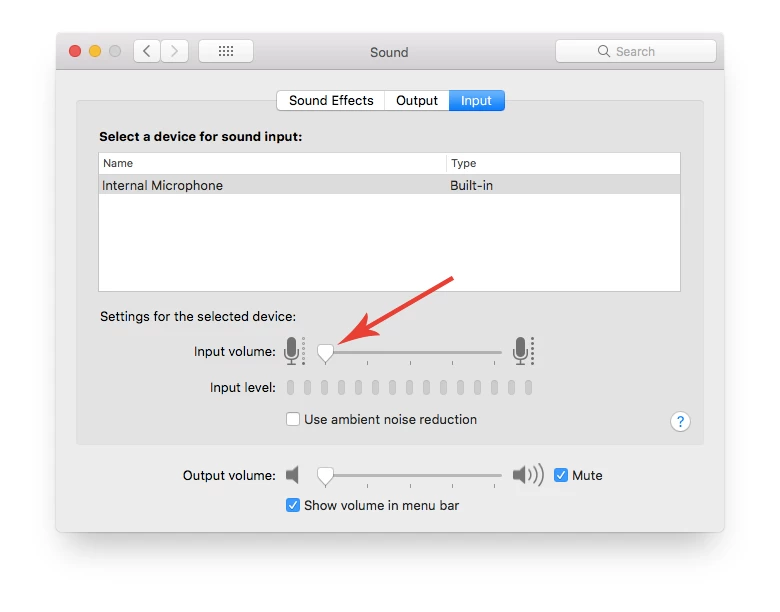
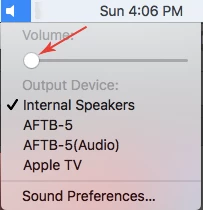
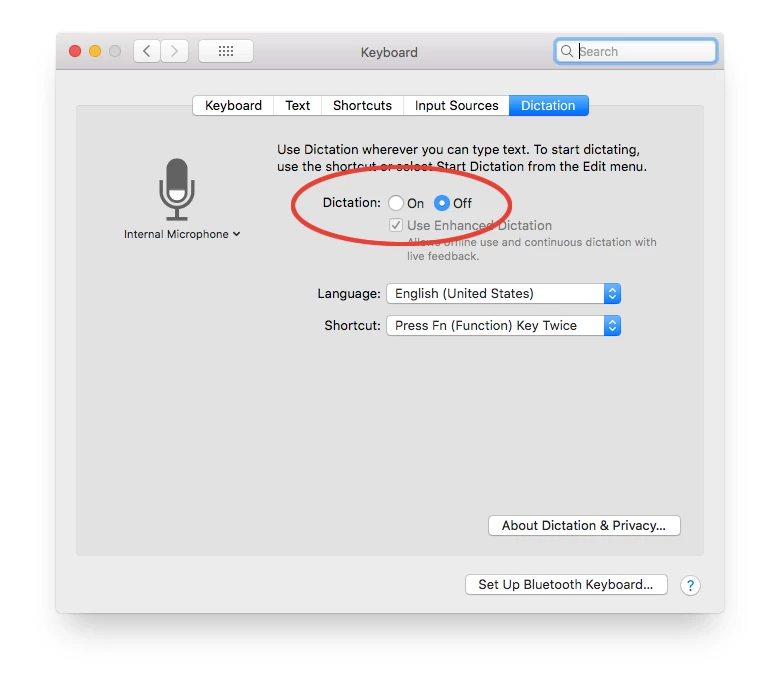
Couple people have asked me, so I thought I would share... The Dictation Setting in Mac OS is actually in the Keyboard settings. For some people on older Macs, we have noticed that they need to turn the internal mic volume all the way down, as well as the internal speaker volume. In most cases, just turning off Dictation seems to resolve the issue, but any combination of these three things seems to resolve the issue for everyone.

23 replies

Participant
July 6, 2018

Turning off dictation worked for me too.

Participating Frequently
June 16, 2018

Yes!! that's it. Strange but true turning off dictation worked for me. But...why??? must be sharing a resource with an Adobe sw call. trouble is I like dictation, so now I'll just have to monkey with System prefs all the time. Please work out a fix Adobe.

Participant
March 7, 2018

I have had this problem since 2014, it's not Just Hi Sierra, I'm using a Logitech MX Performance mouse and some days its usable and some days it's not so I change back over to the wired mouse, Unforuinitly I cant find a wired mouse similar to the MX if I did I would use it all the time and save the hassle. This shouldn't be happening with an imac that cost almost €3000

Known Participant
February 21, 2018

I have the same problem. I signed up to Creative Cloud 5 days ago, however I have not been able to create anything so far due to being stuck on the hand tool after about 10mins of running any adobe program. Here is a quick summary of facts:

Adobe Creative Cloud programs tried - Photoshop, Indesign and Illustrator

All three programs will run for about 5-10 mins before becoming locked on the hand tool. The only way to get rid of this bug is to reboot my Mac. Adobe did take over my MacBook, uninstalled Creative Cloud, then reinstalled and the problem was still there. Adobe told me it was a Apple fault....

I have spent the last two days talking to Apple......

Apple MacBook

I have a MacBook Pro (13-inch, 2017, Four Thunderbolt 3 Ports) with macOS High Sierra version 10.13.3. Apple have wiped clean and then reloaded my time machine back up twice (in the last two days) I have also had my keyboard cleaned and the space bar is working correctly. Apple cannot find a fault and have told me it is an adobe problem....

I have just read this thread and turned off my dictaphone and the problem is still there.

Anyone got any further ideas, solutions?

Monika Gause
Community Expert
Community Expert
February 21, 2018

You will need CC2018 on High Sierra

Known Participant
February 21, 2018

Hi, I have only just signed up (5 days ago) to the latest Creative Cloud subscription, so up to date.

iamrdux
Participant
January 6, 2018

Yes!!! I don't know why I didn't think of turning off Dictation and the mic before. Thank you, totally worked.

Participant
November 30, 2017

@Adrian Wilcox Photography

Thank you, thank you, thank you!  I have been dealing with this issue for about two weeks.  Finally found your answer just moments ago - and your advice worked!

I cannot thank you enough!

Participant
November 15, 2017

Since we now know that it is dictation that causes the problem, would it be possible to change the "correct" answer to reflect that solution to save people the time and trouble of reading the many, many replies on this thread and possibly giving up before they realise how to fix it?

Thanks.

michaelteter
Participant
November 20, 2017

The dictation thing may have "solved" the problem for some of you, but it had no effect for me.  Dictation was already off.  VoiceOver was already off.

And this problem extends well beyond Adobe products.  This is a Mac High Sierra bug that shows up when moving the cursor over a region that wants to change the pointer graphic.

Participant
December 2, 2017

Muting the mic and disabling Dictation (and VoiceOver) did NOT work for me, but after doing those things, I turned-off the “Snap to Point” option in Illustrator (Preferences: Selection & Anchor Display) and now things seem to working fine.

Participant
November 12, 2017

Couple people have asked me, so I thought I would share... The Dictation Setting in Mac OS is actually in the Keyboard settings. For some people on older Macs, we have noticed that they need to turn the internal mic volume all the way down, as well as the internal speaker volume. In most cases, just turning off Dictation seems to resolve the issue, but any combination of these three things seems to resolve the issue for everyone.

Participant
November 12, 2017

Also discovered that on computers set up with VoiceOver Accessibility turned on, the issue isn't resolved unless you disable VoiceOver.

Participating Frequently
October 19, 2017

Yes, What's the problem Adobe ????

I will not pay for a BUG. I am in a big projet now and it's very very penalizing for me !!! Could I have a support ??

Thanks

Participating Frequently
October 19, 2017

OK, 2 weeks later... a brand spanking new Illustrator CC 2018... still not working... nothing resolved!! NOT GOOD ENOUGH!!

Monika Gause
Community Expert
Community Expert
October 19, 2017

Crayola45  schrieb

OK, 2 weeks later... a brand spanking new Illustrator CC 2018... still not working... nothing resolved!! NOT GOOD ENOUGH!!

Did you restart after upating?

Did you rebuild the preferences?

Participating Frequently
October 20, 2017

Hi, Yes, did restart... but no didn't rebuild as selected to keep existing references. Am trying a reinstall with preferences wiped to see if that makes a difference. Not great at the backend stuff, can drive a car but would struggle to fix it! ^_^

UPDATE - after an uninstall / reinstall / restart with factory settings... still no change. Cursor has a mind of its own, everything slow-to-stop and laggy!!