ddavis
Participant
October 2, 2017
Answered

Major Cursor Bug with macOS High Sierra 10.13 and Illustrator CC 2017

  • October 2, 2017
  • 23 replies
  • 35638 views

I have latest version of Illustrator installed with the new release of macOS High Sierra 10.13 on a MacBook Pro 15in, Mid 2012 laptop with or without Thunderbolt display. However with touchpad control (not magic mouse) use is even worse. Ghost clicks and actions are rampant and object selection is horrific and cursor clicks and drags itself selecting unintended objects, etc. etc. I would think both my space bar and touch pad were driving themselves however these issues only apply to Illustrator and not other apps, include other Adobe Apps. Even the text tool and typing are difficult, partially with the selection issues and even typing text once the selection is made. This applies both to art-board content and the contextual menu selections entering sizes and applying transformations to objects.

Is anyone else experiencing this with a similar system configuration?
This topic has been closed for replies.
Correct answer Adrian Wilcox Photography

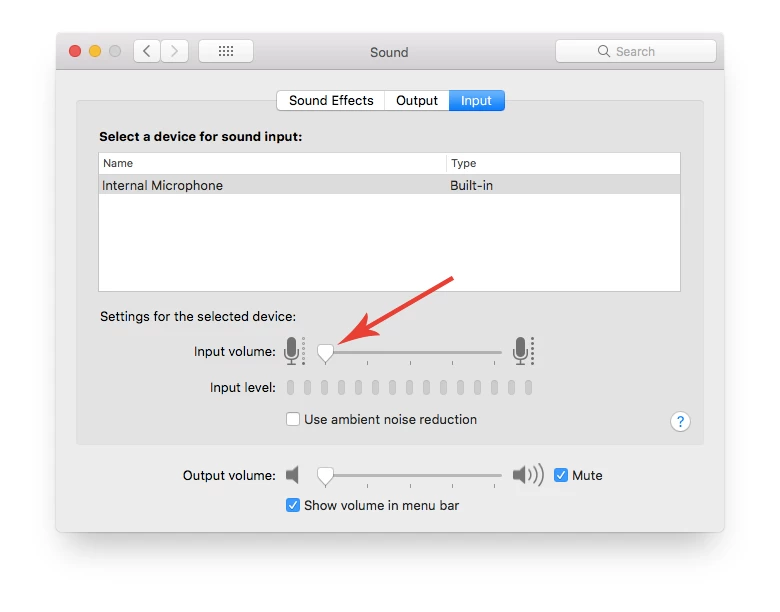
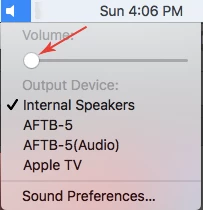
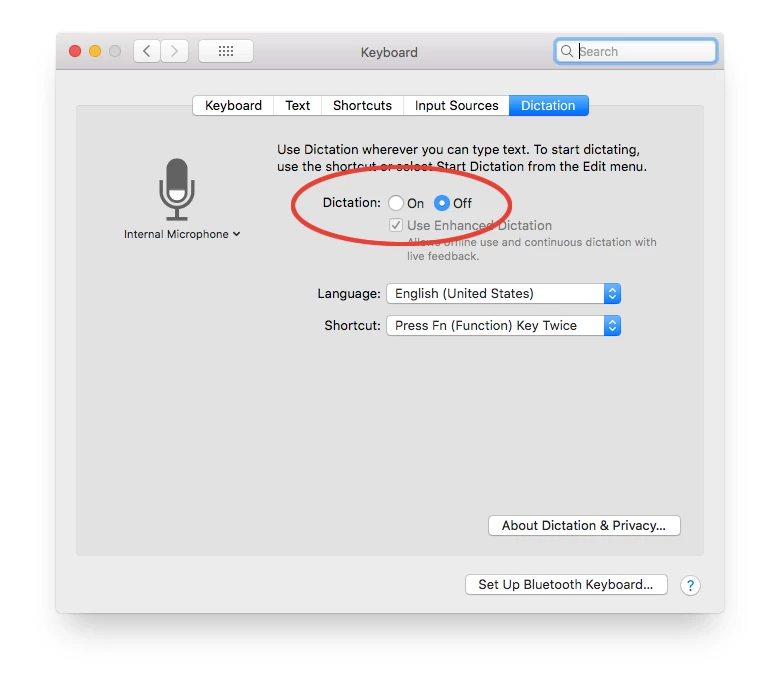
Couple people have asked me, so I thought I would share... The Dictation Setting in Mac OS is actually in the Keyboard settings. For some people on older Macs, we have noticed that they need to turn the internal mic volume all the way down, as well as the internal speaker volume. In most cases, just turning off Dictation seems to resolve the issue, but any combination of these three things seems to resolve the issue for everyone.

23 replies

Participant
October 18, 2017

This issue has not been resolved.  The apple update didn't fix the illustrator mouse click issue.

Participating Frequently
October 17, 2017

Hiiiiii, WHEN theses bugs will be fixed ???? Please, Adobe ?????!!!

Participant
October 13, 2017

Ghost clicking and also unwanted click, unwanted selection,  click and point place WAAAAAAAAAAAAy off...  and inoperable shortcuts, delete problems, unresponsiveness, hamster wheel of death,slow slow slow, hand tools with a mind of it own and replacing current tool you are using out of nowhere... this useless version of Illustrator his right next to Atari's "E.T. the video game" on the lower shelf of the pantheon of bug-infested code...

This should thread should not be marked has RESOLVE it's even more insulting to us your customer paying every month for software that should be working fine from start.

tmartino
Participant
November 21, 2017

YES! SAME THING HERE!

Monika Gause
Community Expert
Community Expert
November 21, 2017

thomasm64231438  schrieb

YES! SAME THING HERE!

You have two possiblities:

You can downgrade your OS

You can update Illuustrator to CC2018

nicksorenson
Participant
October 11, 2017

i've been running high-sierra since its beta inception and illustrator has been unusable throughout. soooo frustrating. i've resorted to affinity for vector work now.

Monika Gause
Community Expert
Community Expert
October 11, 2017

blacksinai  schrieb

i've resorted to affinity for vector work now.

Because its Appearance panel, Live paint, Image Trace and its threaded text are so superior ... oh, wait ...

Inspiring
October 11, 2017

My tools also disappeared in InDesign and I was ready to downgrade to OS Sierra, but tried first to uninstall InDesign and then reinstall. Don't know if it is a permanent fix or not, but it works for now.

ddavis
ddavisAuthor
Participant
October 11, 2017

I also tried this with Illustrator including deleting all existing preferences, but this had no impact on the issue on my machine.

Monika Gause
Community Expert
Community Expert
October 11, 2017

ddavis schrieb

I also tried this with Illustrator including deleting all existing preferences, but this had no impact on the issue on my machine.

The InDesign issue has been fixed by an Apple update - the Illustrator issue is not.

Participating Frequently
October 9, 2017

The supplemental update from Apple did not fix the Illustrator issue yet. Adobe, please fix ASAP.

Participant
October 6, 2017

Just got a 'supplemental update' from App Store now.

Special mention—the second point in the list:

Participating Frequently
October 6, 2017

I'm also having this issue. It's making Illustrator nearly impossible to use and extremely frustrating. Adobe, please update this ASAP and make an loud announcement so that those with this issue are aware of the fix when it's ready.

Participant
October 6, 2017

Found a workaround to the Illustrator issue. Whilst working with Adobe tech support for a few hours last night we found Illustrator works fine from a newly created user account. For the moment, when I need Illustrator I'll just flip over to this new account and go to work until they come up with a fix. I've signed into the CC app so I have access to all my files and libraries.

Hope this helps.

Participating Frequently
October 10, 2017

Thanks for the tip. However, how can you use a new user account if Illustrator is registered to that account? Won't it break the registration and put it in Trial mode?

Participating Frequently
October 4, 2017

Hi,

I have the same problem ! How can I do to fix the pb ?

Do i Have to change mac OS high sierra >>> mac OS Sierra ?

And how can I do ?

Thanks,

Participant
October 5, 2017

Re changing from High Sierra back to Sierra: There are a number of sites that provide you with that info, but I've done this before with (previous OS versions) for others and it can be quite painful and time consuming. Short answer: find an Apple certified technician (they're everywhere) and have them do it. Prices vary, so you might shop around. Depending upon demand and other current orders, it may take them more than a day or two (or a week), so ask what they believe how long it will take. If you have the time, you might want to wait for the public beta mentioned above (but that could be a month away).

Participating Frequently
October 5, 2017

thk for your answer. But I haven't the time to go tho a shop. So i will wait an new update of adobe

Participant
October 4, 2017

Don’t mean to add to the dozens of snarky comments already posted about this compatibility issue (and hurriedly locked threads) but if Adobe can send me regular marketing emails trying to get me to upgrade to more products and spend more money with them, why can’t we get emails about crucial compatibility issues that are basically ruining our production? I committed to Adobe Creative Cloud to run my business and trust Adobe to deliver something that works. I don’t consider myself a tech geek with hours of time on my hands to investigate and research software - that’s your job. Surely a jerky yellow square all across your screen (in inDesign) is not difficult to spot in Beta? You have our emails guys...

Participant
October 4, 2017

i have a glitchy cursor issue as well in InDesign (Creative Cloud... latest version).

have recently installed high Sierra 10.13 on 2 different 27" iMacs (2012, and late 2015) and have the same issue on both machines.

i tried to take screengrabs, but the issue does not appear in them. odd.  with the selection tool, when the cursor is over a selected object, the cursor changes from the correct selection "arrow" to what i can best describe as a changing block of colors & shapes and is nearly impossible to work with.

Participating Frequently
October 4, 2017

Yep it's BS. I'm finding it impossible to do simple things, like grab the edges of table cells to resize rows or columns.