ddavis
Participant
October 2, 2017
Answered

Major Cursor Bug with macOS High Sierra 10.13 and Illustrator CC 2017

  • October 2, 2017
  • 23 replies
  • 35638 views

I have latest version of Illustrator installed with the new release of macOS High Sierra 10.13 on a MacBook Pro 15in, Mid 2012 laptop with or without Thunderbolt display. However with touchpad control (not magic mouse) use is even worse. Ghost clicks and actions are rampant and object selection is horrific and cursor clicks and drags itself selecting unintended objects, etc. etc. I would think both my space bar and touch pad were driving themselves however these issues only apply to Illustrator and not other apps, include other Adobe Apps. Even the text tool and typing are difficult, partially with the selection issues and even typing text once the selection is made. This applies both to art-board content and the contextual menu selections entering sizes and applying transformations to objects.

Is anyone else experiencing this with a similar system configuration?
This topic has been closed for replies.
Correct answer Adrian Wilcox Photography

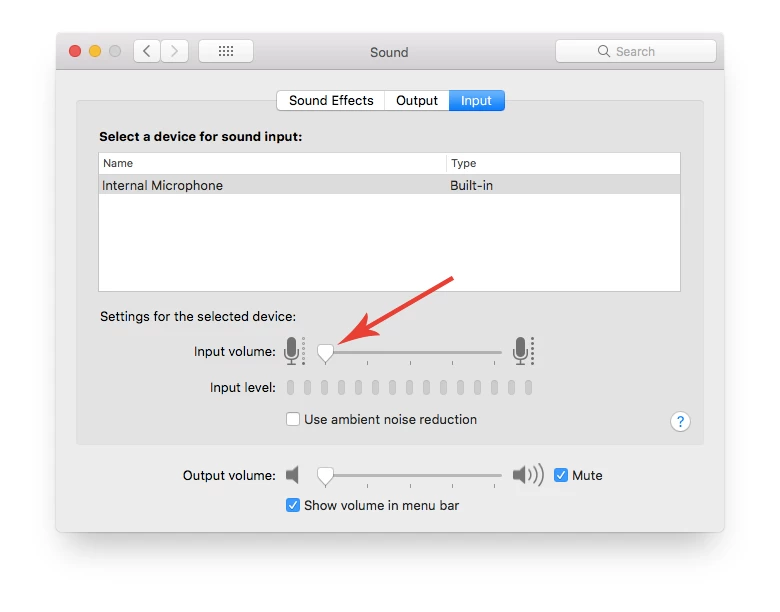
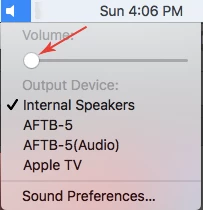
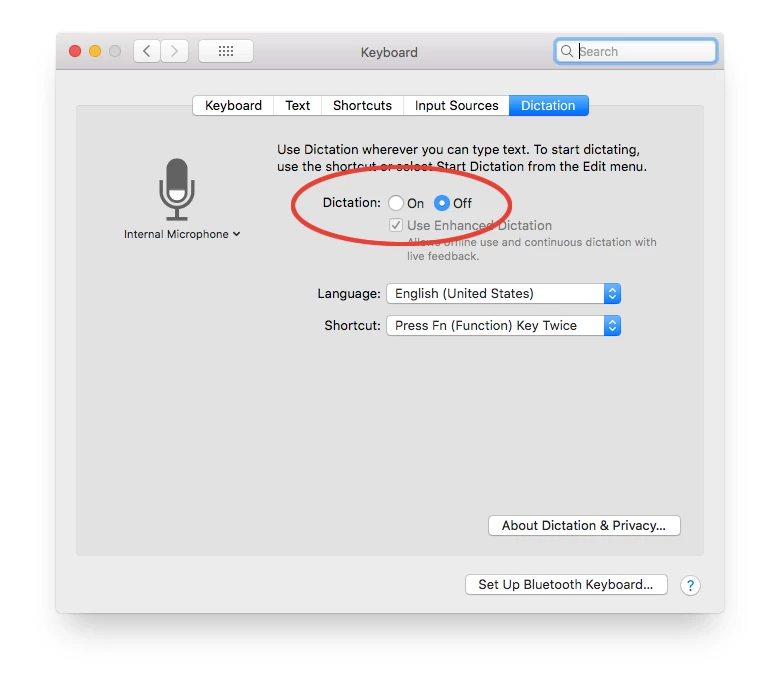
Couple people have asked me, so I thought I would share... The Dictation Setting in Mac OS is actually in the Keyboard settings. For some people on older Macs, we have noticed that they need to turn the internal mic volume all the way down, as well as the internal speaker volume. In most cases, just turning off Dictation seems to resolve the issue, but any combination of these three things seems to resolve the issue for everyone.

23 replies

AshutoshChaturvedi
Legend
October 3, 2017

For Adobe Illustrator - We have not seen or heard of the issue that you mentioned about ghost clicks. Nor have we seen this issue with a similar hardware to the one you mentioned.

Please get in touch with us at sharewithai@adobe.com  I would like to get this investigated.

To assure others on the thread. Apple and Adobe are doing their best to address compatibility issues with the product. Till that time I would humbly request you to be with OSX 10.12.

Participating Frequently
October 6, 2017

Hi, just thought I'd jump in and say that whilst I'm not (so far) experiencing any issues with Indesign or Photoshop... Illustrator is off the scale. The cursor issue is a major headache in itself as you're not quite sure if anything or everything is selected, and if it is selected it has a mind of it's own... jumping across the screen or rotating the element selected. That said it is just about useable if you are desperate. However, in addition the whole package seems to grow progressively slower and unresponsive the more you ask it to do. As a logo and branding design Illustrator is a MUST so you can imagine how frustrating this situation is for me... not to mention my clients! Hope theres a fix coming real soon but in the meantime I agree that it would be a smart move for Adobe to be a bit more up front and communicative about the problem with the software we all rely on so much.

Participant
October 6, 2017

I just updated my High Sierra with the new update from Apple today and the issue is fixed.

Participant
October 3, 2017

Same problems, Illustrator is essentially unusable. Talked to Apple, they won't have 10.13.1 released until next year. Several non-Apple websites are reporting Apple has released a beta 10.13.1, but that's not true. Waiting for a public beta release appears the only option, as moving back to a previous OS is too painful.

Participant
October 3, 2017

Just talked to Adobe about this issue. Here's what they say:

There is a compatibility issue happening with the High Sierra and the Engineers on both the end are working on it.

They have no date as to when a fix will be available.

Doug A Roberts
Community Expert
Community Expert
October 2, 2017

i've heard of similar problems with indesign. best advice at the moment is roll back to your previous system until its fixed, probably with an OS update.