Gareth_Williams
Inspiring
July 29, 2026
Question

Making Rounded Diamonds?

  • July 29, 2026
  • 25 replies
  • 199 views

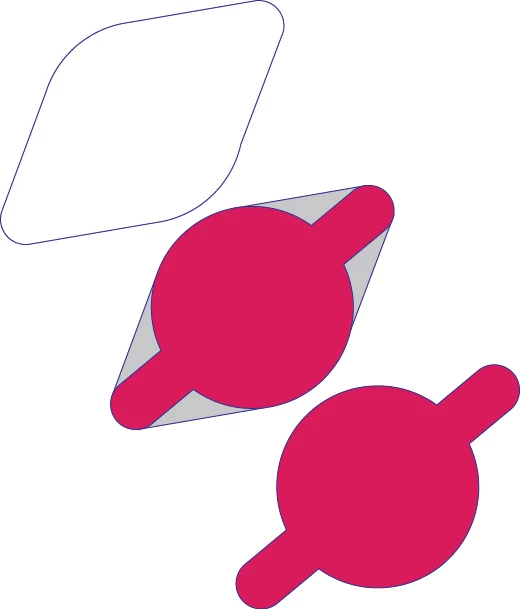
Hi everybody, I am trying to make these weird rounded diamond shapes out of another shape consisting of a tube and a circle. I want to blend the ends of the tube smoothly with the edges of the circle with straight lines to make a new shape. As illustrated. I hope that makes sense! 

When making the grey shape to merge with the original red shape, with snap to point and smart guides on, you can kind of do it by eye, but you have to guess exactly where on the circle circumference to put the point to get a smooth blend. As you can see if you zoom in, the bottom right side of the new shape is not quite right. Is there a better more reliable of doing this than just going by eye and guess work?

 

    25 replies

    Gareth_Williams
    Inspiring
    August 4, 2026

    I started with Carlos’s method as it was posted first. I have run into trouble at the very last step.

    If you select the tangent lines FE and GH, the line AB and the small circle C1 (in green) and rotate 180º you get this!

    Can you just select the two tangent lines and line AB and reflect it from the end of the line AB which is at the centre of Circle C2? 

    Thanks again.

    CarlosCanto
    Community Expert
    Community Expert
    August 4, 2026

    @Gareth_Williams that looks great! ok you need to set the rotation point at the center of the big circle (anchor b). At the moment you’re rotating around the selection.

    reflecting at center of C2 works as well, the reflection point is the same as the rotation point

    Gareth_Williams
    Inspiring
    August 5, 2026

    I’ve done it now.

    I’m just having problems uniting the whole shape with the shape builder tool. I can’t get the top section between the two circles to go grey when I roll the shape builder pointer over it. I’m almost there!


    Gareth_Williams
    Inspiring
    August 1, 2026

    Wow! There is some good stuff here! I will try to follow the steps illustrated next week and update the thread with news the outcome, or any difficulties or questions I might have. Thanks!

    Jacob Bugge
    Community Expert
    Community Expert
    August 1, 2026

    Thank you for a very inspiring challenge, Gareth.


    This thread is pleasant and rich, just like many of the threads in the old days.


    I for one am looking forward to its continuing.


    Jacob Bugge
    Community Expert
    Community Expert
    July 31, 2026


    Lovely drawings, Carlos.


    And now we are talking.


    Ever since I met Illy (job description Adobe Illustrator) in the previous Millennium, she has always been very helpful, and she has much drawing skills than I. So I have adapted to her ways.


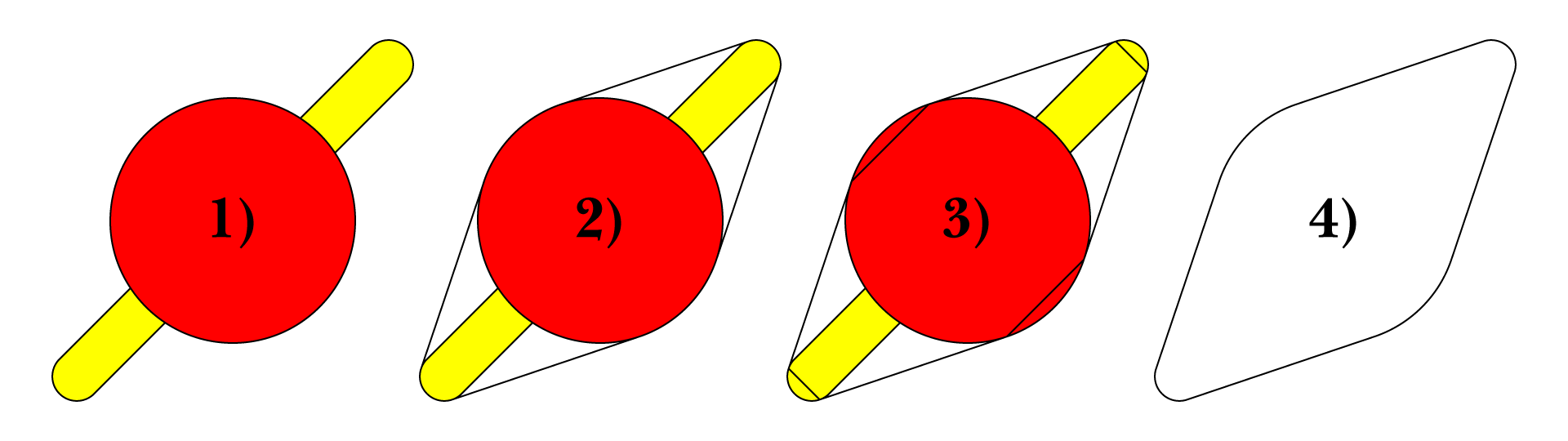
    Here is a 13 step way (curiously the same number as yours), each step shown separately, with different part colours and using the following Tools along with Object>Path>Add Anchor Points, the Join Reasonably script, and Pathfinder>Unite:


    Circle

    Rounded rectangle

    Line Segment

    Rotate

    Reflect


    Click to get closer, Click again to get closer still

    CarlosCanto
    Community Expert
    Community Expert
    July 31, 2026

    thanks Jacob, nice method of yours as well


    how did you go from 9 to 10, did you re do the previous steps or is it the green angle translated to the purple angle?

    CarlosCanto
    Community Expert
    Community Expert
    July 31, 2026

    this is probably not practical but for the geometry lovers, here’s how to draw tangents by hand


    Jacob Bugge
    Community Expert
    Community Expert
    July 30, 2026

    Gareth,


    Just to go vintage with the whole solution, based on the Common Tangents script answer by Kurt with addition of another script from the same collection and rounding up in a way that has been with us for decades, you can also:


    1 ) Starting with the paths,

    2 ) Select both, then apply Common Tangents,

    3 ) Select all, then apply Join Reasonably,

    4 ) Apply Pathfinder>Unite (different wording over time).


    Click to get closer, Click again to get closer still

    You can find the scripts in the free set of scripts by 佐藤浩之 (Satō Hiroyuki), either here or here,

    https://github.com/shspage/illustrator-scripts/tree/master/etc

    https://shanfan.github.io/Illustrator-Scripts-Archive/


    Ton Frederiks
    Community Expert
    Community Expert
    July 30, 2026

    @Gareth_Williams Or you could start with a diamond shape and round the corners with the round corner widgets.


    Gareth_Williams
    Inspiring
    July 30, 2026

    Thanks Ton, that looks fantastic but the problem is, my shapes start with a central circle and a pair of smaller surrounding circles defined by something else in the illustration. I’ll keep investigating and we’ll see how it goes! Thanks again.

    Gareth_Williams
    Inspiring
    July 30, 2026

    Smart guides are not helping to find the tangents. When you put the first point down how would it know that’s what you are trying to do? I’m basically just dragging the eight anchor points of the grey shape around on the path of the red shape until it looks smooth by eye. All smart guides is doing is keeping the points on the path of the red shape. It takes a long time and it not always right in the end! It might be time to experiment with Hiroyuki Sato's script called "Common Tangents”!

    Gareth_Williams
    Inspiring
    July 30, 2026

    Smart guides might help if the tube and circle shapes are separate. I’ll try that next!

    Kurt Gold
    Community Expert
    Community Expert
    July 29, 2026


    In current versions of Illustrator smart guides can detect tangents, but for your task you may also have a look at Hiroyuki Sato's script called "Common Tangents" and then Shape Builder tool to unite.

    Note that the script will only work when your circles and tubes are separate objects.


    Jacob Bugge
    Community Expert
    Community Expert
    July 29, 2026

    Ah Kurt, it is always such a pleasure to see one of the scripts in this old and most trusted collection, which you brought into this forum so many years ago.