
Known Participant
December 11, 2023
Answered

Measurement inaccuracies/changing issue

  • December 11, 2023
  • 1 reply
  • 359 views

Hi

I'm having issues with illustrator creating objects at slightly differing sizes to what I've asked it to. 


For example in the screen shot below I set a specific size for a rectangle and it was actually very slightly off once it had been created. I've done this with and without constrain proportions, exact same thing happens and I've noticed it a lot on other files too.
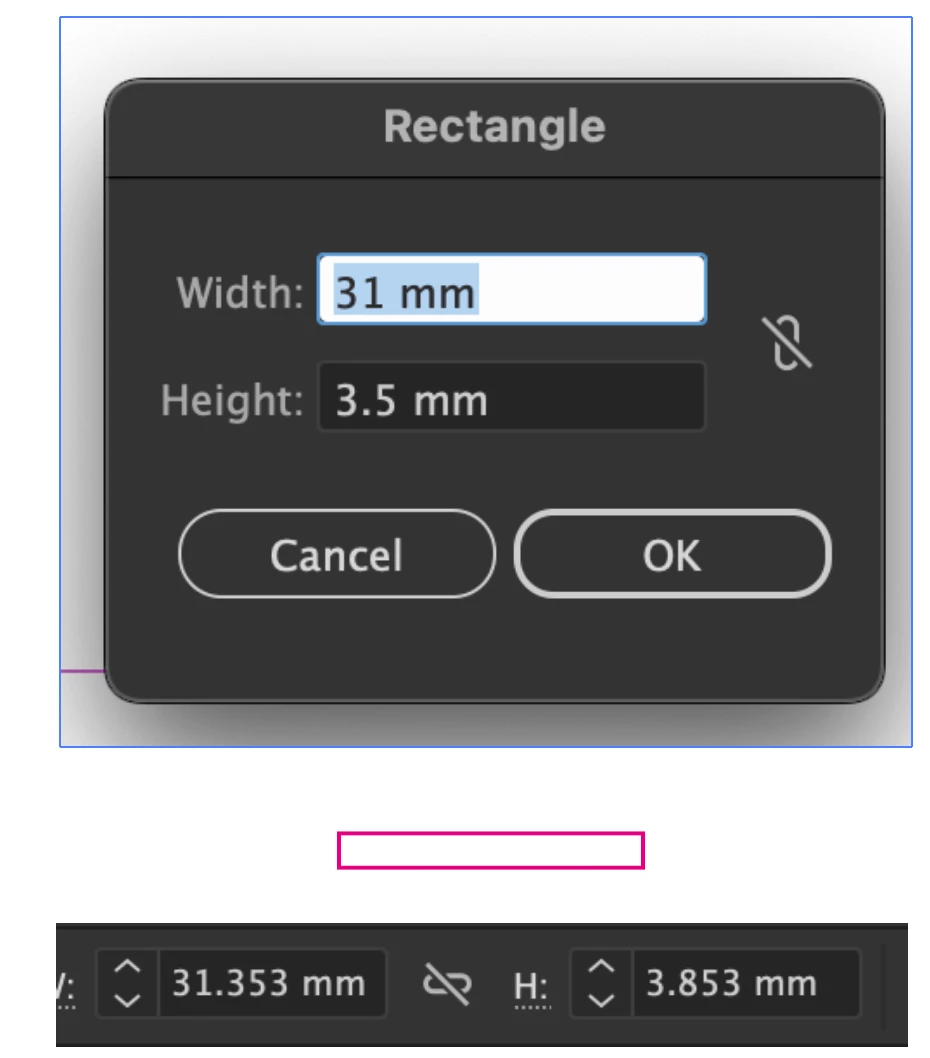


I found this post for an identical issue but as it's quite old the settings they refer to aren't there anymore, I did turn off "Snap to pixel" in the View menu but that didn't work either, I unchecked all the "snap to" options and checked for anything in the preferences and the new document window (including the additional options pop up window) and couldn't find anything. 


Any ideas?


Thanks

This topic has been closed for replies.
Correct answer Doug A Roberts

Looks like 'Use Preview Bounds' is on. Turn it off in Preferences > General. (Monika Gause's post in the thread you linked also provided this answer).

The clue is that the additional distance is .353 mm, or exactly 1 point.

1 reply

Doug A Roberts
Community Expert
Doug A RobertsCommunity ExpertCorrect answer
Community Expert
December 11, 2023

Looks like 'Use Preview Bounds' is on. Turn it off in Preferences > General. (Monika Gause's post in the thread you linked also provided this answer).

The clue is that the additional distance is .353 mm, or exactly 1 point.

IsoneryumAuthor
Known Participant
December 11, 2023

Ah, good spot, thank you! I totally missed that, got focused on the pixel grid thing. 


That did indeed do the trick, although everything fixed itself within my file without my having to do anything - which makes me think it was correct and the size I told it to be all along but weirdly displayed as slightly off. Who knows, thank you for reading the previous post better than I did though!