


Participant
January 15, 2017
Answered

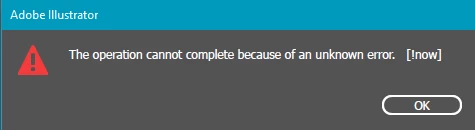
[!now] error message whenever I try to export files
  • January 15, 2017
  • 15 replies
  • 93519 views

this error message has randomly started happening since i updated illustrator. I have done a clean windows install and it still happens. All I am doing is trying to export designs at 300dpi as a png. I cannot export anything now. And as a work around I have to copy the designs to photoshop and export using that. However I don't like this option as the file is not a vector anymore. I have searched the internet everywhere and can't find anyone with this issue. Please HELP

Correct answer defaultfrbv4gjl8o35

Had the same issue just now. I'm pretty sure that it was because the output filename was too long; I unchecked the Suffix option and that fixed it.

15 replies

Participant
October 26, 2024

Same. I also get lots of app crashes. This version seems very buggy.

defaultfrbv4gjl8o35Correct answer
Participating Frequently
March 22, 2024

Had the same issue just now. I'm pretty sure that it was because the output filename was too long; I unchecked the Suffix option and that fixed it.

Participant
February 27, 2023

Hello! I was having this same exact problems and the other solutions were not working when I went to export normally (file -> export as -> png with artboard selected). Instead of doing that, try right-clicking the asset you want to export and hit export selection. I was able to export my files this way.

Participant
February 15, 2022

Had the same issue with a big file. As I lowered the dpi from 300 to 72 it worked...dunno if it's because there's a 72 dpi raster file in the project, because I have too little free RAM or because the file is too big...

Participant
October 4, 2021

If your artboard is too big, it won't let you export as. I ran into this issue when I thought my artboard was 1920x1080 PIXELS when in fact it was in INCHES. Doh!! Try double checking the size of your artboard and see if that helps. 🙂

Participant
February 27, 2020

Size down your vector and try to export agian. If it dose not work keep scalling in down till it lets you. 

Participant
September 9, 2020

yes, this works. Thank you so much. Also the "export for screens" works without this error too

Participant
June 27, 2021

"export for screens worked" worked! thank you!

Pedro_duh
Participant
January 12, 2020

Solved the problem. If using AI 2020 export using Export for screens > Artboards > Export Artboard

Participant
July 24, 2021

This one worked!

Participant
September 8, 2021

To the readers, double check the size of your artboards!  The Export for Screens menu, when using effectively the same settings, will present a different menu to you.  E.g., 72 ppi.  But it will, instead of producing a [now!] error message (which is not helpful), produce a message along the lines of "the file is too big" or something.


You can use the Export for Screens method to select, e.g., width and set number of pixels wide you want.


Ideally, the same error message could be produced for the Export menu.  Let the user know why 😉  I inherited this AI file, and have no idea what the sizes of all this stuff actually is, but clearly it's huge.

Speedy5310
Participant
July 9, 2019

Yup, same problem here.

Which version of Illustrator? 23.0.3 64-bit

Which system? Windows 10 Home

Where are you trying to save the file? External SSD and desktop

Which export method? Export As > Use Artboard > 300ppi, Type Op, Transparent.

What kind of file are you saving? If it's not a PNG, please create your own thread. PNG, 128in x 62 in (tablecloth design), CYMK

Legend
July 9, 2019

There is no such thing as a CMYK PNG file. You must choose a different format, or give up on CMYK.

KJ.12AM
Participant
July 9, 2019

just switched color mode... no success. any other solutions?  Thanks

aleksandrbochek
Participant
June 26, 2019

We had this issue solved via renaming the path to the file — it was too long for the system (Windows 10, Illustrator CC2019)

Participating Frequently
July 31, 2018

i encountered this with very large scaled vectors. I discovered it was trying to export 32000 pixels wide. i actually fixed it by opening it in photoshop and scaling from there.