


Scott Falkner
Community Expert
Community Expert
October 3, 2018
Answered

Object > Artboard > Fit to selected art. Artboard is wrong size

  • October 3, 2018
  • 2 replies
  • 1078 views

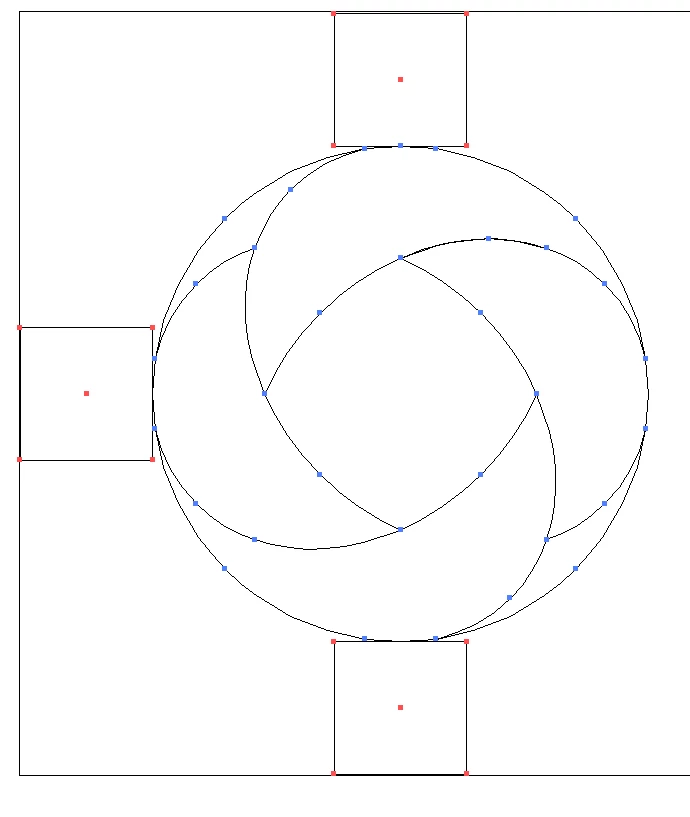
When I select Object > Artboard > Fit to selected art the artboard does not fit to the selected art. I can manually resize the artboard, so this is not a limit of precision. Is there a fix for this? Is this a known bug of the thousands of known bugs in Illustrator)? Is there a script that will to this better?
    This topic has been closed for replies.
    Correct answer Scott Falkner

    There was no stroke applied, nor any other effects. I ended up resizing manually. Use Preview Bounds was off.

    Seems to be working fine now. I'm just going to file this under general Illustrator crappiness.

    2 replies

    Ton Frederiks
    Community Expert
    Community Expert
    October 3, 2018

    What isthe difference between what you see as the W and H of the selected art in the Transform panel and the size of the Artboard after fitting?

    Did you check if there is a difference when you change your Preference > General setting to Use Preview Bounds?

    Monika Gause
    Community Expert
    Community Expert
    October 3, 2018

    Is there a stroke applied to those shapes?

    pixxxelschubser
    Community Expert
    Community Expert
    October 3, 2018

    Like Monika Gause​ said