


Participant
June 1, 2022
Answered

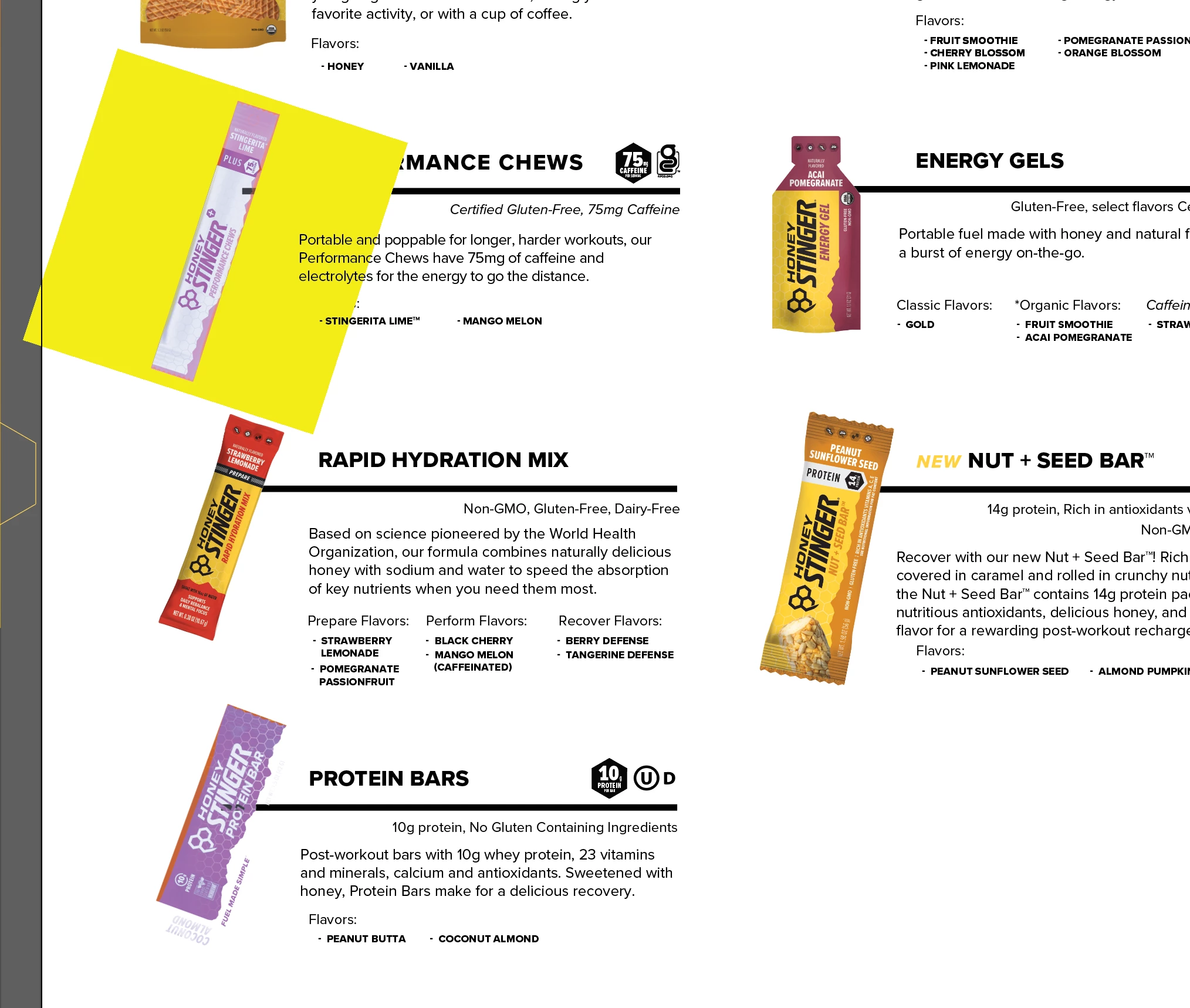
PNGs linked in show up in purple/white with yellow background

  • June 1, 2022
  • 7 replies
  • 11728 views

I linked in some photos and they have all the same specs as the other photos in the document but for some reason when I reopen the file, they show up like the coloring has been messed with.  They are also both PNGs but only the one keeps showing up with a yellow background. They also keep getting put in groups they were not in, in clipping masks they were not in. I have to relink them each time I save the file. I cannot figure out what is going on. 
This topic has been closed for replies.
Correct answer Anshul_Saini

Hi All,

 @Simona5FDD @rodmartinezmedina @shishir27035451avbp @JuliusYap @Baruch220614570sop @Boris0608 @jamile @Ornella2609028749u7


We are glad to inform you that this issue has been fixed in Illustrator v27.0.1. 


Note: The files which are corrupted will not get fixed. To fix them, first, update to v27.0.1 and ensure you relink all the images in order to resolve the issue in the existing files. Let us know if the issue persists after doing this.


Thanks,

Anshul Saini


#Marking it as Correct to highlight

7 replies

alexgsrubio_
Known Participant
January 5, 2024

I have similar issues. When placing PNG my whole swatches shifts toward CMYK looing swatches. I am using version 27.5 and every time I open the file a need to change all my elments to te correct RGB swatch.

These are my color settings.

Anshul_Saini
Community Manager
Community Manager
January 9, 2024

Hi @alexgsrubio_,


I'm sorry to hear about the swatch issue. To better assist you, could you please update Illustrator to the latest version (v28.1) and check if the problem persists? Additionally, it would be helpful if you could share the color profile ICC, the PNG causing the issue, and a screen recording demonstrating the problem. This information will aid in investigating and providing a more accurate solution.


Thank you,

Anshul Saini

Participant
November 18, 2022

Happening on the new 2023 version on MAC.

The issue apparently has not been fixed.

Anshul_Saini
Community Manager
Anshul_SainiCommunity ManagerCorrect answer
Community Manager
November 18, 2022

Hi All,

 @Simona5FDD @rodmartinezmedina @shishir27035451avbp @JuliusYap @Baruch220614570sop @Boris0608 @jamile @Ornella2609028749u7


We are glad to inform you that this issue has been fixed in Illustrator v27.0.1. 


Note: The files which are corrupted will not get fixed. To fix them, first, update to v27.0.1 and ensure you relink all the images in order to resolve the issue in the existing files. Let us know if the issue persists after doing this.


Thanks,

Anshul Saini


#Marking it as Correct to highlight

Participant
November 18, 2022

happening in 18 nov 2022. Adobe cant fix a bug in more than a year.

Just lost a week's work. Thank you Adobe. This sucks.

Participating Frequently
November 7, 2022

Just a little tip.. if you have many images to embed you can do all at once by selecting them in the links panel


Participant
November 8, 2022

Thanks!!

Anshul_Saini
Community Manager
Community Manager
September 10, 2022

Hi All, @erinbx @Nutnapun Akkhajiratorn @Gabriele_Radvila @bdgbs @Mark252272492ivs @Erin23930521ktoq


Sorry for the inconvenience caused by this issue. I  am glad to inform you that this issue has been fixed in v26.4.1. However, the files which are corrupted will not get fixed. You have to first update to v26.4.1 or above and relink all the images in order to resolve the issue in the existing files. Let us know if the issue persists after updating in the Illustrator new files.

Note: Current Illustrator version is v26.5. I will recommend updating to the latest.


Regards,

Anshul Saini

Participant
October 28, 2022

Hi! I have the same issue with the 27.0 version. When I try to "Unembed" a linked image, Illustrator forces me to save it as a new file, but I already have them. So, now the choice is between relinking all the images every time or saving them as new files again.

Anshul_Saini
Community Manager
Community Manager
June 2, 2022

Hi @Erin23930521ktoq,


We are sorry for the trouble. We are able to reproduce the issue at our end. We have already logged a bug with the product team, and they are currently investigating the issue.

This is happening with the Ai file, which has linked images. While saving, when the "Include linked files " option is selected and then reopened, the Ai file images get inverted, or yellow color can be seen.


To avoid this, you may try the following steps:

  • Embed the images in the document
  • Uncheck the "Include linked files"
  • Downgrade to an older version of Illustrator 


Let us know if this works for you or not.


Thanks & Regards,

Anshul Saini

Participant
July 13, 2022

Thanks for the information, that works great. Cheers


Anshul_Saini
Community Manager
Community Manager
July 13, 2022

Glad to hear that. I would like to inform you that the product team has created a fix for it, and it will be released with the next update in August. We appreciate your patience. Thanks!

Regards,

Anshul Saini
