
Possible to move objects (symmetrically) further from their position without changing their scale?
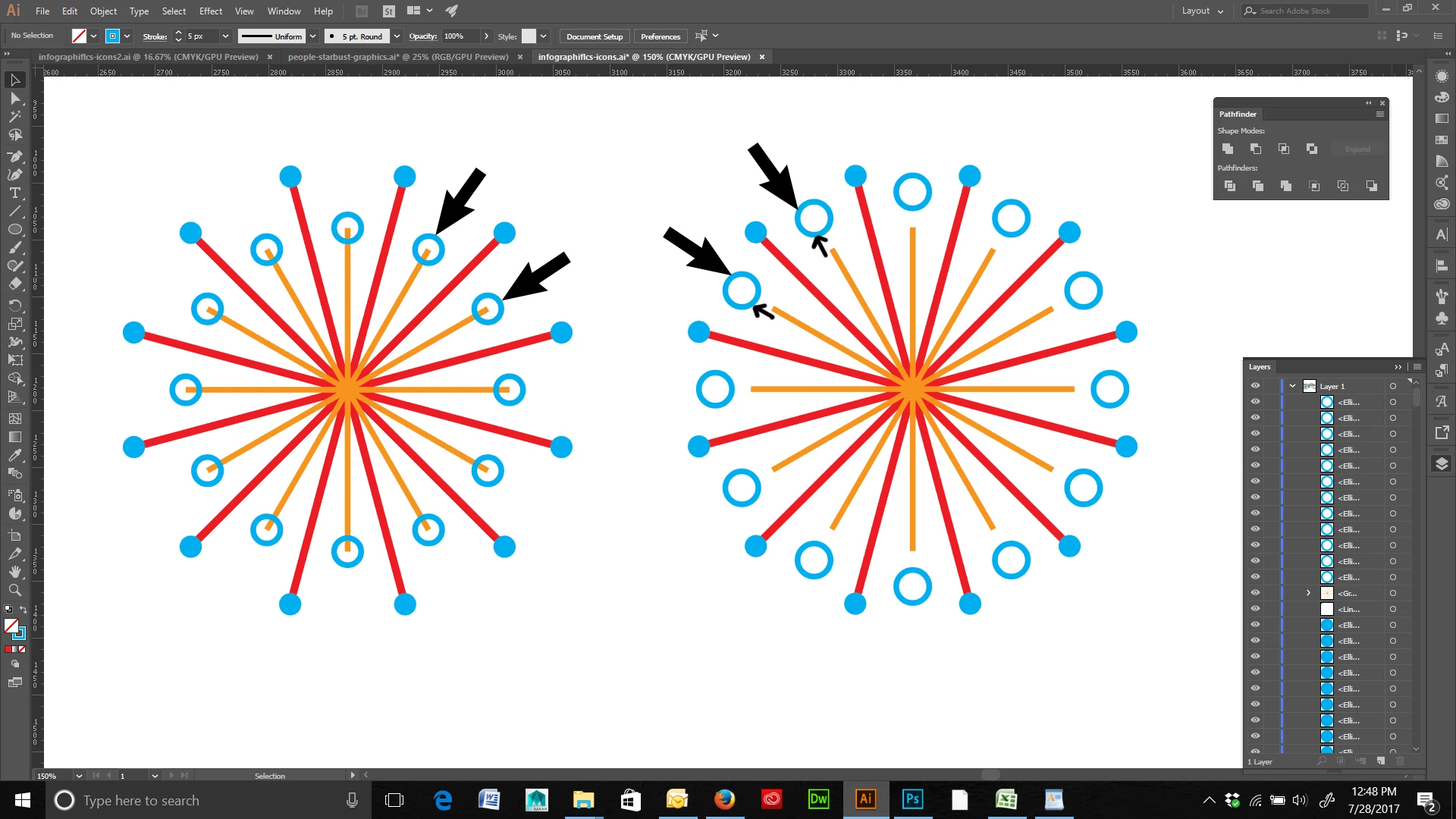
Is there a way in Illustrator to move objects symmetrically from their original position without changing their size? For example, in the attached image I have a starburst on the left that has small circles on the ends of some shapes. I would like to move those circles further away from the ends of those shapes so that they are positioned in the same place as the image on the right. However, I do not want them to change from the size that they are now.
Is there a way to move these circles further out without changing their scale/shape but do so symmetrically? Or do I have to manually move each one and hope that they are in the correct symmetrical space? I am hoping to be able to do this without creating a new circle, placing it, and using the rotate/copy method to place those shapes. Reason being, I am still learning Illustrator and I am trying to learn the capabilities of the program to see what is and is not possible.
(BTW-- In the image on the right I simply selected all of the circles and scaled them up in order to get them in the correct position.)
 AdChoices