


Corindog
Participant
March 13, 2018
Answered

Red screen in illustrator

  • March 13, 2018
  • 7 replies
  • 7480 views

Hi

I've just run the update for illustrator and all I can see now is a red screen (ie the illustrator window is filled with red).

New windows, existing artwork, everything is just red with nothing else.

Can someone suggest how to fix?

Many thanks
    This topic has been closed for replies.
    Correct answer Omar.Fathy

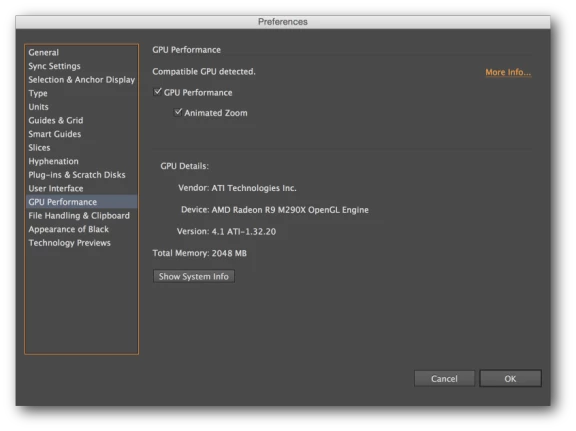
    Just try to Disable the GPU Performance and it will be good.

    - From the rocket icon in the application bar.

    - disable the GPU Performance.

    7 replies

    KShinabery212
    Community Expert
    Community Expert
    July 30, 2018

    I would have heart attack if that happened to me.  Hope you found a solution.

    Let's connect on LinkedIn. https://www.linkedin.com/in/kshinabery/
    Participant
    July 25, 2018

    To anyone else still seeing this, just hit F on your keyboard. This seems to be some sort of temporary compositing glitch and if you toggle views a bit (using the F key) you can get it to disappear.

    For me I see the red screen in the artboard area whenever I open a new file. When I turn on the application frame (as suggested above by Adobe) or hit F to toggle views it goes away and I'm able to work as expected. I did not change anything in the Preferences panels.

    My setup: MacBook Pro (15-inch, 2017); macOS 10.13.6; Illustrator on an external monitor.

    Participating Frequently
    July 29, 2018

    Thanks for the post

    Hitting the F key works for me, without turning off the GPU.

    Get this sorted Adobe, its not good enough to open files and be presented with a red screen and no logical way to work on the file.

    Monika Gause
    Community Expert
    Community Expert
    July 29, 2018

    TriChas  schrieb

    Get this sorted Adobe, its not good enough to open files and be presented with a red screen and no logical way to work on the file.

    This is not a general issue.

    In order to get this sorted, please post a bug report on http://illustrator.uservoice.com

    As this is a very specific issue, you will need to post details about your system and hardware.

    Participating Frequently
    June 27, 2018

    Any ETA for a fix to this? It's been three months. Turning on the application Frame or disabling the GPU is not an acceptable permanent solution.

    Thank you.

    AshutoshChaturvedi
    Community Manager
    Community Manager
    March 17, 2018

    Sorry for the inconvenience caused. We need some help with a test.

    With GPU ON Can you please turn on your application framework from windows→ Application framework and let us know if the issue goes away.

    I have also taken the liberty to subscribe you guys on the UserVoice post: Illustrator documents open to a red / black screen – Adobe Illustrator Feedback

    martian73
    Inspiring
    March 22, 2018

    I just turned the Application Frame and the GPU on, and the file does not open up to a black screen, so this seems to be a fix.

    BUT, (in my opinion) the Application Frame is horrible, so if we can get things back to how it used to be that would be fab.

    Thanks.

    Participating Frequently
    March 14, 2018

    Same issue here when i updated Illustrator CC this morning… bloody big red screen. Not really good enough solution to just say turn off GPU performance. Obviously it is a bug in the update. I created a new set of prefs and still happens. Why is it happening Adobe and when will it be fixed?

    Omar.Fathy
    Community Expert
    Community Expert
    March 15, 2018

    It is not a bug, Yo have to get a high performance GPU to enable it and if you don't have a good GPU or you have a problem with it's driver so don't enable it .

    Doug A Roberts
    Community Expert
    Community Expert
    March 15, 2018

    why are you suggesting it's not a bug? that's clearly at odds with people's experience here.

    Omar.Fathy
    Community Expert
    Omar.FathyCommunity ExpertCorrect answer
    Community Expert
    March 13, 2018

    Just try to Disable the GPU Performance and it will be good.

    - From the rocket icon in the application bar.

    - disable the GPU Performance.

    Corindog
    CorindogAuthor
    Participant
    March 13, 2018

    Fantastic. That's fixed it.

    Thanks Omar

    Doug A Roberts
    Community Expert
    Community Expert
    March 13, 2018

    never seen anything like that. what OS?

    post a screenshot?

    Corindog
    CorindogAuthor
    Participant
    March 13, 2018

    Hi Doug, here's what I'm seeing.

    Spoke to Adobe helpline and they've told me to switch off my GPU performance. A bit annoying as I'm on a two week old mac.

    MACos 10.13.3

    Graphics card: Radeon Pro 560 4 GB, Intel HD Graphics 630 1536 MB

    I think it's got something to do with using an external monitor because the problem disappears when I use my laptop without.

    Any ideas?