TuTzeeT
Participant
September 11, 2015
Answered

Right Click inside artboard is not working

  • September 11, 2015
  • 60 replies
  • 31708 views

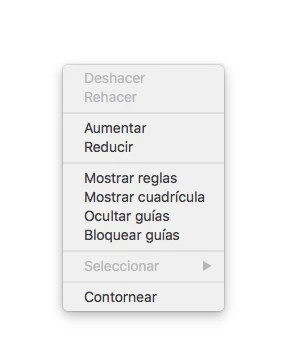
Not the tools right click, i mean, in the artboard. Since i've upgraded my illustrator to CC 2015 in Os X El Capitan (Public Beta 6) the rigth click menu disappear. I need to uninstall and the install again an then works, but when i close the program and opened again, the menu again disappear. This is the menu that i don't found. (I took a screenshot when it works)

Sorry for my english, i don't remember because i was depported again to Mexico.

    This topic has been closed for replies.
    Correct answer AshutoshChaturvedi

    Hello,

    We have fixed this issue in our latest CC 2015.2 update. Please apply the patch using Adobe Creative Cloud application.

    If you do not see the patch right away

    1. Go to Adobe Creative Cloud application
    2. Click on the Gear icon on the top right
    3. From the menu select “Check for App Updates”

    Regards,

    Ashutosh Chaturvedi

    60 replies

    Participant
    November 27, 2015

    Seriously Adobe, this bug has been up since 2months back by now and it's getting frustrating to not be able to right click inside Illustrator.

    You have not you even giving us an update on whats wrong and when it will be fixed? This is a serious issue, don't you think?

    Paying to use Illustrator which doesn't work the way it suppose to. Not nice.

    Curtis Smith
    Participant
    November 23, 2015

    okay, I got mine working useing the monitors on the right side of the laptop fix. So annoying. I have two displays next to my laptop. one via HDMI and one via thunderbolt. as long as they are configured on the right side then right click works just fine. As soon as one of them moves to the left in display properties the problem immediately comes back regardless of what monitor is primary or which screen illustrator is on. Running El Capitan on a current model 15" Macbook Pro.

    juancarlosperez
    Participant
    November 21, 2015

    I can't believe it! Now I'm in panic. I just upgraded to a new macbook pro, connected two new monitors via thunderbolt, updated my OS to El Capitan, and just purchased and installed the latest Illustrator CC.. now I find that I can't right click, so I can't perform my work efficiently... come on Adobe, what's up with that!! seems that this has been going on for a while and there is no correction yet.

    Larry G. Schneider
    Community Expert
    Community Expert
    November 21, 2015
    Participant
    November 18, 2015

    I have the same problem!!! with 2 screen! ADOBE WAKE UP!!! Your applications are too expensive to be full of bugs!

    Participant
    November 17, 2015

    +1 for fix the bug already, please.

    Thanks to everyone posting their solutions.

    None of the workarounds have been effective in my case so far: macbook pro + thunderbird display + el capitan update + illustrator cc 2015 = cannot right click.

    christinaplumb
    Participant
    November 16, 2015

    Found a solution

    Thanks to my co worker, hopefully this helps others. I had not updated to El Capitan when this bug began. What had happened is Ai updated and forgot my monitor preferences, or changed  the way their monitor preferences work.

    Previously I could work from any monitor (whether it was the primary monitor or not) and click in whatever monitor .ai was launched in. The display was automatically detected and it would show me the tool panel in that window. He saw in the my third monitor, in the right corner, a portion of the tool bar was showing up.

    This is how we sort of got it to work:

    Close .ai. Open settings, displays, arrange displays. Drag the header of the primary display to whatever monitor you want to use as your primary display. Launch .ai, it should appear in the window you set as the primary. Things should work fine from there.

    I haven't had the issue since, but why it happened blows my mind. After doing that, I could move the environment around and use it on any monitor with right click available on every display. I think it was registering the right clicks on another screen. Odd fix, but I haven't had any problems since. I also havent updated to El Capitan, when I do, I'll report back any errors and fixes I find (assuming the issue presents itself again).

    Participating Frequently
    November 16, 2015

    One more thing, this file creates when you close the Illustrator. So you have to delete the file and open lllustrator to make the contest menu work with the left-set-external monitor.

    Participating Frequently
    November 16, 2015

    The temporary solution is described here: El Capitan update seems to have broken my right click just in Illustrator.... Any help would be appreciated

    My external monitor is set to be on left. I haven't used automator to delete the file which causes the problem and I do it manually each time when I run Illustrator with external monitor on the left. Again, the file you need to delete is located in ~Library/Preferences/Adobe Illustrator 19 Settings/en_US/WSMgrCfg/WSMgrCfg

    Do not touch the folder itself, jus the file. Do not afraid to delete it. After relaunch of the Illustrator it appears again.

    Participating Frequently
    November 16, 2015

    Any suggestions on how to get Adobe's attention to this matter?  This is very, very frustrating? UGH!!!!!!!!!!

    Participating Frequently
    November 16, 2015

    Answered my own question:  Feature Request/Bug Report Form

    Participant
    November 16, 2015

    ADOBE! Wake up. We need a solution for this.