TuTzeeT
Participant
September 11, 2015
Answered

Right Click inside artboard is not working

  • September 11, 2015
  • 60 replies
  • 31708 views

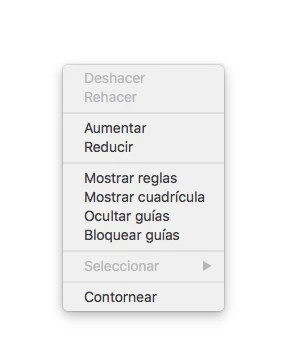
Not the tools right click, i mean, in the artboard. Since i've upgraded my illustrator to CC 2015 in Os X El Capitan (Public Beta 6) the rigth click menu disappear. I need to uninstall and the install again an then works, but when i close the program and opened again, the menu again disappear. This is the menu that i don't found. (I took a screenshot when it works)

Sorry for my english, i don't remember because i was depported again to Mexico.

    This topic has been closed for replies.
    Correct answer AshutoshChaturvedi

    Hello,

    We have fixed this issue in our latest CC 2015.2 update. Please apply the patch using Adobe Creative Cloud application.

    If you do not see the patch right away

    1. Go to Adobe Creative Cloud application
    2. Click on the Gear icon on the top right
    3. From the menu select “Check for App Updates”

    Regards,

    Ashutosh Chaturvedi

    60 replies

    hill01
    Participant
    October 29, 2015

    I still can't believe how long Adobe are taking to provide a hotfix for the right click issue, considering how many people are complaining about it in the forums. Coming on a month now.

    Participant
    October 30, 2015

    typically adobe...

    Participant
    October 29, 2015

    Having the same issue! Reporting in.

    Thanks,

    Brian

    Miiagod
    Participating Frequently
    October 28, 2015

    Same here. Noticed the issue today, very irritating! I updated my OS to El Capitan just a few days ago. I have reported the bug. I also use a dual monitor set up and certainly won't be giving up on that. Has anyone had news on the fix?

    Curtis Smith
    Participant
    October 16, 2015

    Okay, So today my right click came back. I didn't do any updates in Illustrator or in the operating system. Yesterday it wasn't working but today fully functional. Even tried closing the app down and re opening to see if it would falter again. But its still there. Very odd. Unless my OS did a background update. Where would I go to check that? Anyone know?

    Known Participant
    October 16, 2015

    There was no OS update. Most of the time the right click menu comes back simply by restarting Illustrator. That's how I fix this issue (until it comes again... and again...).

    Curtis Smith
    Participant
    October 9, 2015

    Same problem here. Running El Capitan. Latest version of illustrator CC v19. Unplug both external monitors on MBP Retina and the context menu starts working again. Tried uninstalling ALL creative suite using clean tool and re installed after a reboot for each uninstall and after the clean tool. Started working again until I closed down for the day and the next day it came back again. Assuming due to closing and reopening the application.

    Participant
    October 9, 2015

    Also experiencing this issue. Not using El Capitan yet. Illustrator CC is up to date. Will try updating to El Capitan for resolution.

    Doesnt work on either monitors.
    Doesnt work if one monitor is unplugged.
    Doesnt work if I restart.

    Participating Frequently
    October 14, 2015

    Well, your case is weird, as you have no El Capitan installed and the problem persists even with only one monitor active. So it might be just an error in preferences.

    Try this:

    Remove ~/Library/Adobe Illustrator/en_   folder (or rename it instead of removing it just in case anything goes wrong)

    delete all ~/Library/ adobe.xxx.plist files (or move them to some other temporary folder in case anything goes wrong)

    Reboot.

    hill01
    Participant
    October 8, 2015

    Same problem here. When unplugging second thunderbolt monitor the problem goes away.

    Will Adobe please advise if they are aware of this issue.

    Decaliostro
    Participating Frequently
    October 8, 2015

    Problem solved, i've deleted all of my adobe apps, cleaned with Adobe creative cloud cleaner, reinstalled again and that's it ))) right click works good on dual monitor set. iMac 27" + thunderbolt monitor.

    Participating Frequently
    October 8, 2015

    As others have noted, right click for contextual menus doesn't work in Illustrator CC 19.1.0 when using a secondary external monitor -- at least on a 15 inch MacBooK Pro Retina. Disconnecting the external display resolves the issue -- magically right-click menus reappear. Obviously this is a bug with Illustrator and/or OS X El Capitan. I'm sure there's a ton of folks that use this set up so it's a bit of a pain in the ass that right-click is no longer working.


    So... I have a question, does anyone from Adobe read these customer post? If so, it would be great to get some kind of acknowledgment and/or update on whether or not anyone's even trying to resolve this issue. 


    Frustrating -- ugh!


    ruidovisual_
    Participant
    October 6, 2015

    It works for me if I disconnect my Thunderbolt or close my MB Pro Display and work only over the Thunderbolt (better). But still a problem. BTW El Capitan is no longer Beta. Hope it'll be solved soon : )

    Inspiring
    October 7, 2015

    Just to throw my name in the ring, no right click. I really don't want to disconnect my right monitor all the panels are there!

    Monika Gause
    Community Expert
    Community Expert
    October 7, 2015

    garethirwin1234 schrieb:

    Just to throw my name in the ring, no right click.

    Has no effect at all.

    You want to report a bug?

    Go here: http://www.adobe.com/products/wishform.html

    In order to get noticed when it's fixed, watch the Illustrator blog

    http://blogs.adobe.com/adobeillustrator/

    Or the Creative Cloud app on your desktop. It will show you when there's an update available.

    Or the Twitter channels

    Or the forum's home page

    Illustrator

    This thread might not even be updated when the bug is fixed, because there are dozens of threads already.